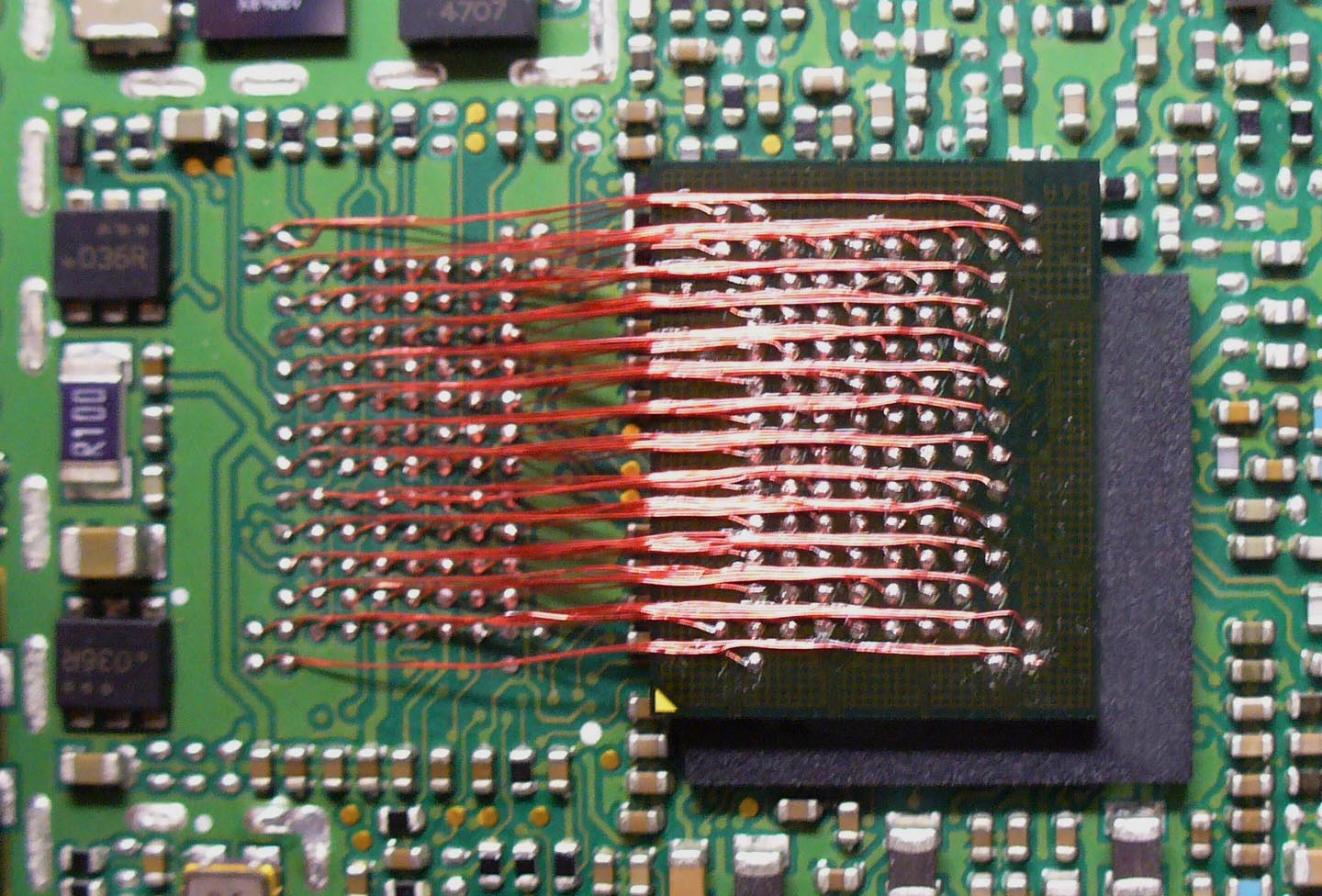
Replacing a BGA chip?

I've got an eReader that is completely unresponsive since I've plugged it in my phone charger. It's one of those Quick Charge charger, so I guess there was a bug and it sent too much voltage to my eReader.

I think I've isolated to problem to the power management unit (PMU) chip, a Ricoh RC5T619 (1010 5039QB). Now my issue is that this is a BGA chip, and it's in a crowded region of the PCB.

I have access to a hot air station, but zero experience using it, and I've found the chip on eBay. Is it worth a try? Would someone with experience be willing to attempt the repair? Do you know of a compatible chip I could manually solder tons of tiny wires to? I'm confident I could do that. Or maybe just a reflow would work, insulating the rest of the board and heating the chip with the heatgun?

Any help is appreciated!
Summoning @Bad_Ad84, @Helder, @Zer0-2k11, and @TriMesh for their knowledge and wisdom.
You could solder wires to the Bga chip, if you fancied it.

If you buy a replacement chip, that is pre balled. You could install with hot air station as the chip is so small.
Is it worth it to try and reflow the existing chip first?
Also, my Ricoh RC5T619 has 1010 5039QB written on it and I can't find this exact chip online. Would any RC5T619 work?
If I get a chip without the balls, I might simply try to stick it on its back next to the footprint and solder tiny magnet wires to it. Would uneven wires length be a problem?

I bought a replacement device, so I'll just use the broken one as a learning tool.

Thank you for your help!

PS: By "hot air station" what I mean is that I have an adjustable temperature heatgun with a small nozzle.
With nearly 100 balls dead bug wiring really isn't the way to go.
That's not to say it's impossible, but since the IC can be acquired with fresh balls there's really no reason not to go for that.
That's precisely what I had in mind, and I'm confident I can pull it off with proper tools.

I'm not confident in BGA soldering though. I can't heat the whole PCB because there's a ton of plastic parts/connectors on it and I never used the heatgun for anything but desoldering... I don't want to break 10 parts trying to fix one.
Fair enough, for a power ic the trace lengths and such likely don't influence the working of the whole thing.
BGA soldering really does down to proper gear. With just a hot air station and no preheating or ways of monitoring board temperature I can see how just doing good old wires in which you trust your skills is more appealing :)
Yeah, with a complete rework station I might go and try to repair it professionally, but given my means I think cutting corners would be fine for my own device.

Do you happen to know if any Ricoh RC5T619 would work or if I need to find the exact same 1010 5039QB one?
Some devices have datasheets that explain what the numbers mean. Those could mean a firmware version or a sub-model.
Take a look on you tube and search for iPhone 6 touch disease ic replacement. This will give you an idea of how it is done and what is needed.
If u have identified that the problem lies in the power management chip then a reflow is probably not going to work. First u will need to lift the chip and then reflow a fresh preballed chip in its place. The thermal profiles should be on the datasheet. They follow general pb free profiles. Not sure if u can buy the chip preballed with Sn/Pb balls.
U will need a preheater, clamp, temp probe and flux. I say go for it, it will be a good learning experience. Just practice some chip lifts on broken hardware first ;)
You can use aluminum foil as a heat reflector to try and protect nearby components. Also depending on the plastic components they might actually be spec'd for reflow (smd connectors). You'll want a RC5T619-1xxx, the 1 indicates the package (CSP0608-80: 0.65mm pitch in this case). If it has a 0 it would be a 0.5mm pitch package.
I can only find 0xxx and 2xxx packages online, that's a bummer. I'll keep my eyes opened. Anyone knows how to drive such an eink display with a Raspberry Pi?
I got you fam

http://s.aliexpress.com/VzMRzAbQ?fromSns
You are a fine person indeed.

Just bought one, I'll update you in a few months when I receive it!
Aluminum duct tape is a great alternative too and it will protect the surrounding components and will stay in place too (reusable as well). Use tons of flux when you place the chip in it's new location and start heating with low air to not move the chip, keep doing small circular motions till you see the chip move into place but the solder balls connecting to the pads then lay off the heat.

Be sure the pads are nice and clean before doing this. Nothing like going into something new wholeheartedly and hopefully learning a new skill in the process.
I think I'll try to manually solder magnet wires to it instead of soldering the BGA with the heat gun. I'm afraid I'd break it further.

I have access tottons of metallic tape and kapton though...
https://www.ebay.com/itm/Hand-Manua...906897?hash=item4b319ccd11:g:gtkAAOSwlRpZaO88

Get it hot, push the button, stick the head on the chip, let go of button, if it lifts you're good; if not then heat more. Pops right off and only costs a buck. Buy 5 because you'll lose those suction heads easily. Can also use one of those IC poppers thrown in every SMD soldering kit but I definitely prefer this. Just use the indicators to line it up on the board like you would with a computer CPU.
unless your high voltage charger was bought from a dubious location, I doubt it would have damaged anything, the chargers stay in low 5v mode unless told too (there is communication goin on ere) they are a pain to get to work normally with quick charge compatible devices..

have you checked for shorts
check for voltage in various locations, battery terminal (with charger plugged in), charger port ect
poke around some more

Check battery voltage! It'll have protection, so needs to be above 2.5v for any life (some devices shut off charging if the battery is too low, it's stupid)

press on the PMIC with power connected? anything happen?

I'd wager this is a short that just happened at the same time, ceramic caps suck.. Anything on the board look "odd"?

Your eyes are the best tool you have
Thanks for the info, it's really appreciated.

It stopped working approximately exactly when I plugged it, I know because i just plugged it 2 seconds and then decided to put it in my bad instead of letting it charge home and I noticed it was dead right away. I was reading on it just before, so there's really a small window of opportunity. Of course it could be a coincidence, correlation ≠ causation, but it certainly seems like something funky happened in either the charger or the ereader, I'll lean on the safe side and only charge my replacement ereader with a 5V-only charger.

I don't think the battery is the problem as it was still around 20% and the PMIC heats up a lot when I plug it (the plastic back cover of the ereader even melted a little), I feel like a protection wouldn't drop that much current into such a small chip.

I'll be away from home for several days, but I'll check it again before trying to solder the replacement chip. AFAIR, the voltage seemed fine pretty much everywhere I looked. Nothing looks weird, except a smd inductance that has a slightly broken casing, but it was like this before.

Original thread: https://assemblergames.com/threads/replacing-a-bga-chip.69240/