2k-char-processor: Charset conversion tool from rm2k to other engines

2k char processor​

Hello everyone,
this program allows you to convert charsets from rpg maker 2K/2K3 to rpg maker mv and other engines.

features:
  • Convert charsets from the RM2K format to the more modern RMMV format with scaling.
  • VX format conversion
  • Batch conversion
  • Cutting the charsets into indivudual sprites.
  • Resizing
  • Background color removal

https://github.com/EverardoMeireles/2k-char-processor/releases/tag/Latest

Spoiler: Images
processor image.png


MV:
index.php

VX ACE:
index.php


MV, scaled by 2:
2x.png

MV, scaled by 3(much more to scale with other rm2K assets):
3x.png
It's interesting to me, but my case is a little unusual. It's a secret project, so I'm not going to go into details, but something like this could same me some work later. I'm not sure how useful it would be to most people, and I can do this by hand easily enough. I would like you to continue, but I don't think you should base your decision on me in any way.
I think it's a good idea! But your github page is not working 🙁
yes please!
I love the 2k3 resources I've got and I'd like to switch to MV soon. Don't want to spend time on converting stuff by hand. I hope you will keep working on that 😊
Sharm said:
I'm not sure how useful it would be to most people, and I can do this by hand easily enough.

Yeah i managed to do it easily on gimp when i wanted to get the resources to unity, but doing it every time i wanted to port resources is kind of a pain.
The idea is to do create something that could convert a whole batch of resources at once to any engine you would want, there are literaly thousands of free rm2k3 resources available out there, it would be a shame to think that they will just sit there being unused awaiting their deletion from their hosts.

I think it's a good idea! But your github page is not working 🙁

Fixed it!
Oh! It converts for multiple engines? That's way more interesting than I was expecting! I am now very interested in this. I don't fully understand the layout for 2k3 yet, but if I could do it once and have it work on many, then I'd put more effort into learning the resource standards.
So, after six months with the project just sitting on my pc i finally got time to work on it, it is functional now, but quite barebones as i just had a couple of days to work on it.
There it is:
-It convert rm2k/2k3 charsets to vx, mv and other engines, 70% of it is basically just a glorified resizer, but maybe it could save some time to some people wanting to import those old nostalgic graphics to a modern engine.

Just clone or download the repo and click on Start.bat, information on the README.
https://github.com/Brocoio123/2k-char-processor

If anyone has the time to use it, please report bugs and make suggestions, i'll include those on the next version.

I'll update the thread or create another later
If I click start.bat it just briefly flashes the command prompt at me. So I went and edited start.bat and added a "pause" line at the end so I could see what it was doing. Got this.

VJyVJht

Downloaded python, still the same. Any idea whats wrong?
If you're taking suggestions, having the program batch them through rotsprite to resize would be pretty useful. It's not as good as a real pixel artist for upscaling stuff, but it's pretty good and respects color counts.

for example, it upsizes
OyO42um.png


to this
PpeZlnb.png
If I click start.bat it just briefly flashes the command prompt at me. So I went and edited start.bat and added a "pause" line at the end so I could see what it was doing. Got this.

VJyVJht

Downloaded python, still the same. Any idea whats wrong?
You get this even after downloading Python? Thats strange, i'm on vacation right now, when i get home i'll try to make an executable version.
Can you try to run the command python -V on cmd and see if it works?
Also, can you try to install both python 2 and 3?
If you're taking suggestions, having the program batch them through rotsprite to resize would be pretty useful. It's not as good as a real pixel artist for upscaling stuff, but it's pretty good and respects color counts.

for example, it upsizes
OyO42um.png


to this
PpeZlnb.png
Pillow already has nearest neighbour, bilinear, bicubic and anti-aliasing resising, it would be interesting to add another option, do you know a library that works with this algorithm?
Also, your resized image has some artifacts such as thicker contours and the eyes of the characters seem to be severely deformed, is this normal with this method?
You end up with some weirdness when resizing to a fractional multiplier - that's sort of inevitable no matter what algorithm you use, since obviously going from 2-pixels of eyes to 3 pixels of eyes is either gonna be wider somewhere, or end up smearing the colors. I personally think it's easier to touch-up a sprite with a few misplaced pixels of the right color than try to touch up something that's blurred the pixels together, but obviously people have different workflows and art preferences

Look like there's already free-use python code for an implementation of the algorithm without the cleanup.

https://github.com/pinobatch/hello-world/blob/master/rotpixels.py

Which is based on this forum post from Xenowhirl describing the algorithm

the algorithm is dead simple, so I'll just describe it and you can decide: First it scales the image to 8x size, using a "pixel guessing" algorithm to add detail. Then it scales the image to 1/8 size and also rotates it using standard aliased rotation and scaling. That's basically it. To get a big speed increase for a small penalty in quality, you could use 4x instead of 8x and skip some other optional steps I did, but I wanted high quality above all else.

Here's the more detailed version: First it scales the image to double size using something similar to Scale2x, but checking if pixels are more similar to each other instead of if they're equal, which makes the result less blocky and ultimately leads to smoother output. The important thing is that the scaling algorithm works by choosing a pixel instead of by blending pixels. It does that 3 times to achieve an 8x scale, determined empirically to be a good place to stop. Then (optional step) it tries to find the best rotation offsets by looping through a small grid of offsets between 0 and 7 pixels in x and y, and for each one looping through the 8x image at the rotation angle with step size 8 pixels, and adding the squared distance of the difference in color components between each point and its immediate (1 pixel) neighbors in the 8x image, which will be 0 except on the boundaries between 8x pixels. Then it simply performs standard nearest-neighbor scaling+rotation, starting at the offsets that gave minimal sum of squared differences, and using 1/8 scale to return the image to normal size while rotating it. Finally (optional step), it tries to fix any overlooked single-pixel details by checking for any pixels in the output image that have 3 or 4 identical neighbors equal to them and unequal to the color at the corresponding place in the source image, and replacing those pixels with the one from the source image.

You might say I'm cheating by not vectorizing the graphics into lines and curves and rotating those, but I say this method is an approximation of that and works better in practice. When the original image has little detail at the angle it's being sampled, aliased rotation makes too many arbitrary decisions, but the smoothing of a pixel-choosing enlargement algorithm is sufficient to resolve most of the ambiguity.
You get this even after downloading Python? Thats strange, i'm on vacation right now, when i get home i'll try to make an executable version.
Can you try to run the command python -V on cmd and see if it works?
Also, can you try to install both python 2 and 3?

Yeah, still nothing. An executable would be much appreciated if its not a lot of trouble.
It looks like the japanese fandom has made one of their own

https://krmbn0576.github.io/rpgmakermv/converter.html
Just added an executable.
https://github.com/Brocoio123/2k-char-processor

If you download it and it doesn't work please let me know 😉
Its been almost a year and i just realized how un-user friendly this is, will release an update soon.
New version, now it actually works properly and is way more simple to use.
Download this and run RM2K to RMMV.exe (it can still convert to other engines but i think most people are going for rmmv anyway).

https://github.com/EverardoMeireles/2k-char-processor/releases/tag/Latest

Spoiler: Images
converter.PNG
Scaled by 2:
2x.png

Scaled by 3:
3x.png
Rewrote the entire thing, so many things that shouldn't have been there in the first place.
Now it no longer uses the command line, you just click the buttons and it does its thing like it should have been since the beginning, also fixed a bug that made it not work on some windows machines.


Also if you could give me a star on github it would be nice of you 🙂
Made a release, fixed some bugs, fixed compatibility issues and edited my posts.
There is a bug where it will not accept folder names with spaces and for some reason its difficult to fix so i just left it there.

Final features:
  • Convert charsets from the RM2K format to the more modern RMMV format with scaling.
  • VX format conversion
  • Batch conversion
  • Cutting the charsets into indivudual sprites.
  • Resizing
  • Background color removal
If you want to convert rm2k/2K3 tilesets as well do this:
Spoiler
Step 0: download Hermes passer's tilecon tool:

Step 1: Put all your tilesets on a folder.

Step 2: Use my program or a photoshop script to resize the images to nearest neighbour with no anti-aliasing:
https://github.com/EverardoMeireles/2k-char-processor/releases/tag/Latest

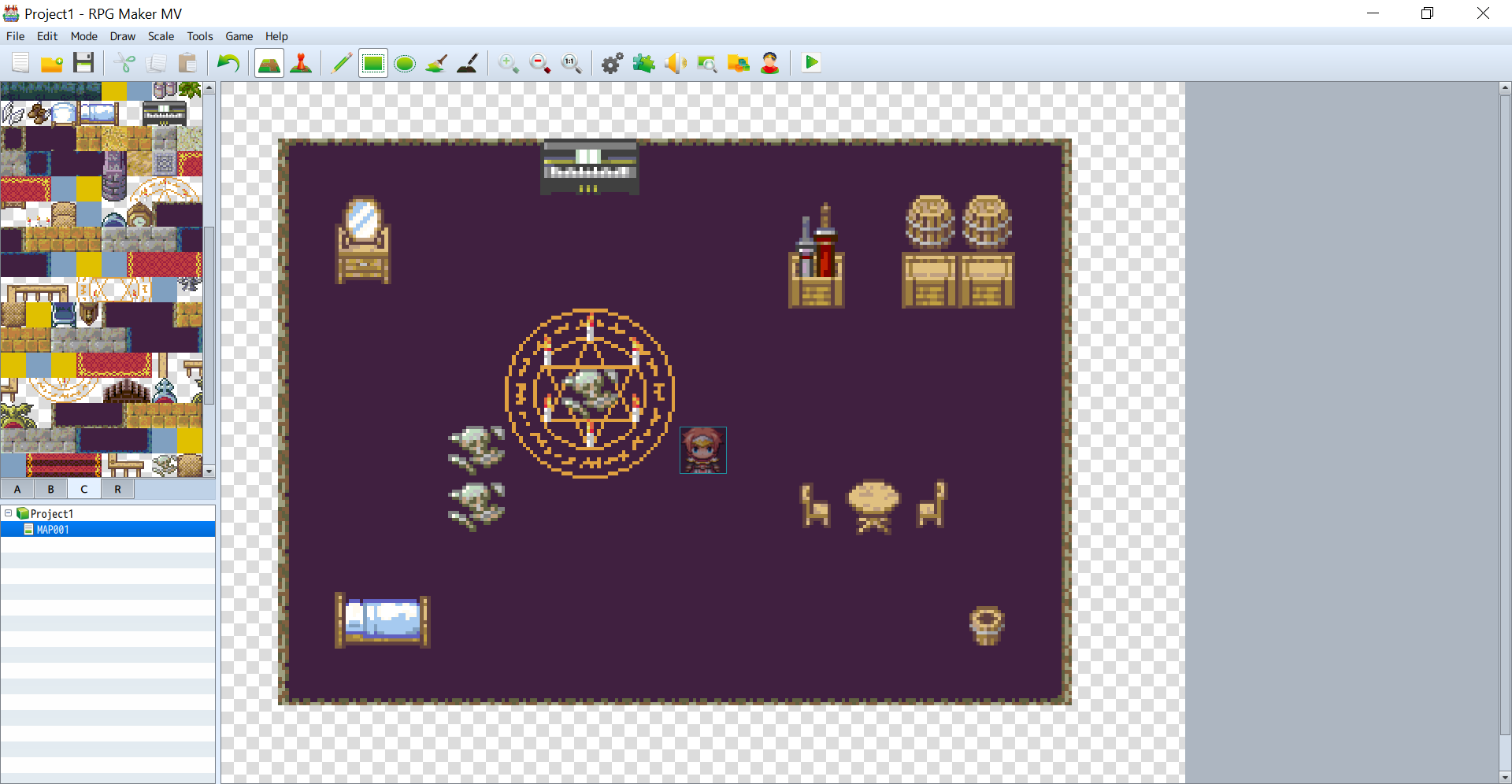
howto0.PNG


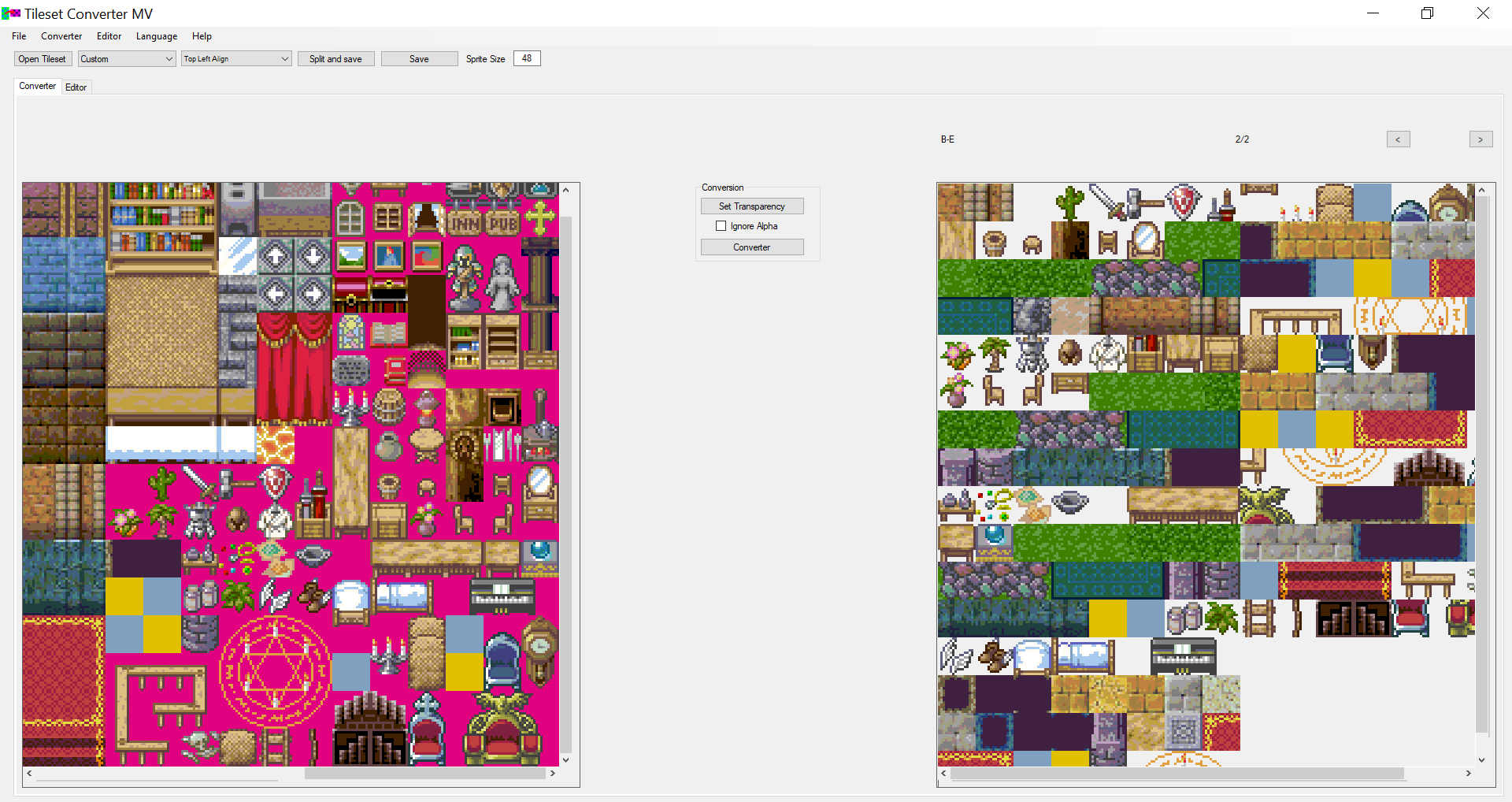
Step 3: Open tilecon -> Custom format, Sprite size 48, set transparency -> save
howto1.png

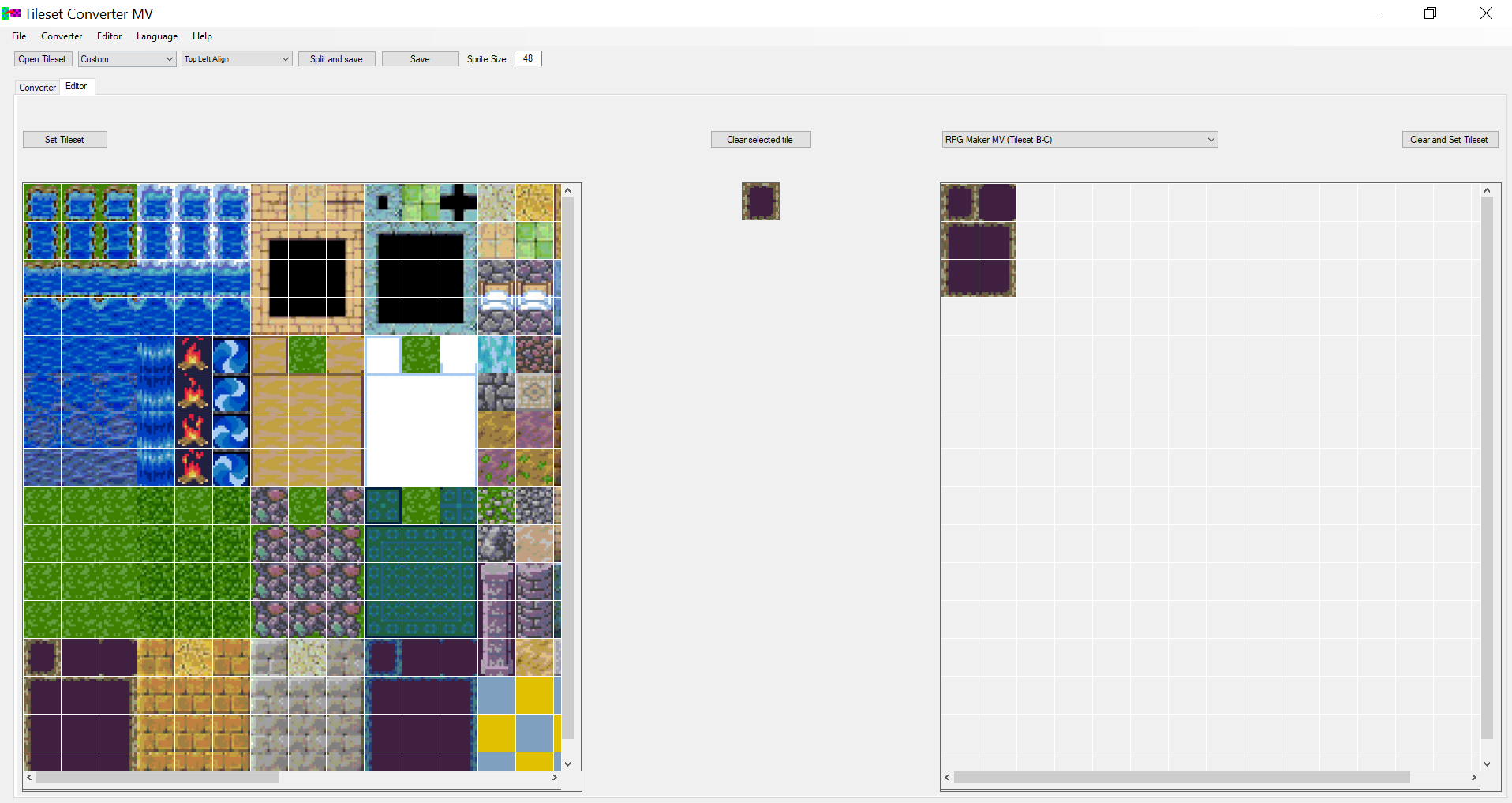
Step 4: On tilecon's editor:
howto2.png

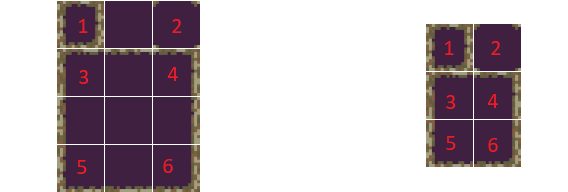
Arrange all "ground" tiles like this(left is rm2k's format, right is mv's format):
howto3.png

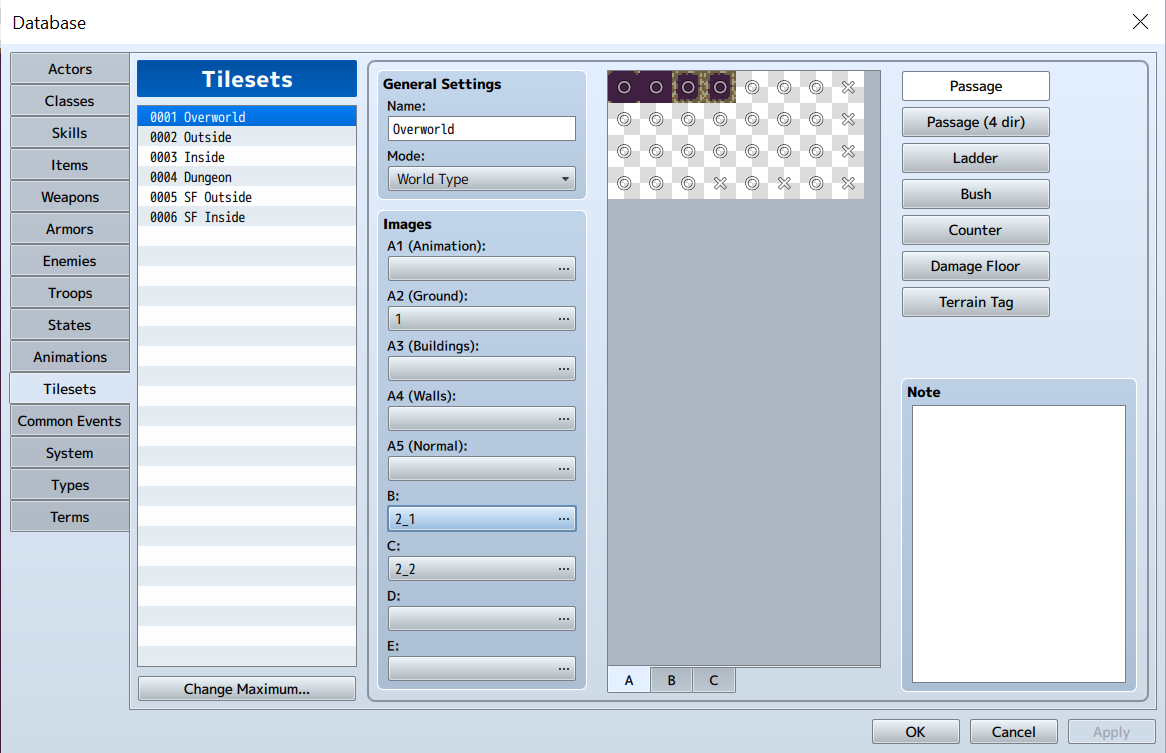
Step 5: In RMMV:
howto4.png


As you can see all B and C sprites are all over the place however they are perfectly usable:

howto5.png
You could probably clean rpg maker's spritesheet by painstakingly placing all B and C sprites on the sheet using the editor like in step 4

For the animation tiles you can use tilecon's built in animation converter on the resized tileset.
New release, fixed bugs and a couple of issues with the feature that removes the background color and makes it transparent, now it works with rm2k tilesets too.

https://github.com/EverardoMeireles/2k-char-processor/releases/tag/Latest

Original thread: https://forums.rpgmakerweb.com/threads/2k-char-processor-charset-conversion-tool-from-rm2k-to-other-engines.106669/