Hints (tooltips) for words in Messages and Items

Help In Messages
Version 1.1
by Pheonix KageDesu
​


54.png


Plugin allows you create tooltips for any word or sentence in messages or for Items \ Skills


✅Features:

  • You can make word or sentence made easy for understand for player, or adding tooltip for it
  • You can customize tooltip window, change window skin
  • Extended control characters for better customization of your toolitps
  • You can also add tooltips for items, weapons, armors and skills.
  • Supports automatic word wrapping mode, no need to constantly use control characters for words
  • AutoWrapInUse2.png

How to Use:

Spoiler: Instructions
Basic way​

1. In Plugin Parameters create new Help Message with unique Id


2. Use control-character \TM[Id] for linking created Help Message to any word or sentence in message

\TM[id]your word\TM, where id - your created help message Id


3. Hover word by mouse
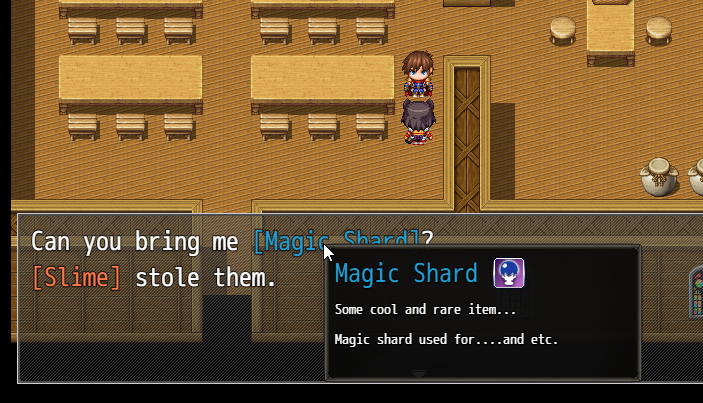


Using Auto Word Wrap
​
1. In Plugin Parameter create new Auto Wrap Sentence with your word (or sentence)


2. Just write your word (sentence) in message like always


☝You can use Auto Wrap Sentences for any words or sentences and any escape-characters or other things
Example: Add icon, color and smaller font for "Long Sword"


Plugin Commands
​


This two commands allows you Activate or Deactivate Auto Wrapping or Help Hints


! Tested with VisuStella Message Core


Download (1.1):


Demo project for MV: download

Demo project for MZ download


Terms of Use:

Creative Commons 4.0 Attribution, Share Alike, Non-Commercial

(Attribution Non-Commercial Share Alike, cc by-nc-sa)


You can use plugin in non-commercial project for free


About use in commercial projects -> on official plugin webpage
Oh, one plugin from Pheonix Kagedesu came to MZ. *Ragnarok is near*
Cccooooooooooolll!!!
Me, as you... well, you know (I'm HuskyTrooper by the way), will be able to use it commercially?
Gonna wait for ABS and much better, NET in MZ.
:MV3:
Gonna wait for ABS and much better, NET in MZ.

Thank you. Yes, ABS and NET planned for MZ as well

will be able to use it commercially?

I can answer you in PM about this, if you need.
will this work on mobile? When you touch the words instead of hovering over them?
well done!
will this work on mobile? When you touch the words instead of hovering over them?

Version 1.0 - not, but maybe i will implement Mobile support in the update.
Very cool!
Ah finally something like this!
It reminds me of the very useful system in the game Tyranny, they used it to tell you things your character knew, but you may not remember.
I'm using this in my short game I am making to give the player some hints about the world it takes place in.
Dear Phoenix KageDesu, hope you are well!
I love this plugin, but it is incompatible with another plugin I am using (Eli Message Actions - Link). When they are both ON, hers works but yours doesn't.
Is there anything that can be done to solve this? Otherwise, I'll avoid using Eli's plugin. Thanks in advance and sorry for bothering.
PS: I speak a bit of russian if you feel more confortable.
Send me Demo project with issue in PM and i will try help you making patch
This is incredible! totally original and functional! I liked it a lot and I imagine that you can do a lot from this script. Congratulations!
Is there an option in future for MV release?
Yes, soon I will make update and add RPG Maker MV support. Maybe some new features too. If anyone have suggestion let me know before i open this plugin in code editor.
It would be good if hint load its text from txt file with text code, e.g \hint[1] will display line #1 from Such file, plugin parameter is not flexible as separate text file, especialy when switching between windows
Definitely looking forward to an MV release of this!

I use a lot of your plugins and anytime you release a new one I am always excited to incorporate it into my project. I would love to add this one as a way to add lore and instructions for the player.
Plugin updated to version 1.1.

RPG Maker MV support added​

Now plugin file PKD_HelpInMessages.js works in both RPG Makers MZ and MV.

Demo projects​

Added Demo projects for RPG Maker MV and MZ. You can download them
from first post in thread.

Hints for Items (Equipment and Skills)​

Added new Plugin Parameter Is Show Item Hints – now you can assign hints for items\weapons\armors\skills via special note keyword <pHint:ID>
2022-05-12_0-52-20.png

2022-05-11_23-57-49.png

2022-05-12_0-30-23.png

2022-05-12_0-14-30.png


New extended control characters (RPG Maker MZ only)​

Add some new control characters that allows you customize your hints and create really useful tooltips. More informatin in plugin Help section. Examples you can find in Demo project.

2022-05-13_0-24-57.png
I hope it can work my Menu Customiser =) thank you alot for making it
to work in MV as well =)
Thank you SO much for the MV support.

Your plugins are the absolute best and I cannot wait to add this to my game!
@Pheonix KageDesu I got a question, on the demo, when you select item
in the item menu (menu -> item) it shows the helpWindow on selecting,
or on mouse destination.

is it possible to use that as "MouseOver" like the same as text?

as txt can be used (which is nice or structure), there is also a
weapon or armor with "<pHint: ID>" which I believe was in the PRO version?
of does that only count as battle skills, battle items?

if it's the 2nd one, than im really good with the basic version.
as I have description window on the item scene, I can add some
"hidden" effects if mouse over rather than on item select/item select mouse destination.

while I use key items mostly, if mouse over isn't possible or minor change
in the code to switch that "use mouse", than im happy with message window only
as well.
is it possible to use that as "MouseOver" like the same as text?
Yes, plugin have Parameter <At mouse pos> for that and in Demo it "false"
weapon or armor with "<pHint: ID>" which I believe was in the PRO version?
of does that only count as battle skills, battle items?
Weapons, Armors and Items supports <pHint:ID> in Basic version
But Skills -> Pro version only

Original thread: https://forums.rpgmakerweb.com/threads/hints-tooltips-for-words-in-messages-and-items.126322/