Converting Graphics for usage in 2000

I'm sure as heck that this topic has been covered in some degree by someone here more than once, but my circumstances are specific enough for me to felt as if I should try making a post about it myself, sooo here I am!

I love 2000 to bits - it's great. But, I'll be real: I still barely get how image compression works. ;w ; Trying to get graphics into my project makes my soul sad, especially with how often I find myself needing to test how stuff looks in-game. There are a lot of steps to the process.

The main programs I use for digital illustration are Aseprite and Clip Studio Paint. Typically, when making graphics for my game, I usually need to use Paint.NET to convert the finished product of whatever I make in Ase/CSP to be readable in 2000...but the process of doing all of this really wears on me. Especially as, sometimes, graphics don't convert right and include random, compression made "transparent" bits that add ~ mysterious pink pixels ~ in random spots around the chipset or given graphic. x_X;;;

My question is this -- for those who make graphics in 2000, what do you use to cover the compression end? I'd especially love to know from the perspective of someone who uses Ase or CSP.

...Or, heck, if not? What do you use to draw that lets you basically just directly export a file that can be made in 2000? Either is fine! I don't mind learning a new art program if it works and doesn't suck eggs, haha.

Thanks for your time and attention! ^-^
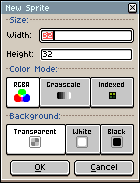
As far as I understand, it's necessary to set it to "Indexed" when creating a new chart:
newsprite

I've seen this happen in other image editors before:
mysterious pink pixels ~ in random spots around the chipset or given graphic
It always seems to happen when you're editing an image with multiple layers of varying opacity and then merging them all together when saving as a PNG file.

I don't believe it's related to image compression.
In particular, I prefer working with 24-bit images and then batch converting them with FSResizer.
it's necessary to set it to "Indexed"
I'm going to go as far as saying you should be doing this regardless if it is the solution or not, or if you are even working in a newer engine where indexing isn't required.

Indexing is basically free performance. Less colors: smaller file size. Less colors: less bit depth, less ram utilization.

Please always index your files when working in pixel art 😍
This all makes sense, yeah...Indexing, huh. My previous research on this topic has told me similarly, regarding Indexing being basically 'the way to go'.

In that case (if I'm understanding this all correctly), I should change my approach to how I'm used to picking out colors for a given sprite, then. See, I often used RBGA because it let me access ~ all the colors ~ through the dial, but using Indexing doesn't quite let you do that in the same way...I'll need to learn more about how Aseprite works on that level, then.

Thank you both so much! ^^ This info is all mondo helpful and I'll make good use with it. :yhappy:
By using indexed colors, you'll have a simple palette to analyze and find colors that shouldn't be in the list, which generates those pink dots, but only when it's already in PNG format.

You can also save the palette to use in future assets you create and maintain the same color scheme:
https://www.aseprite.org/docs/default-palette/
I use Pro Motion NG, there's a free version so maybe you could try that and see if it exports correctly? but tbh while I always recommend Pro over Aseprite, imo you should always stick to the program your used to unless there's a strong reason to change.

Anyway, a program I've moved onto now for compression and conversion of graphics, is something called XnConvert , it's a pretty powerful tool.

Just when you do export and compress, make sure it's 8bit(256 Colour) indexed, RPG Maker 2000 and 2003(even with maniacs and easyrpg player which has support for 24/32bit images) does not support the smaller bit depths(2bit, 4bit etc), which is very annoying as it's an easy way to reduce file size if don't go over say, 4 colours in an image(2bit), having an 8bit indexed image for a graphic of only 4 colours is very inefficient.

Also, it's worth noting that when you import graphics to RPG Maker 2000 and 2003, you have to select a transparent colour for all images used. This is selected on the screen that appears after you click the image you wanted to import in the resource manager, the current transparent colour will flash, and you can click anywhere on the image to change the colour that should be transparent.

If the you colour selected for transparency is something your using to form part of the image, you may well get some crazy results.

Lastly, if you use the RPG Maker 2000/2003 image format(XYZ), EasyRPG Player has a list of tools you can use that maybe of help: https://easyrpg.org/tools/downloads/

Original thread: https://forums.rpgmakerweb.com/threads/converting-graphics-for-usage-in-2000.181840/