Message Face Control


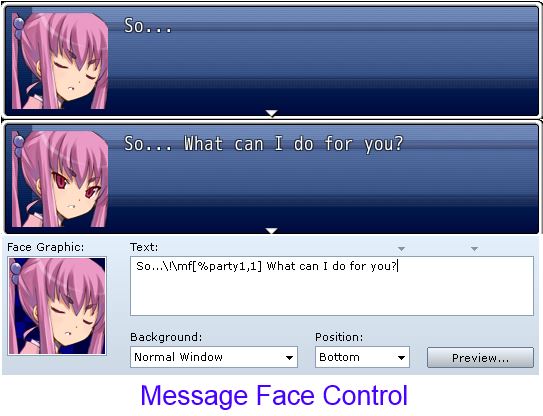
This script provides a message code that allows you to change the face that will be displayed in the message box. This allows you to display different faces in the middle of a message.


The message code is customizable so you can choose what code you want to use in case of conflicts with other scripts.


This script can be used in conjunction with other scripts that treat certain face names in a special way. For example, you can use Placeholder Graphics to draw faces based on certain actors or party members.


Get it at HimeWorks!
Wooooah

You actually did it!

Sweet.
Wow....i didint understand what you were trying to do before, but now i do. This is great! What are the terms by the way? 
This looks incredible!  Definitely a nice little tool for making the narrative a bit more believable.

I wonder whether there are any Bust-display scripts that use the message window's chosen picture as a base for deciding which Bust to display?  If so, the possibilities really start to open up nicely in combination with a script like this.
Wow....i didint understand what you were trying to do before, but now i do. This is great! What are the terms by the way?
The terms are included with the script.

This looks incredible!  Definitely a nice little tool for making the narrative a bit more believable.


I wonder whether there are any Bust-display scripts that use the message window's chosen picture as a base for deciding which Bust to display?  If so, the possibilities really start to open up nicely in combination with a script like this.
Galv's script uses the face image.


http://galvs-scripts.com/galvs-message-busts/
This is perfect for a visual novel.  I cannot wait to try this out with the new project, and I just got Galv's message busts all set up too.

EDIT:  I just started to use it with Galv's message busts, and it isn't working for me.  I used the correct notation in the message window, but the bust doesn't change like it should when the face graphic is changed on the sheet through the dialogue.  Also when the text is written it doesn't display the full message just the portion of the text after the command is processed.

i7YWrEQ.jpg


Also when attempting to change code = "MF" to something else in quotations, the new command makes the [actor,*] command display even with the new command properly given.
For the message code, I've updated the script to perform a scan to determine whether you're using face control codes. This is because if you initially didn't have a face, then the text will be drawn at the corner of the window.

I'm not sure if it will resolve the issue with galv's script.

Looking at Galv's script, it might not

Code:
 TEXT_X = 0           # Offset text when displaying busts above the message                       # window. The script automatically offsets the text x                        # by the bust image width IF the BUST_Z is 0 or more.
Send me a demo project so I can see what's causing the issue.

Original thread: https://forums.rpgmakerweb.com/threads/message-face-control.35246/