Equip Slots Core


​


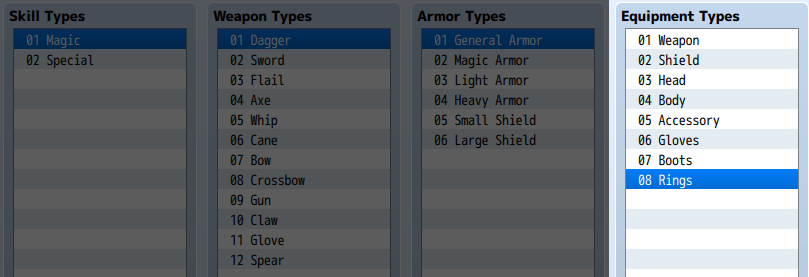
By default, RPG Maker gives you 5 equip types to work with:
 
​
You also have the ability to add and modify equip types directly in the database in the Terms tab.
 
​
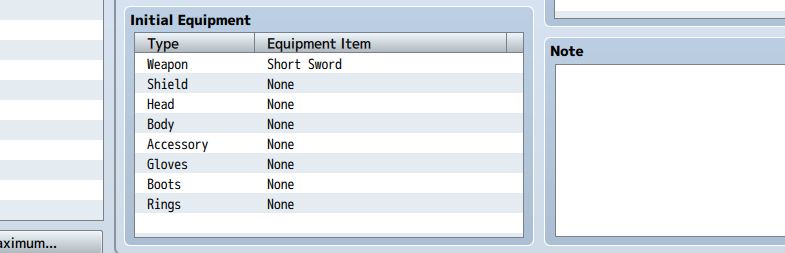
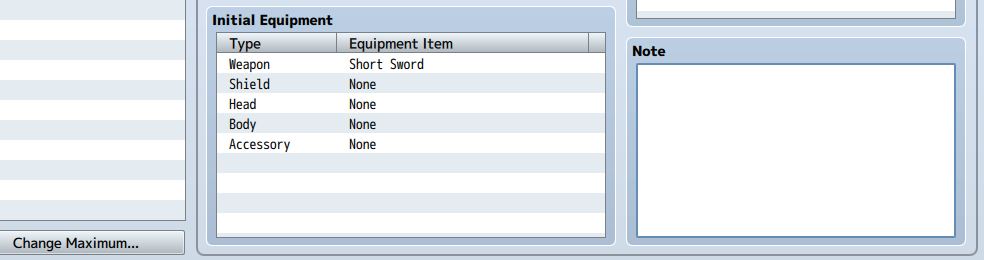
However, one problem you might notice is that every actor will have those equip slots, even if they can’t use any of the equips that you’ve designed for those slots.
 
​
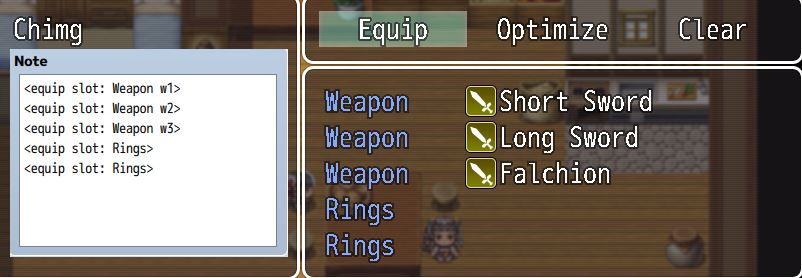
Another problem is you can’t add multiple copies of the same slot to an actor: they can only have one of each. Want to wear two accessories? Can’t be done.

This plugin solves that problem. It provides ways for you to customize your actors’ equip slots, allowing you to choose exactly which slots they will have in the game.
 
 ​
More information and downloads are available at HimeWorks​
This plugin provides bare-bones equip slots functionality and does not come with a custom scene.
This gives you the flexibility to introduce your own equip menu.
For those that are using Yanfly's equip core, I have updated this plugin so that it will replace the equip slot functionality while maintaining compatibility with the equip menu.


Just place my plugin under Yanfly's to make use of the menu


EquipSlotsCore7.jpg
Hello Hime,


I can't seem to make this work. I've put this one under ALL my other plugins and it still says: Type Error: undefined is not a function.


I have this in my actor's notetag:


<equip slot: Weapon>


<equip slot: Head>


<equip slot: Armor>


<equip slot: Sphere>


<equip slot: Sphere>


<equip slot: Sphere>


This didn't work, so i've tried this:


<equip slot: 1>


<equip slot: 2>


<equip slot: 3>


<equip slot: 4>


<equip slot: 4>


<equip slot: 4>


..and all variations of the above (ie, changing 1 to 01, or omitting the space between slot: and the actual number, etc)


I would really like to make this work as i want the fourth to sixth equipment slot to only accept "spheres"


Thank you!


[EDIT] And yes, i'm using Yanfly's equip score as well.
The two setups should both do the same thing.


Please check that you are using the latest version (Nov 18). The initial version did not support yanfly's equip scene.
The two setups should both do the same thing.


Please check that you are using the latest version (Nov 18). The initial version did not support yanfly's equip scene.
Hello, I downloaded the plugin literally just two hours ago, from your website. Having the plugin below everything and without the notetags added will make the game run successfully, but adding any of the notetags (or all of what was required) will make the game put out the "Type Error: undefined is not a function." error.


Just to be clear, the tags should be in the notetag boxes of the actors themselves, right? Not in the classes notetag box?
Yes, I have only provided support for actors right now. I am still thinking about how to mix in classes with it.


Do you have other plugins? Are they enabled?
Yes i do have a lot of plugins; (too many to mention here, actually )and all of them are enabled. However, turning all of them off and leaving just this plugin on, it worked.


So im guessing i just have to turn them on one by one to check the specific conflict. Thanks. 🙂
Sorry for double posting, but i've found the issue: yanfly's item core.turning this off will run the game with no errors; even if all my other plugins are turned on. Having yanfly's item core below your plugin will still produce the error, though.
Open YEP_ItemCore.js, go to line 761, then erase the following lines that I have added a // in front.

Code:
Game_Actor.prototype.equipInitIndependentEquips = function(equips) {    var slots = this.equipSlots();    var maxSlots = slots.length;    // this._equips = [];    // for (var i = 0; i < maxSlots; ++i) {      // this._equips[i] = new Game_Item();    // }    for (var i = 0; i < maxSlots; ++i) {      var slotType = slots[i];      var equip = this.grabInitEquips(equips, slotType);      if (DataManager.isIndependent(equip) && this.canEquip(equip)) {        var array = $gameParty.gainIndependentItem(equip, 1)        if (array instanceof Array) {          newItem = array[0];          this.changeEquip(i, newItem);        }      } else if (this.canEquip(equip)) {        this._equips[i].setObject(equip);      }    }};
@Tsukihime I tried that and while the equip slot plugin works even with the item core plugin turned on, all my declared slots are considered as items and showed up in the weapon and armor list of the item menu scene (whereas before they don't show up at all). Even weirder is that turning your plugin off will have the declared weapon slots still show up in the item menu scene; with even more undeclared weapon and armor showing up.
Can you post a screenshot? I am not sure what you mean.
Sure, here  are screenshots from the item menu (some parts blurred out):

[IMG]https://dl.dropboxusercontent.com/u/1214123/Misc/forhime1.jpg[/IMG]

[IMG]https://dl.dropboxusercontent.com/u/1214123/Misc/forhime2.jpg[/IMG]

..these show up as soon as i removed the lines you specified. they were not there before (and they are not even supposed to be there in the first place). putting back the lines puts out the previous error.
Are you sure those are equip slots?


If you renamed your equip slots, do those rename as well?
Just to be clear though, the screenshots above are from the item menu. BUT, of course i've put the equip slots notetags in the hero's notetag box (and they do work; but now it produced complications with yanfly's item core plugin as seen above).

An update, now whenever i add new items, similar items will not be grouped anymore (ex two green herbs would be two actual green herbs in the list instead of "green herbs 2".
Just to be clear though, the screenshots above are from the item menu. BUT, of course i've put the equip slots notetags in the hero's notetag box (and they do work; but now it produced complications with yanfly's item core plugin as seen above).
My question is whether the "hat" and "tunic" are equip slots or not, because you said your "declared equip slots" are now items.


An update, now whenever i add new items, similar items will not be grouped anymore (ex two green herbs would be two actual green herbs in the list instead of "green herbs 2".
This does not happen to me.


If you have followed my instructions and only deleted the specified 4 lines, it should not affect how items are grouped, especially since the lines that I deleted were related to equip slots.


If you have changed your max item limit in the plugin parameters for items, then this is the expected behavior because all items are now independent items.
My question is whether the "hat" and "tunic" are equip slots or not, because you said your "declared equip slots" are now items.
Yes, i've declared hat and tunic as initial equipment. They don't show up in the items menu before, but now that i've removed the four lines you mentioned earlier, they show now show up exactly as they were shown in the above screenshots (and of course putting those lines back would give the Type Error).

And yes, my bad re: the second issue, yes i did try and put an item limit in the parameters but now i've reverted it to zero and that part is okay again.
Yes, i've declared hat and tunic as initial equipment. They don't show up in the items menu before, but now that i've removed the four lines you mentioned earlier, they show now show up exactly as they were shown in the above screenshots (and of course putting those lines back would give the Type Error).


And yes, my bad re: the second issue, yes i did try and put an item limit in the parameters but now i've reverted it to zero and that part is okay again.
I see the problem.


I've added a patch to the download page


Install that under both plugins.


What was happening was the initial equips were already equipped.


However, the lines that I asked you to delete actually re-initialized the equips to nothing, so when the new independent equips were added, nothing was added to the inventory.
@Tsukihime Thank you very much! I've downloaded and installed the patch and now everything works perfectly! 🙂
I've updated the plugin to serve as a base for enemy equips.

You don't have to do anything on your end, but if you're interested in using Enemy Equips you would need to update.

There is currently one feature that I have not implemented yet, and it is the "dual wield" trait.

Here is how I am planning to implement it.

By default, you have your weapon and shield slots.

However, if the dual wield trait is applied, you will have two weapon slots.

It doesn't "replace" the shield slot; it simply makes your first two slots weapon slots.

Naturally, this only makes sense if your first two equips were actually related to hands. If your first slot was a Weapon and your second slot was Head, it wouldn't make sense to replace Head with Weapon.

To provide support for dual-wield, I am thinking of requiring a second set of note-tags.

This is how you would specify your "normal" slots

Code:
<equip slot: Weapon><equip slot: Shield><equip slot: Head><equip slot: Body>
This is how you would specify your dual-wield slots

Code:
<dualwield equip slot: Weapon><dualwield equip slot: Weapon><dualwield equip slot: Head><dualwield equip slot: Body>
So basically, if you absolutely need the dual wield functionality, this is the solution I am offering, because this plugin also supports games with equip slots like this:

Code:
 <equip slot: Weapon>  // main<equip slot: Weapon>  // sub 1<equip slot: Weapon>  // sub 2<equip slot: Weapon>  // sub 3<equip slot: Armor>
And the default dual wield doesn't make sense here.
Hi there Hime! 

Just wanted to notify, that it seems like the YEP Item Core and this script doesn't work together anymore with the patch

error_hime_by_suziouwabami-d9hikbo.png

Original thread: https://forums.rpgmakerweb.com/threads/equip-slots-core.50348/