GDT Elements Leveling

element_banner.jpg


GDT: Elements Leveling v1.5
 
Introduction


This plugin gives your characters the possibility to level up their elements by using skills of this element.


Leveling up elements can give you two advantages:

  • Skills of this element get stronger
  • Learn better Skills of this element (or combined elements)


Notetags


Skill:


<elementxp:xp>  You can choose how much xp an element should gain after using this spell (you gain xp for every enemy you hit)


Classes;


<elementSkill: elementId, levelOfElement, SkillTolearnId> Which skill should be learned after an element reached a specific level


<elementSkill: elementId1;elementId2, levelOfElement1;levelOfElement2, SkillTolearnId> You can use 2 or more element level requirements if you want to


A bit more help is inside the Plugin Help after installing the plugin


Lunatic Tag


Classes & Actors: <elementCurve> Script </elementCurve>


This can change the elementCurve for specifig Actors, Classes and even different Elements


For detailed Information look into the Plugin Help (Example in Screenshot below)


Installation-Guide
Just copy the plugin into your plugin folder and add it to your plugin list


If you want to you can configure the plugin parameters, level the level curve


If you want to use the Menu for Yanflys StatusMenuCore just add ElementsLevel to Command Order Parameter(Screenshot)
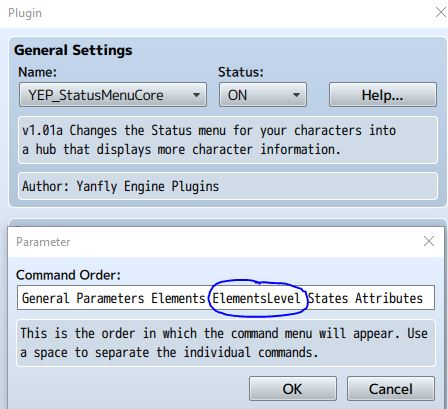

And be sure to have the StatusMenuCore to load before GDT Elements Level


The parameters for the status work the same as for the Element Status Menu in Yanflys StatusMenuCore


 Download


Credit and Thanks
- Gamedev-Tutorials
You can use and edit this plugin as you want. This plugin is open for non commercial and commercial use. Just give me a little credit =) 


Changelog


v1.1: Just some Bugfixes


v1.2: A Skill can now have multiple depending Skill Levels to be learned


v1.3: Elements Level Status Window added for Yanflys StatusMenuCore. Just Add ElementsLevel to the Menus. Spaces are now allowed in Notetags


v1.3.1: Bugfix: There was a bug when your class didn't had any skill to learn.


v1.4: Added Icons to the Status Window


v1.5: Lunatic Tag: ElementCurve added


Demo


Screenshot


With Icons


elem_icons.jpg


Without Icons


elem_level_status_menu.jpg


Lunatic Tag: elementCurve


levelcurve_tag.jpg
thanks this is what ive been looking for and was about to brush up on my js and try and throw together myself!


it seems though, when i level up a skill. does it have to be in the skills to learn tree for the class to learn it? im getting an error when it tries to learn a skill. Any ideas? its giving me a null value trying to be passed for the skill name. Do i have to the full xxxx number convention or can i just use single digits?


 got the actual error this time. 


TypeError: Cannot read property 'name' of undefined
    at file:///C:/Users/root/Documents/Games/testy/js/plugins/GDT_ElementsLeveling.js:191:60
    at Array.forEach (native)
    at Game_Actor.displayElementLevelUp (file:///C:/Users/root/Documents/Games/testy/js/plugins/GDT_ElementsLeveling.js:190:15)
    at Game_Actor.gainElementExp (file:///C:/Users/root/Documents/Games/testy/js/plugins/GDT_ElementsLeveling.js:177:13)
    at Game_Actor.updateElementExp (file:///C:/Users/root/Documents/Games/testy/js/plugins/GDT_ElementsLeveling.js:100:12)
    at file:///C:/Users/root/Documents/Games/testy/js/plugins/GDT_ElementsLeveling.js:114:13
    at Array.forEach (native)
    at Function.BattleManager.gainElementExp (file:///C:/Users/root/Documents/Games/testy/js/plugins/GDT_ElementsLeveling.js:113:29)
    at Function.BattleManager.gainRewards (file:///C:/Users/root/Documents/Games/testy/js/plugins/GDT_ElementsLeveling.js:107:10)
    at Function.BattleManager.processVictory (file:///C:/Users/root/Documents/Games/testy/js/rpg_managers.js:2386:10)rpg_managers.js:1722 SceneManager.catchExceptionrpg_managers.js:1683 SceneManager.update
Very cool concept, I can't wait to try this out!
i fixed it. you cant have a space in the command between the numbers. 
This looks very cool, question: Is there a way to show a character's current element levels in the status screen or separate menu? Maybe an idea for an update?

I will try to add the elements to the status menu (on weekend). Thanks for the hint 🙂

i fixed it. you cant have a space in the command between the numbers. 

Never tried it with spaces. But i will try to make it possible. Thank you =)
Cool, maybe you can make it compatible with Yanflys status menu plugin too? 😀
I just added a new version of Elements Level Plugin.


I changed the following stuff:


Elements Level Status Window added for Yanflys StatusMenuCore. Just Add ElementsLevel to the Menus. Spaces are now allowed in Notetags
nice job!


so i do have this error now though. any thoughts?


TypeError: Cannot read property 'split' of undefined
    at Game_Actor.getSkillsToLearn (file:///C:/Users/root/Documents/Games/testy/js/plugins/GDT_ElementsLeveling.js:274:30)
    at Game_Actor.learnSkillsforElement (file:///C:/Users/root/Documents/Games/testy/js/plugins/GDT_ElementsLeveling.js:235:30)
    at Game_Actor.calculateElementLevel (file:///C:/Users/root/Documents/Games/testy/js/plugins/GDT_ElementsLeveling.js:227:13)
    at Game_Actor.gainElementExp (file:///C:/Users/root/Documents/Games/testy/js/plugins/GDT_ElementsLeveling.js:188:45)
    at Game_Actor.updateElementExp (file:///C:/Users/root/Documents/Games/testy/js/plugins/GDT_ElementsLeveling.js:112:12)
    at file:///C:/Users/root/Documents/Games/testy/js/plugins/GDT_ElementsLeveling.js:126:13
    at Array.forEach (native)
    at Function.BattleManager.gainElementExp (file:///C:/Users/root/Documents/Games/testy/js/plugins/GDT_ElementsLeveling.js:125:29)
    at Function.BattleManager.gainRewards (file:///C:/Users/root/Documents/Games/testy/js/plugins/GDT_ElementsLeveling.js:119:10)
    at Function.BattleManager.processVictory (file:///C:/Users/root/Documents/Games/testy/js/rpg_managers.js:2386:10)rpg_managers.js:1722 SceneManager.catchExceptionrpg_managers.js:1683 SceneManager.update
ok nm i figured it out. 


  Game_Actor.prototype.getSkillsToLearn = function(elementId) {
    var skills = [];
    var skillIds = this.currentClass().meta.elementSkill;
    skillIds = (skillIds instanceof Array) ? skillIds : [skillIds];
    for(var i=0; i < skillIds.length; i++) {
      var skill = skillIds.split(",");

      if(skill.length < 3) {


        continue;


if i didnt have a skill set up to learn in the class, and was using it only for boost in dmg for the element i would get an error on level up b/c of those lines of code.


if i added a bogus line like <elementSkill:3,99,63> in my class, it worked fine, is there a way to write an if then conditional on this whole block so it dosent error out? 


im not new to programming just dont know js hehe...
This plugin is brilliant! Too brilliant for me to use for now though.
ok nm i figured it out. 


  Game_Actor.prototype.getSkillsToLearn = function(elementId) {
    var skills = [];
    var skillIds = this.currentClass().meta.elementSkill;
    skillIds = (skillIds instanceof Array) ? skillIds : [skillIds];
    for(var i=0; i < skillIds.length; i++) {
      var skill = skillIds.split(",");
      if(skill.length < 3) {
        continue;


if i didnt have a skill set up to learn in the class, and was using it only for boost in dmg for the element i would get an error on level up b/c of those lines of code.


if i added a bogus line like <elementSkill:3,99,63> in my class, it worked fine, is there a way to write an if then conditional on this whole block so it dosent error out? 


im not new to programming just dont know js hehe...

I see the error. Sorry. Thought i tested everything but i missed one condition. I will fix this after work. Thanks for the hint. 
np.


if you have some free time ive got some questions id like to ask you?
np.


if you have some free time ive got some questions id like to ask you?

If it's related to the plugin just write it here 🙂  Else write me a pm 🙂
I made a Bugfix. Version 1.31


When a class didn't had a Skill to learn, the plugin crashed when you gained xp. This is now fixed
Can show Icon next to the word ICe? Or Fire? Depending on the element? 

I can implement this. but currently there exists no icons for elements. But i'll make it possible to use icons for elements.
With v1.4 the Element Status window gets some icons for the elements. Have fun with it 🙂
With v1.5 you can change the Element Level Curve via Lunatic Tag
Hello @Gilles !

I have been messing around with this for a bit and was wondering, how did you create the events with the crystals in your tutorial video, where activating the crystal increases the level in a particular element by one?

I have been trying to re-create something similar, but where the player can select which element they wish to raise.

Example:

Character activates crystal, and a dialogue box opens with 4 choices

Fire
Water
Wind
Earth

Whichever the player selects increases its level by one

Any help you could give me would be great!

Original thread: https://forums.rpgmakerweb.com/threads/gdt-elements-leveling.64207/