Minimap Plugin

Excellent plugin bro! Really customizable. I do have a weird problem though. When I move my character up, the mimimap is selected, as if it were a selection in a window. Any way to clear that?
when I press down, I select the minimap


View attachment 57401


how to fix?

Change all "Window_Selectable" to "Window_Base".

NOTE:
Please report any bugs you happen to find. Hopefully I'll be able to fix them, I'm still kind of fresh to making Plugins, but I have some tiny experience in javascript.

To avoid breaking a whole slew of other plugins with this.

Change "upp_miniMapCmds.apply(this);" to "upp_miniMapCmds.call(this, command, args);"

🙂

To fix the param to hide the minimap name.

Add

if (!_minimapshowCustomName) {
$miniMapName.hide();
}

to the end of the function

NAME_DISPLAY.prototype.initialize = function() {
holy cow.. This looks pretty dope.. 🙂 am I able to just use this on one map ? Like my world map ? Which would not be huge but not small like most maps.. Gotta wait till I'm home to download this 😠 brilliant job anyway dude.
Pretty nice plugin, thanks. Easy to use. Good set of configurable options.

Wish it had FOW though.
great work. any thought about adding auto hide?
Change all "Window_Selectable" to "Window_Base".


To avoid breaking a whole slew of other plugins with this.

Change "upp_miniMapCmds.apply(this);" to "upp_miniMapCmds.call(this, command, args);"

🙂

To fix the param to hide the minimap name.

Add

if (!_minimapshowCustomName) {
$miniMapName.hide();
}

to the end of the function

NAME_DISPLAY.prototype.initialize = function() {
Would you be willing to provide your edited version of this plugin IceViper?

Also OP, great plugin. I'd love to use it but I plan of having a commercial release of my project. What are your terms and conditions?
I keep getting a funny box under my mini map (how do i get rid of it), also with this one is it auto on and then I set commands to turn it off in spots I don't want it?
Great plugin, thanks!
If you got th time, and don't mind doing it, I was wondering if it would be possible to set some part of the map as "hidden part". I.E. : even if you got the map activated, you won't have access to those part on the minimap.
There's some games where you can found example of that feature, mostly Hack n'Slash. One of my favourite one being Grim Dawn.
You can actually do that. I did it by setting the area I want hidden as region 2 and having this as the map notetag "<mmRegion2Color: 189, 189, 175, 0>" (the 0 at the end makes it transparent.)

As you can see from the white dot on the map, I'm currently standing in an area within that map that you cannot see on the mini-map.
upload_2018-4-19_11-31-22.png
Wow, thanks. I'm feeling a bit stupide now. I should have thought about that. Easy and simple.
Thanks for the quick reply. ^^
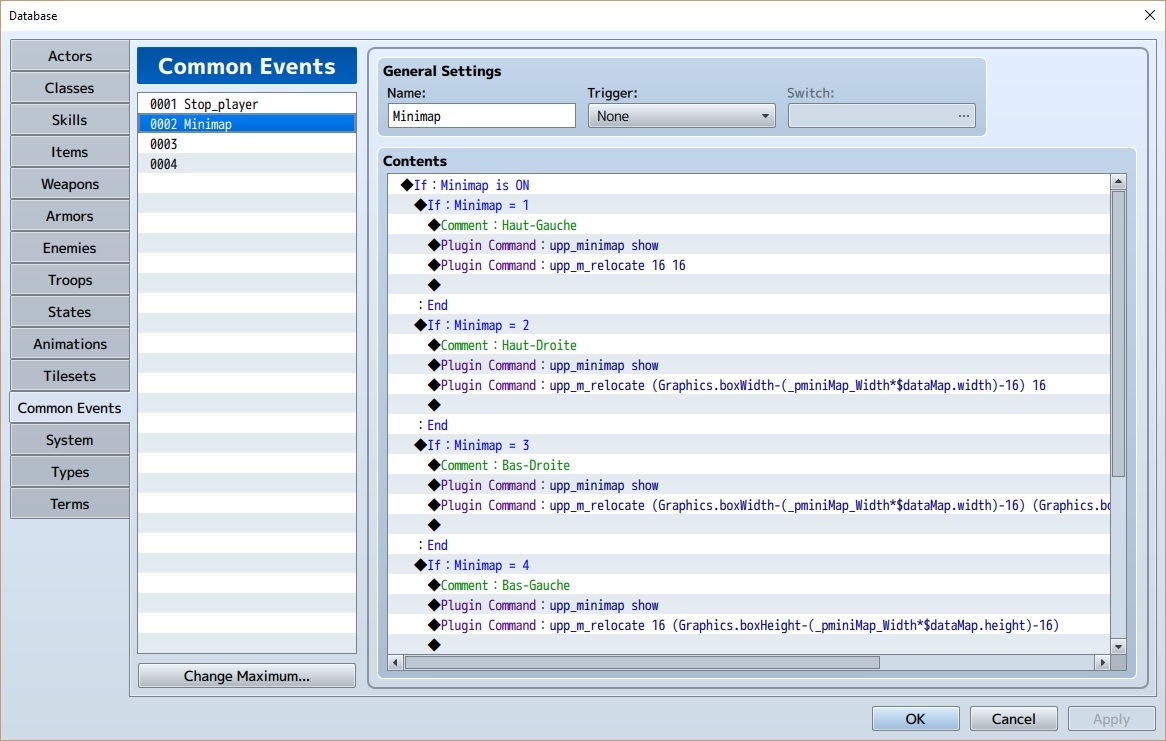
Little trick, to move the minimap on the sides of the game for any resolution.
You have to change the script a bit (just change 4 lines):
At line 1297, change Number to String.
Same for line 1298.

At line 1480, change to
_pminiMap_X = eval(args[0])
At line 1481, change to
_pminiMap_Y = eval(args[1])

Why do that?
Without changing this, you can not calculate based on the game resolution. This converts the calculation to a Number value.

Now, it will be enough just to make a command plugin.
To move up-left (the simplest):
upp_m_relocate 16 16

To move up-right:
upp_m_relocate (Graphics.boxWidth-(_pminiMap_Width*$dataMap.width)-16) 16

To move down-right:
upp_m_relocate (Graphics.boxWidth-(_pminiMap_Width*$dataMap.width)-16) (Graphics.boxHeight-(_pminiMap_Width*$dataMap.height)-16)

To move lower left:
upp_m_relocate 16 (Graphics.boxHeight-(_pminiMap_Width*$dataMap.height)-16)

Make a common event that will call one of these commands with each map change and it will automatically adjust.
The value "16" is just to prevent the minimap sticks too much on the sides, you can change it as you see fit.

For my part, I use OptionsCreator to be able to change the position / remove the minimap.

Spoiler: Images (Down-right)
1524187298970991153.jpg
15241873331537853447.jpg
@TheUnproPro this is one of the best and the only minimap plugin.
I hope you or someone updates it, so that it runs without bug and incompatiblity with Yanfly, SumRndmDde, and Mog Plugins.
What a great plugin!
This is exactly what I was looking for.
I just want to ask, anyone has any idea of any Vx Ace minimap scripts? I searched a lot and they are either non commercial or not for VX Ace... Would appreciate it if anyone responds.
Hello. Nice pluggin. Good work. I have a problem with hide the map. I write "upp_minimap hide" in the notes and nothing happens. Did I do somethind wrong?? Tanks!!
No problem, I know hoy it works. Thank you anyway!!!
[EDIT] Nevermind! I was using an outdated version ^^
Terms of use can be found here:
https://rpgmakermv.co/resources/rpg-maker-mv-mini-map-plugin.973/update?update=1275

Spoiler: Old post
Hi people!
I get an error with this plugin when i try to use this function to draw an event. <mmDisplay>
"Type error, cannot read property 'replace' of undefined"
Spoiler: Image
0xemrYZ.png
Anyone knows how to solve this?
try to put 'update' instead of replace, but not work.

Here the console:
Spoiler: image
uOeHJQm.png
The minimap is super stretched while in bigger maps.
Change all "Window_Selectable" to "Window_Base".


To avoid breaking a whole slew of other plugins with this.

Change "upp_miniMapCmds.apply(this);" to "upp_miniMapCmds.call(this, command, args);"

🙂

To fix the param to hide the minimap name.

Add

if (!_minimapshowCustomName) {
$miniMapName.hide();
}

to the end of the function

NAME_DISPLAY.prototype.initialize = function() {

When I start my game, the world map show me bigger, the rest of them is fine expect world map
Plugin commands did not work for me. I created an event and wrote: upp_minimap show and minimap did not hide.

NVM I ve already solve the problem. Dunno how to delete my post 😛
Is there a way to distinguish between events so that you can hide some and show others and allow the player to switch between which ones to show? And is there a way so the minimap stays one size?

Original thread: https://forums.rpgmakerweb.com/threads/minimap-plugin.66443/