I'm having a similar problem, but when I Resize, it makes everything look pixelated and awful. What do you mean by "Tilecon by default"?
Tileset Converter to MV (2.4, 2021-08-01)
Useful Development ToolsI'm having a similar problem, but when I Resize, it makes everything look pixelated and awful. What do you mean by "Tilecon by default"?
Curious, is there a program to do the reverse? MV to VX (48x48 to 322x32).
no, and tha would also be technically almost impossible due to the worse limitations of VX.
Adding data to tilesheets is what is causing the blur - removing data to reduce the size will have worse effects of distortion.
First and foremost, sorry by the late response. I totally forgot i posted the program in this forum since i turned off the email notifications.
If there is any bug or problem after this comment please refer to the discus comment section on the project page since may take a while to me to check for new comments here.
Merged. Thanks
Yes there is : )
1-2. You mean to save the converted image with the same name of the opened image but in a diferent folder? I would prefer to save it in the same folder with with some sufix like '_mv-a1'. Not really a problem since tilecon asks where you want to save.
3. if anything detect the tileset by its size would be better (if you're talking about detecting which tileset type the input is on load). If you meant to set the MV output given the input's name, no since it tilecon detec itself which MV tile it should be converted to (since for example, a xp autotile should be converted to a A-1 or A-2 mv tileset).
I didn't merge since you closed before i notice the PR. That said, the PR message should be clear about what is changing on the load/save functions and miscelanious stuff like .designer.cs and .csproj and .resx shoudn't be in the PR unless they're needed.
I doubt you will but if you send another PR only for the Russian TL i would glad merge.
I rename it to tile size to make more obvious. Did you hit "custom" on the tileset list? If you're trying to to convert from a rpg maker tileset you have to set which rpg maker version your tileset is. This "custom" tileset is a niche feature made as per a friend's request.
I did this program because i wanted to solve a problem i had, and it did so i didn't even consider that there was something left to fix. Sorry if any bug prevented tilecon from solver your problem but i tweak this program on my free time.
Older versions used to blur the image when resizing, but i changed it since i think that pixelated looked better. 🙂
If is not that, then it can be the lack of the .NET Framework in the system. You can download it here.
Which version you tried? 2.0 had a some nasty bugs. Try 1.9 or 2.4.
I was thinking about adding a option to convert to VX and and stretching from MV to VX would be quite trivial but my MV trial is expiring this week soi will leave it for another time.
If there is any bug or problem after this comment please refer to the discus comment section on the project page since may take a while to me to check for new comments here.
Merged. Thanks
Yes there is : )
1-2. You mean to save the converted image with the same name of the opened image but in a diferent folder? I would prefer to save it in the same folder with with some sufix like '_mv-a1'. Not really a problem since tilecon asks where you want to save.
3. if anything detect the tileset by its size would be better (if you're talking about detecting which tileset type the input is on load). If you meant to set the MV output given the input's name, no since it tilecon detec itself which MV tile it should be converted to (since for example, a xp autotile should be converted to a A-1 or A-2 mv tileset).
I didn't merge since you closed before i notice the PR. That said, the PR message should be clear about what is changing on the load/save functions and miscelanious stuff like .designer.cs and .csproj and .resx shoudn't be in the PR unless they're needed.
I doubt you will but if you send another PR only for the Russian TL i would glad merge.
I rename it to tile size to make more obvious. Did you hit "custom" on the tileset list? If you're trying to to convert from a rpg maker tileset you have to set which rpg maker version your tileset is. This "custom" tileset is a niche feature made as per a friend's request.
I did this program because i wanted to solve a problem i had, and it did so i didn't even consider that there was something left to fix. Sorry if any bug prevented tilecon from solver your problem but i tweak this program on my free time.
I did mean the by default, the tilecon will not resize the tileset and only place them in a MV tileset. I was thinking in Portuguese when i wrote that, i apologise.
Older versions used to blur the image when resizing, but i changed it since i think that pixelated looked better. 🙂
I would like to know too. Are you talking about a message box appearing when you drag/select a image? If so is because the image size does not match the tileset so you may want to change the tileset type on the first combo box.
If is not that, then it can be the lack of the .NET Framework in the system. You can download it here.
Which version you tried? 2.0 had a some nasty bugs. Try 1.9 or 2.4.
I was thinking about adding a option to convert to VX and and stretching from MV to VX would be quite trivial but my MV trial is expiring this week soi will leave it for another time.
The option to convert RM2K/2K3 tiles is not working properly, however i found a workaround.
If you want to convert RM2k/2K3 tilesets to MV do this:
If you want to convert RM2k/2K3 tilesets to MV do this:
Step 0: Download tilecon:
 hermespasser.github.io
Step 1: Put all your tilesets on a folder.
Step 2: Use my program or a photoshop script to resize the images to nearest neighbour with no anti-aliasing:
https://github.com/EverardoMeireles/2k-char-processor/releases/tag/Latest

Step 3: Open tilecon -> Custom format, Sprite size 48, set transparency -> save

Step 4: On tilecon's editor:

Arrange all "ground" tiles like this(left is rm2k's format, right is mv's format):

Step 5: In RMMV:

As you can see all B and C sprites are all over the place however they are perfectly usable:

You could probably clean rpg maker's spritesheet by painstakingly placing all B and C sprites on the sheet using the editor like in step 4
For the animation tiles you can use tilecon's built in animation converter on the resized tileset.
Tileset Converter MV • Gládio Cítrico
Convert old RPG Maker tilesets to RPG Maker MV tileset format.
hermespasser.github.io
Step 1: Put all your tilesets on a folder.
Step 2: Use my program or a photoshop script to resize the images to nearest neighbour with no anti-aliasing:
https://github.com/EverardoMeireles/2k-char-processor/releases/tag/Latest
Step 3: Open tilecon -> Custom format, Sprite size 48, set transparency -> save
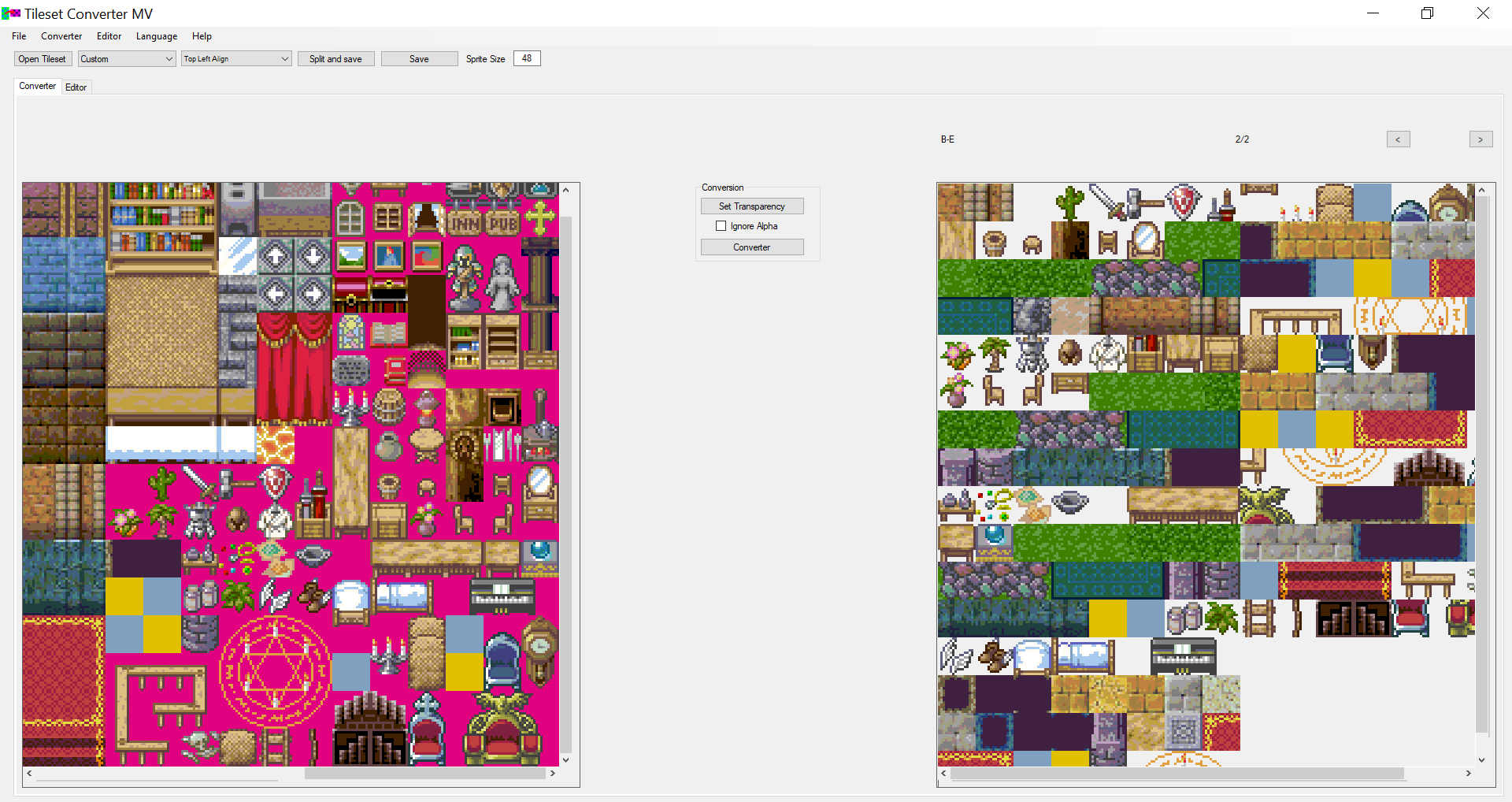
Step 4: On tilecon's editor:
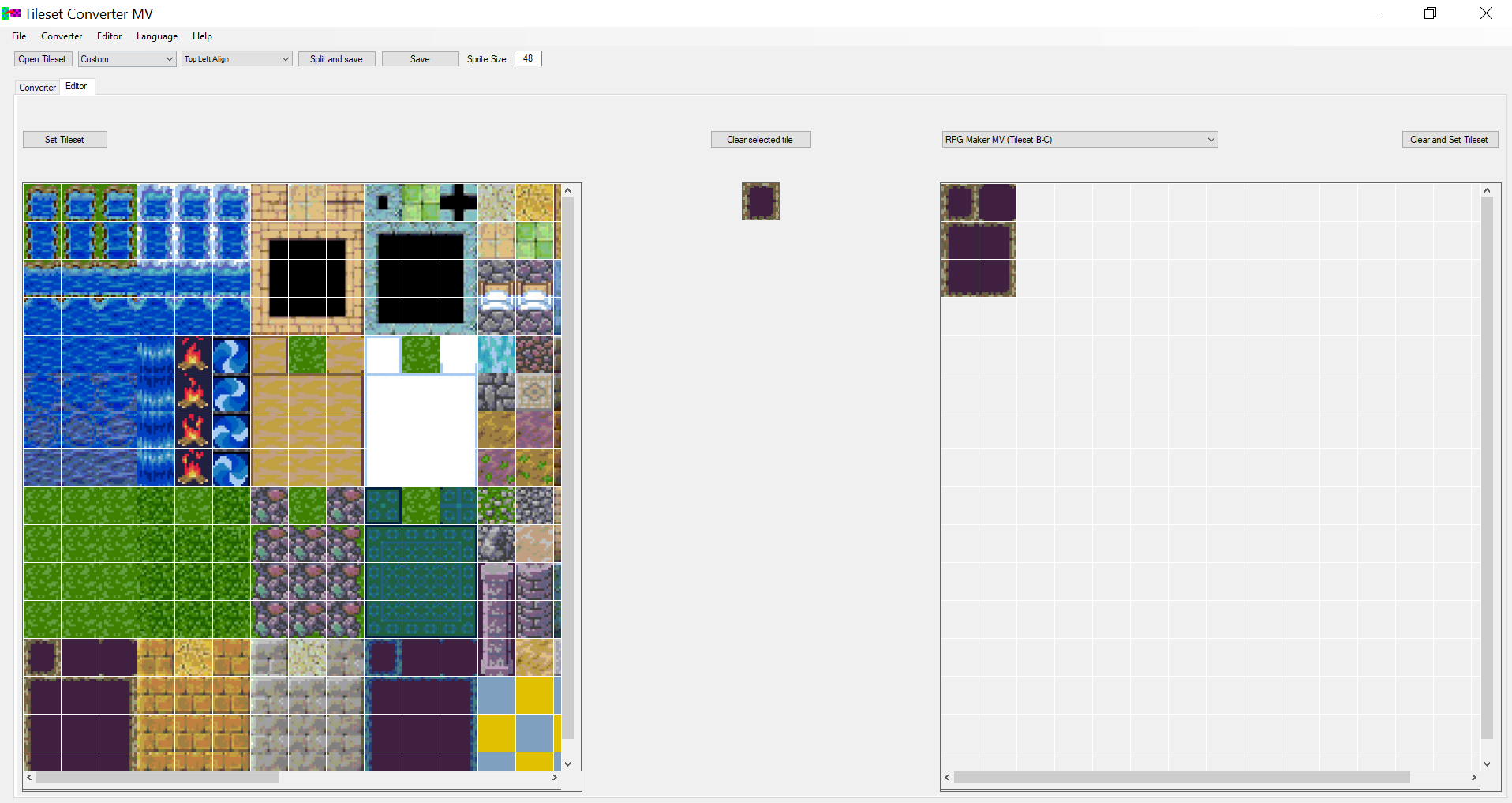
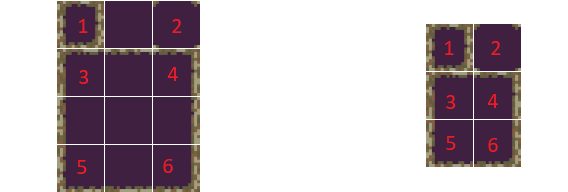
Arrange all "ground" tiles like this(left is rm2k's format, right is mv's format):
Step 5: In RMMV:
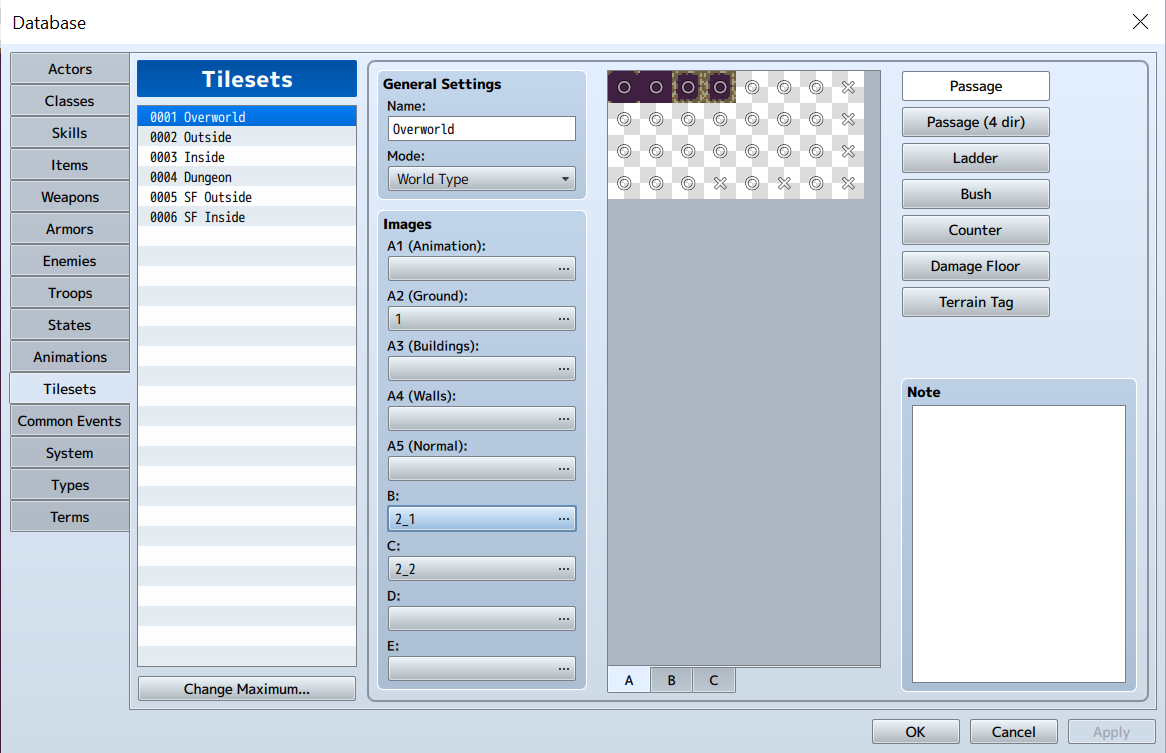
As you can see all B and C sprites are all over the place however they are perfectly usable:
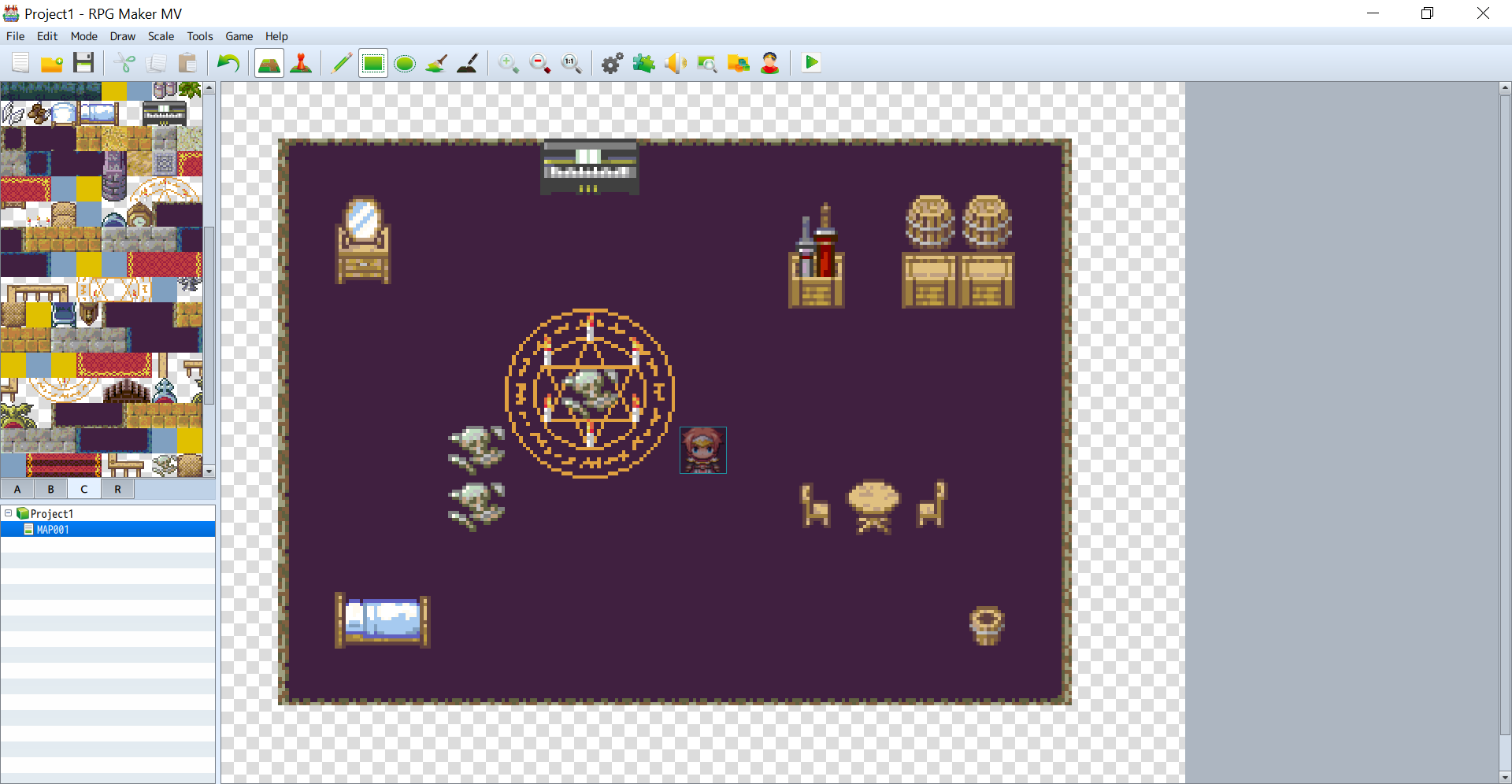
You could probably clean rpg maker's spritesheet by painstakingly placing all B and C sprites on the sheet using the editor like in step 4
For the animation tiles you can use tilecon's built in animation converter on the resized tileset.
Since it looks like you are still supporting this, I thought I would mention that rm2k/2k3 animated tilesets do not properly convert. Everything else seems fine however. Not quite sure how one would convert the animations correctly anyways to be honest.
Came in just to say thanks!! This is a great tool, really appreciate you making and posting it for everyone to use 🙂
It's really awesome! I am grateful that I can use it in my project, but why it won't use water for 2000/2003?
Original thread: https://forums.rpgmakerweb.com/threads/tileset-converter-to-mv-2-4-2021-08-01.78001/