Here's the Model 2 motherboard serial. It is 004668 so it was somewhere in the middle. Do you have any idea if the serial numbers were separate between Model 1/2/3 or if they were all lumped in under the one lot? Given the motherboards seem to all be identical (except for some minor tweaks) I'd say they were shared between the three models. Especially since they all have the same chips and sockets available for the hard drive too.
Amstrad Mega PC / Amstrad Mega PC Plus
Repair, Restoration, Conservation and PreservationHere's the Model 2 motherboard serial. It is 004668 so it was somewhere in the middle. Do you have any idea if the serial numbers were separate between Model 1/2/3 or if they were all lumped in under the one lot? Given the motherboards seem to all be identical (except for some minor tweaks) I'd say they were shared between the three models. Especially since they all have the same chips and sockets available for the hard drive too.

One of my mega pcs has a blue amstrad logo, does anyone know the significance? (apart from amstrad running out of red paint)
http://s1269.photobucket.com/albums/jj587/limboy777/Amstrad Mega PC/Documentation/
Also got pics of my documentation in the above.
http://s1269.photobucket.com/albums/jj587/limboy777/Amstrad Mega PC/Documentation/
Also got pics of my documentation in the above.
And you want the best news? I made it home to test out those VRAM chips in the 386SX motherboard.
I'll report back later on! :encouragement:
And I'm reporting back - talk about an anti-climax... I have no PS/2 keyboard here so I can't get into BIOS, diagnostics or anything to check if the VRAM is recognised and working. :stupid:
It does show video though - that has to be a good sign right? Either that or it is ignoring the chips I put in altogether. Ahhh well, maybe next time
I've stuck some photos of the VRAM I jammed in on the end of the Amstrad Mega PC photo gallery here.
Guess I will just have to play with all these Mega Drives instead. Life isn't so bad :triumphant:
http://s1269.photobucket.com/albums...rad Mega PC/?action=view¤t=DSC01141.jpg - here a pic of mine, ive not checked bios out yet but will do when i get a chance. How easy are they to take off (do you use a special plastic tool).
Will send you some interesting cyrix links and image i promised earlier.

Will send you some interesting cyrix links and image i promised earlier.
Hello all, I'm happy to join that discussion, as I am myself a proud owner of an Amstrad Mega PC that I managed to upgrade progressively over the past few years. Mine is either connected on a TV (via a VGA-to-scart adapter that converts RGBHV signals to RGBS ones) or a PC monitor, as I do not have the original monitor with me anymore. It has 16MB of RAM, a Sound Blaster 16 card and an LPT1 ethernet adapter. I also managed to put in a Western Digital 20GB hard drive and making it being recognized as 500MB by the BIOS, without any additional software. If I remember correctly, you have to use a drive with those specific specs to make it work: 2048 cylinders, 16 heads and 63 sectors (landing zone can be set to 0). One reserve though, this won't work with all drives sharing the same specs, you'll have to do some trial and error to find one that works (I happen to have many old spare drives, so that's what I did).
I have a good news for you and people tempted to do the same. I tried several types of VRAM chips in the past (coming from various ISA video cards) and they all appeared to work perfectly. There are several ways to check it: run an utility like MSD (Microsoft Diagnostics) and see if it lists the 512KB properly or run a game/application (Sim City 2000 and Picture Viewer come to mind) and see if they work at 640x480x256colours (obviously, 800x600x256c will also work in Picture Viewer as this mode doesn't require extra VRAM).
In fact, I highly recommend that upgrade as you'll never want to go back!
In fact, I highly recommend that upgrade as you'll never want to go back!
Re: VGA-to-scart adapter that converts RGBHV signals to RGBS ones - do you have a picture and is this custom made? where can I get one from?
Re: Soundblaster, does this mean you have to manually switch of the ad lib part of the mega pc card?
Re: Microsoft Diagnostics - never used this before, is this built into windows 3.11? or dos? Also does the vram not show up in bios. Ive not setup any of my mega pc's at the moment as they are either in bits or because I cant walk in my study room!!
Also have you tired an ISA video/graphics card. I have 3 on the way to me...
Thanks in advance


@limboy777:
- For the VGA-to-scart adapter, you must build and use this adapter and ONLY this one, made by Tomi Engdahl: http://www.epanorama.net/circuits/vga2tv/circuit.html
This is the only one that will deal with polarity properly, for both the Mega Drive part and the PC one (a company named "Nexus" made a simpler one but it will only work on the PC part as it doesn't correct polarities of sync signals, giving you a distorded Mega Drive picture on TV).
To use also the PC part on the TV, a TSR program must be loaded in DOS, such as this one. It will convert the 31.5KHz horizontal frequency sync signals to 15.6KHz. Note that most modes will work correctly, but not low resolution EGA modes (huge pillar-boxing) and 640x480x256colours mode will show vertical stripes when displayed in 15KHz. Programs that access the video card directly (demos come to mind) will not work in 15KHz either.
- For the Sound Blaster, you don't have to switch off the Adlib part. However, both cards will play at the same time when a game requires Adlib sound (can be used to make nice stereo effects when using the SB as a passthrough for MD/Adlib sound, as the sound differ slightly from the two cards). And the SB is not switched off when activating the Mega Drive mode (that's why I'm using it as a passthrough).
- Well, in fact, I was mistaken about MSD as it doesn't show the amount of VRAM, only the manufacturer's name. Some other tools I tested don't seem to report the correct value, including diags.exe (that RetroJunkie suggested earlier). However, ves90c11.exe (a VESA 1.2 layer for that particular chipset, the Western Digital 90C11, the exact one that equips the 386SX version of the Mega PC) does report the correct value.
- Trying an ISA video card is the last thing I have to do, so I can see if I must disable the integrated adapter first and mainly, if those glitches in 15KHz mode (vertical stripes on 640x400, 640x480 and 800x600 256-colour modes) still persist.
RetroJunkie, I saw your PC7486 motherboard mod, and I must admit you had a unique and golden opportunity! In fact, the 7386 and 7486 motherboards bears nothing in common(execpt the "aux" video connector which makes it perfect for the Mega PC), even the BIOS chip and the integrated graphics adapter are different! This makes it a very appealing mod for Mega PC owners who want to gain some speed and ended up too accustomed with their recent machines (net surfing is terribly slow on the Mega PC, and many sites including danbooru appear broken in all browsers I tested, Arachne being the most "compatible" one).
Something a little amusing, when downloading diags.exe, I tested filesharing between a Windows 7 machine and the Mega PC.
It does indeed works, as they both use SMB, but "net start" and Windows must be loaded on the Mega PC side.
And for those who want to setup a CD/DVD-ROM IDE drive, you don't have to specify anything in the BIOS (let "Fixed Disk 1" as "None"), only set its jumper on slave position. Then load a CD-ROM DOS driver and MSCEDEX.EXE into config.sys and autoexec.bat.
I think Id have to pay someone to build me one of those vga to scart cables or use on of the devices BADads mentioned. I have two mega pc monitors so not in a rush but have a little project that I was going to do with one of the mega pcs...
Ive installed a 540mb hdd with ontrack disk manager and it works well. I have a spare 80gb hdd which Im going to try just for the hell of it! and was thinking of using a cf/dom solution so that I have windows on the dom/cf which will hopefully mean it runs fast and lots of storage in the 80gb so I can store dos/windows games of that era. (ill never fill it!)
Thanks for the info on the soundblaster. I think im happy with the ad lib and dont want to use the only isa slot that I have. I have got a network card that i havent tried yet and just got 3 isa graphics cards (which I wont test at the moment). I think I will go with the network card on my main mega pc and test the video cards in my other pc's. The vram chips of them seem to be the same type as the vram chips in one of my mega pc's.
Do you know if the vram chips have to match? They are matched in one of mine. Th other two dont have vram
Retro: The cache on my 486 drx2 50 is all installed and working on the new hdd and the cache software i provided a link to you also has a piece of software to tell you whether its working or not. I found a website where it lists all the cyrix chips that use the 1k cache and the slc 33 is one of these so you should be able to use it to get a speed boost.(ill try and find it! to confirm before you try)
Re the ISA video card. I have the manual which shows what you need to do for jumper settings to be disabled in order to install a seperate video card. I will scan it and put it up but it will be a while before I get a chance and only the pages you require as its massive. I need to scan some other docs for nemesis.
Im still looking for a co-processor but cant find one cheap enough, I cant believe the prices people want! After that and once Ive swapped the vram chips to my main mega pc, I cant really see anything else I can upgrade???
Forgot to mention, I have a CR2032 battery holder with diode installed and it works perfectly!
i done that with my amstrad my board batterry was not leaking so i took it out soon as had it. i do that with all mega cds any batterys inside a older game console.
i think my amstrad montior needs a new vga cable any help on what type of thing i could do it works on 31khz but not in mega drive mode when i frist had it i had to move the cable around a bit for the mega drive side to show on screen i was a bit scared becasue i did not want the montior to blow as it took me a year to find a montior.
i think my amstrad montior needs a new vga cable any help on what type of thing i could do it works on 31khz but not in mega drive mode when i frist had it i had to move the cable around a bit for the mega drive side to show on screen i was a bit scared becasue i did not want the montior to blow as it took me a year to find a montior.
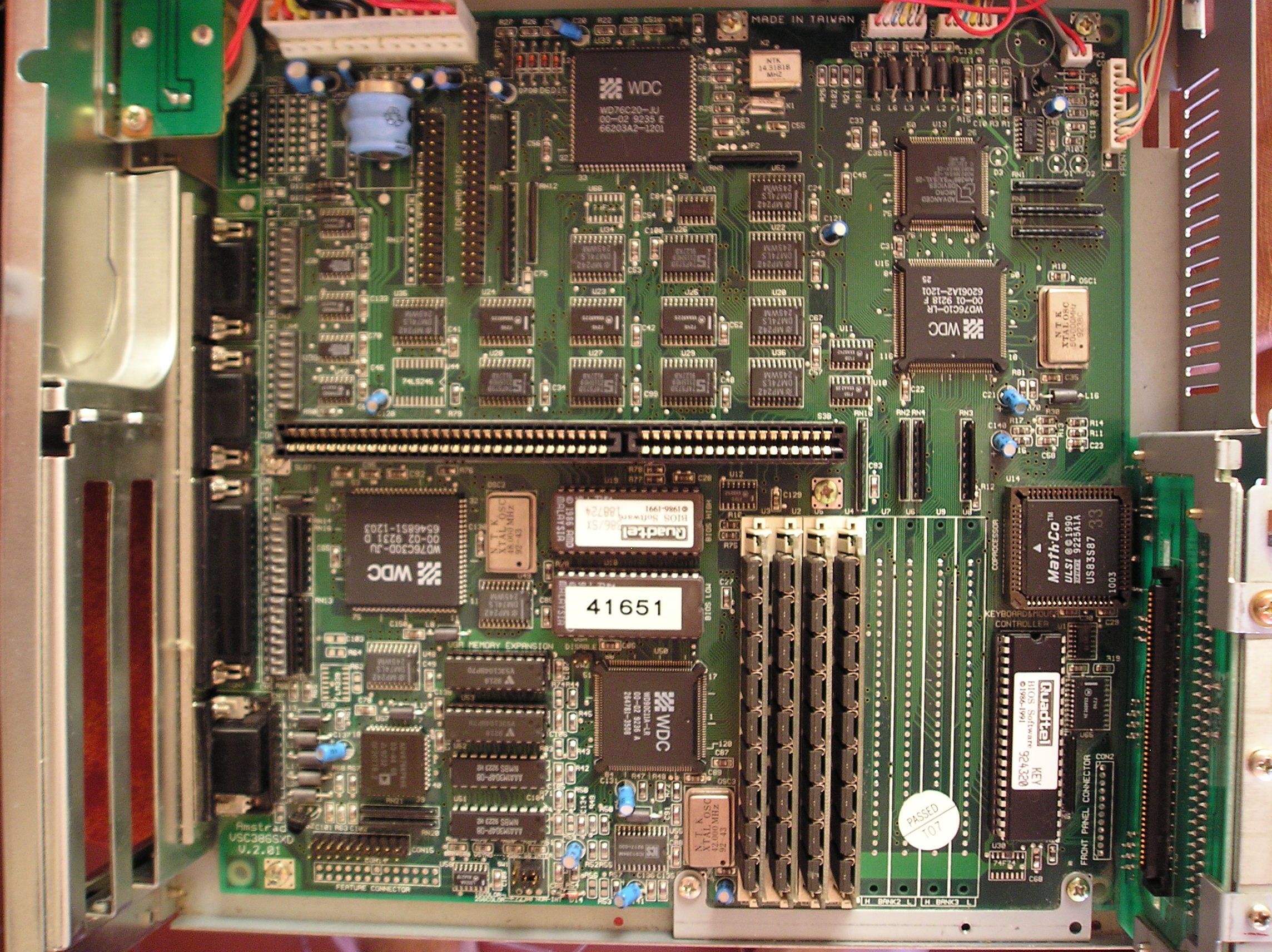
By the way, did you manage to get your 16MB of RAM in hands? Like RetroJunkie said, sticks have to be paired but also and most importantly: they have to be absolutely identical (or at least the same chips). Otherwise, the Mega PC will only recognize a fraction of the RAM installed (the first time, I had the bad luck of having only 3 sticks out of 4 identical and only 8MB were counted). I also found out that you cannot put only 2 SIMMs of 4MB and leave 2 empty slots as the PC will beep and not boot (but it's possible with 1MB ones).
@bart_simpson: the VGA connector on the monitor cable seems to be pretty fragile actually. You just happened to break the pin responsible for 15.6KHz commutation on the monitor. I could suggest cutting a spare VGA cable and solder it in place of the exisiting one (or attach a female connector at the back).
As for the CR2032, it looks like a very tempting solution (my battery doesn't leak yet, but it turned out dead many times due to long periods of inactivity).
I have got 3 video cards and two of them have vram chips, I also have two vram chips installed on one of the other mega pc's but will leave these in place now that you have confirmed any type should work. I am awaiting for a spudger tool!
From what I have read any 387 co processor should work. Will check ebay again after sending this post.
Re 16mb ram, I got the 16mb (4X 4mb) and installed 2 X 4mb ram in addition to the 2 X 4mb already installed.
My mega pc already had 2X 4mb chips and they did actually work i.e the mega pc recognised them as 8mb and always has done even though the other two slots were free. Maybe yours were not installed tightly? (the other thing I read in the manual is that it states you must have the matched ram in two of the slots and these cant be empty (bank 1 and 2 i think) or maybe the RAM you had was a little particular. On another one of my mega pc's I have 2X1mb and 2 X 256k - 2.5mb ram.
I plan to install the other two 4mb chips into this one.
Re battery leakage, I didnt have leakage damage on any of my mega pc's but I did see some white crystaline deposits which I cleaned up with rubbing alcohol before removing the batteries. If you have stripped the computer down to the motherboard then taking the battery out is easy.
I tried the Maxus speedtest software and it showed my Cyrix upgrade working at 49mhz and my standard mega PC's at 24 so the upgrade chip definately speeds up the mega pc.
I've been going through my website as well and entering all my bookmarked sites into the various pages under the Modifications & Repairs menu on my site here. In particular for the original 386SX board I'll be trying to replace the CPU with some random 486SLC and see what happens. As far as I can tell they are both 5V CPU chips with the same amount of pins. I am not too worried about that motherboard as it doesn't really work very well in the state it is in currently.
I am definitely going to take a PS/2 keyboard this weekend though. :livid: How's the VGA experimentation going? Anything to report back on?
@limbo777: I was using some Texas Instruments sticks at the time and only two of them inserted in the first two slots made the PC short-beep several times. they might have been not inserted properly or those particular sticks had to be per four. Who knows, as I don't have those anymore (exchanged them with a guy that had four identical Hyundai sticks and only used them for showing them to his students).
@RetroJunkie: I'm looking forward to your 486SLC mod attempt on the 386SX motherboard. Might be the cheapest option but it will require soldering skills (and adequate tools).
Well, coming back after trying two video ISA cards. And positive results! The only thing you have to do is setting the JW2 jumper to "on" position (putting the little bridge on the two pins), insert your card and power up the Mega PC. It will automatically boot on the external video card. Of course, you'll have to remove both the Mega Drive card and the "ISA doubler" card in the middle of the case to access that jumper first.
Now, some remarks about this:
- I tried with both a Trident TVGA 9000 card and an obscure Macronix one and switching to Mega Drive mode won't disable video on the external VGA. However, I wasn't able to get a picture from the Mega Drive using the internal VGA port. But it might be because I didn't put back the ribbon cable properly (it might have been one entire row of pins off). So it may be possible to have both video from PC and Mega Drive using that kind of setup. Also, switching back to PC only disables the sound of the game and doesn't turn off the Mega Drive!
- I tried 15KHz video with both cards and guess what. No more glitches with the Trident card on SVGA 256-colour modes! The vertical stripes I was talking about earlier seem to be a glitch or malfunction from the internal 90C11 chipset. 15KHz doesn't work on the Macronix card (no program compatible with it). Display in 640x480x256coulours was absolutely gorgeous and sharp on the Trident with my 20" CRT TV. It was like a dream!
- Funny that the original 90C11 chip has native VESA 1.0 implementation (that can be expanded to VESA 3.0 using Scitech Display Doctor) but not the two other cards I tested. The Trident is just not VESA compatible. The Macronix has some VESA functionality.
- Finally, about the Macronix card. I have three words to sum up for Mega PC users: avoid this brand. Especially if you're looking for an used ISA video card. It looks like a bit too fancy as 256-coulours SVGA modes are proprietary and even Windows requires adequate drivers to make them work. It's also slow as hell (AVI playback in Windows is a pain, whereas the 90C11 chip and the Trident card performed roughly the same and quite smoothly -- the Cinepak AVI files I played back were watchable despite some tearing). I may post them here for testing purposes.
So, to conclude, this is a pretty good option but you'll have to pick up a compatible and relatively fast card. VESA implementation would be ideal. Known brands such as Curris Logic, Trident, Western Digital and some others seems to be the best choice.
Now, about 15KHz, the 90C11 chip and SVGA 256-colour modes. I have to load Scitech Display Doctor in memory and select a resolution of 320x480 pixels in Picture Viewer to view my pictures without vertical stripes (but I have some palette glitches instead). Obviously, they don't look as sharp as they did if they were in 640x480. An example of such a picture (manual resized to 320x480 and saved to a PNG file before opening it). You can see the little palette glitches (note that it was absolutely perfect with the Trident card at the original resolution).

Original thread: https://assemblergames.com/threads/amstrad-mega-pc-amstrad-mega-pc-plus.38133/