@pitito about rdx i have to translate some gameplay japan rdx so checkable things to show english and not kanzi. and are some rdx that are videos on those i have to remove the subtitles. is a hex editor enough or the rdx need some kind of tool for this task?
the unreleased code veronica x for dc
Sega Dreamcast Development and ResearchYou need a PRS decompressor, it can be done with Prsdec and to compress again it can be done with Puyotools.
To change the text you must take into account all file addresses because if the English text is larger you must edit the addresses
To change the text you must take into account all file addresses because if the English text is larger you must edit the addresses
seems like a dificult task. but anyway i dont expect to make it right in 1st try. the good news is the rdx trick i need to leave the RM_0000.RDX in place, then rename an edited rdx as RM_0010.RDX so i can test it right after i exit the prison. the real RM_0010.RDX is the place with the save typewriter
I'm sorry to bother you a last time but I still have the problem with "demo mode" that is not centered and it makes me crazy ^^ :

where do you put the 04FF ? I try to change the location of demo text in 1ST_READ.BIN and changing the pointer and nothing happen even if I write 04FF at the begin of the highlighted area you can see above.
where do you put the 04FF ? I try to change the location of demo text in 1ST_READ.BIN and changing the pointer and nothing happen even if I write 04FF at the begin of the highlighted area you can see above.
Try to put
04FF 04FF 04FF 04FF TEXT
04FF 04FF 04FF 04FF TEXT
Thanks I try it and after I'll be focus on map 
i have decompress 2 files the RM_1121.RDX (jap rdx file) R0_1121.RDX (english file) i decompress the english file only to see the english texts since these 2 files are the same map. is there a way to spot when the texts begin and where it ends? edit i found the texts on the r0_1121.rdx it is a redable text but bigger than the one needs replacing
i found a screenshot of yours some pages back. so if the text we want to inject i the japan rdx is bigger we add it to the end of the file. clever that way all the other addresses wont move to to other offsets. now for the game fo find the new injectet texts an address pointing to this location must be made and replace the old one. in your screenshot you clearly show where this location is. my problem is how to calculate the new replacement hex.
In this image you will see where the text begins in each RDX and ends where the next location begins

If you invert the indicated value of 4 bytes, it will give you
"00015E98" this is the offset of the beginning of the text
If you look at the next 4 bytes and invest it will be 000172C8 it is the beginning of the next location and where the text already ends.
In addition to those at offset 0x14 you have more locations to modify and if you follow those locations they will take you to more locations to modify
yes ive succeded translate the RM_1121.RDX the map plays and all checable things give the english derscription exacly as the us map only few rdx left since i will translate only the imported rdx. if that was for my personly use i woudnt bother, since when i play cv i do speedruns, most of the time i even skip the videos. but this game has interest so when its ready and polish from remaining probems i will upload it to every site im alowed as gift to anyone
only few rdx left since i will translate only the imported rdx. if that was for my personly use i woudnt bother, since when i play cv i do speedruns, most of the time i even skip the videos. but this game has interest so when its ready and polish from remaining probems i will upload it to every site im alowed as gift to anyone@yzb37859365
in case you didnt undreastand. the fix we need in those pictures like book is to change the text that is writed inside this in biohazard japan picture like a book
in case you didnt undreastand. the fix we need in those pictures like book is to change the text that is writed inside this in biohazard japan picture like a book
the text inside those pictures like books in non japan biohazard are is sysmes.ald we need to make it look like this
I'm sorry but I still have the problem everything I do...
https://image.noelshack.com/fichiers/2019/43/4/1571917100-mode-demo.png
@pitito Are you sure you don't have change an other value somewhere ?
@truemaster1 What' s your text please ?
Anyway I've started to have for map picture issue
https://image.noelshack.com/fichiers/2019/43/4/1571917100-mode-demo.png
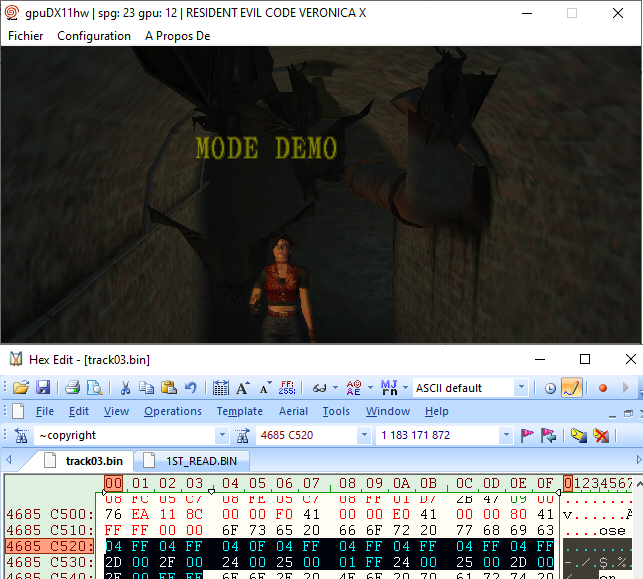
@pitito Are you sure you don't have change an other value somewhere ?
@truemaster1 What' s your text please ?
Anyway I've started to have for map picture issue
If the text is in sysmes.ald, why don't you change it ?
in japan biohazard text are is pictures,in ITEM.AFS 160-276
in japan biohazard text are is pictures,in ITEM.AFS 160-276
But I have two problems similar to the one you corrected
1º The rankings of the game happen to us the same, we need to change them to the new source
GRADE S 1200 to be REPLACED AS 3300
GRADE A 0000 to be REPLACED as 2100
GRADE B 0100 to be REPLACED AS 2200
GRADE C 0200 to be REPLACED AS 2300
GRADE D 0300 to be REPLACED AS 2400
GRADE E 0400 to be REPLACED AS 2500
And finally I need to remove or exchange the "object box" texture of the map. The object words are linked together and I just need to touch up the one below

@fafadou heres mine. @pitito its for sure there is no way to enable the japan 1st_bin to read the texts from sysmes.ald? im not afraid the translation. all version of code veronica have the same texts writed and the files are the same looking book exept the game manual. i can find the texts from an english version. what gives me fear is the editing of the pvrs. also has everyone find a fix for the typewriter? when load a game the texts are all in place when save it jump over some letters.
The text jumps on the loading screen because in the Japanese version there is one more text after the load selection.
That is why the first text of the document appears.
You have to look for the address of the document, or disable it or put the text that should go there.
Game/s of the original version
RESIDENT EVIL CODE: VERONICA
That is why the first text of the document appears.
You have to look for the address of the document, or disable it or put the text that should go there.
Game/s of the original version
RESIDENT EVIL CODE: VERONICA
wait or i misadrestood. or you misandrestood. im talking when saving a game in typewriter some text are ok some others are missing but if you quit and load the game you just save all the save texts are there example
when saving the text is coming out something like this cla / pri
when loading all corect claire /01/prison front
when saving the text is coming out something like this cla / pri
when loading all corect claire /01/prison front
Oh yes, it happens to me too.
That happens because the jap animation is shorter, that is with fewer characters. That's why he skips them.
That happens because the jap animation is shorter, that is with fewer characters. That's why he skips them.
im continue the rdx translation. only 5 left now. i have a problem on RM_9321.RDX this rdx has enviroment texts and subtitles. the subtitles can easy removed find where they are and start to FF FF them. but this rdx have the subtitles under the enviroment text, and the later overlap the first during translation. 2 ways here 1 disable the subtitles complete. the FF FF trick is only remove it from screen. 2 a modification that can narrow down the subtitle area in hex offset for the overlaping stop during the video. here some screenshots that show the problem
Original thread: https://assemblergames.com/threads/the-unreleased-code-veronica-x-for-dc.62584/