RPG Tankentai Sideview Battle System Version 2.6
Translation Version 1.3 by Kylock
Original Script Website: http://rpgex.sakura.ne.jp/home/
While admittedly the translation is not yet 100%, all the important stuff to get you up and running with all the fun combo moves you see on youtube and the ability to create your own moves is there (good luck with that btw).
The enemy status bar addon is now included in the demo.
My ranged weapons addon is now included in the demo. It adds 2 custom animation and an animation sprite. We now have animated projectiles.
If you don't wanna read all my crap, here's the link: DEMO.
Screenshots:
http://i218.photobucket.com/albums/cc30 ... k1/ss3.jpg[/img]http://i218.photobucket.com/albums/cc308/kylock1/ss1.jpg[/img]
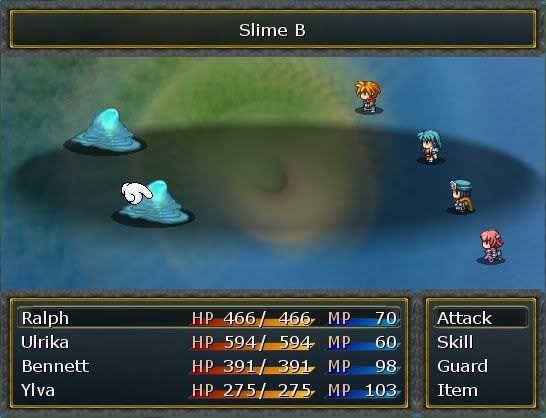
Installation instructions, various credits and release notes are included in the header of the configuration portion of the script (part one).
Please note that to fully incorporate this script into an existing game requires copying image files and game database entries. Once again - specifics are listed in the header on the first part of the script in the demo.
Compatibility may possibly be an issue with other scripts that directly affect the battle system since many battle system functions are rewritten in this. If you need to make this script work with another, please post your request in the appropriate forum. I didn't write this script myself, so I am not confident that I can provide answers to all the questions, but I have been studying it for quite some time, so I believe I have a firm grasp on it's functionality.
Changelog:
- 1.0 - 4.12.08 - Rough release of only scripts with lots of broken-ness.
- 1.1 - 4.22.08 - Release with retranslated hashes and a retranslated database. Distributed as a demo.
- 1.2 - 4.24.08 - Corrected some missing Kanji translations that broke the functionality of some "chained" Skills. (thanks to [email hidden]) Also added the picture for the 'cut-in' move.
- 1.3 - 5.9.08 - Updated Translation to Version 2.6 of the original script.
Configuration changes for animated battlers
Spoiler
To use Minkoff's Animated Battlers styled battler sprites, change to these settings in your module script:
And just copy paste this over top of whats in the script:
I also suggest using SHADOW = false since most battlers have shadows drawn into them, but this is not required to make them work. Since most battlers are also drawn with their weapons, the weapon animations are disabled in this configuration edit.
You will need to put your standard format animated battler sprites in the Characters folder and use the following naming convention: "$charname_1.png"
- ACTOR_POSITION = [[400,100],[430,150],[460,200],[490,250]]
- WALK_ANIME = false
- ANIME_PATTERN = 4
- ANIME_KIND = 11
Expand to see the code.
- "WAIT" => [ 1, 0, 15, 0, 0, -1, 0, true,"" ],
- "WAIT(FIXED)" => [ 1, 0, 10, 2, 0, 1, 0, true,"" ],
- "RIGHT(FIXED)" => [ 1, 5, 10, 1, 2, 1, 0, true,"" ],
- "DAMAGE" => [ 1, 9, 4, 2, 0, -1, 0, true,"" ],
- "ATTACK_FAIL" => [ 1, 1, 10, 1, 8, 0, 0, true,"" ],
- "MOVE_TO" => [ 1, 4, 1, 1, 0, -1, 0, true,"" ],
- "MOVE_AWAY" => [ 1, 5, 2, 1, 0, -1, 0, true,"" ],
- "ABOVE_DISPLAY" => [ 1, 0, 2, 1, 0, -1, 600, true,"" ],
- "WPN_SWING_V" => [ 1, 6, 1, 2, 0, -1, 2, true,""],
- "WPN_SWING_VL" => [ 1, 6, 1, 2, 0, -1, 2, true,""],
- "WPN_SWING_VS" => [ 1, 6, 6, 2, 0, -1, 2, true,""],
- "WPN_SWING_UNDER" => [ 1, 6, 2, 2, 0, -1, 2, true,""],
- "WPN_SWING_OVER" => [ 1, 6, 2, 2, 0, -1, 2, true,""],
- "WPN_RAISED" => [ 1, 11, 2, 2, 28, -1, 2, true,""],
Expand to see the code.
You will need to put your standard format animated battler sprites in the Characters folder and use the following naming convention: "$charname_1.png"
ADDONS
Updated: 5.11.08
My Ranged Weapons addon has been updated and is now included with the demo because it adds new animations and a spritesheet.
These restore the original first 3 skills that no longer work with the new battle system in all of their awesome glory!
Dual Attack Addon
Spoiler
- #==============================================================================
- # â €“ Dual Attack for RPG Tankentai Sideview Battle System
- # 5.10.2008
- #------------------------------------------------------------------------------
- # Script by: Kylock
- #==============================================================================
- # Adds an animation sequence for the RTP Dual Attack.
- #==============================================================================
- module N01
- # Creates a new hash with a new action sequence
- new_action_sequence = {
- "DUAL_ATTACK" => ["PREV_STEP_ATTACK","WPN_SWING_VL","OBJ_ANIM_WEAPON","WAIT(FIXED)","16",
- "PREV_STEP_ATTACK","WPN_SWING_VL","OBJ_ANIM_WEAPON","Can Collapse","COORD_RESET"],}
- # Merges new hash with the script
- ACTION.merge!(new_action_sequence)
- end
- module RPG
- class Skill
- alias k_dual_attack_base_action base_action
- def base_action
- if @id == 1 # Dual Attack is Skill ID 1
- return "DUAL_ATTACK"
- end
- k_dual_attack_base_action
- end
- end
- end
Expand to see the code.
Double Attack Addon
Spoiler
- #==============================================================================
- # â €“ Double Attack for RPG Tankentai Sideview Battle System
- # 5.10.2008
- #------------------------------------------------------------------------------
- # Script by: Kylock
- #==============================================================================
- # Adds an animation sequence for the RTP Double Attack.
- #==============================================================================
- module N01
- # Creates a new hash with a new action sequence
- new_action_sequence = {
- "DOUBLE_ATTACK" => ["PREV_STEP_ATTACK","WPN_SWING_VL","OBJ_ANIM_WEAPON","WAIT(FIXED)","16",
- "PREV_STEP_ATTACK","WPN_SWING_VL","OBJ_ANIM_WEAPON","Can Collapse","COORD_RESET"],}
- # Merges new hash with the script
- ACTION.merge!(new_action_sequence)
- end
- module RPG
- class Skill
- alias k_double_attack_base_action base_action
- def base_action
- if @id == 2 # Double Attack is Skill ID 2
- return "DOUBLE_ATTACK"
- end
- k_double_attack_base_action
- end
- alias k_double_attack_extension extension
- def extension
- if @id == 2
- return ["ム©Ã£Æ’ ³Ã£Æ’ ‚¬Ã£Æ’ ã €šÂ¿Ã£Æ’ ¼Ã£ €šÂ²Ã£Æ’ƒãƒˆ"]
- end
- k_double_attack_extension
- end
- end
- end
Expand to see the code.
Triple Attack Addon
Spoiler
- #==============================================================================
- # â €“ Triple Attack for RPG Tankentai Sideview Battle System
- # 5.10.2008
- #------------------------------------------------------------------------------
- # Script by: Kylock
- #==============================================================================
- # Adds an animation sequence for the RTP Triple Attack.
- #==============================================================================
- module N01
- # Creates a new hash with a new action sequence
- new_action_sequence = {
- "TRIPLE_ATTACK" => ["PREV_STEP_ATTACK","WPN_SWING_VL","OBJ_ANIM_WEAPON","WAIT(FIXED)","16",
- "PREV_STEP_ATTACK","WPN_SWING_VL","OBJ_ANIM_WEAPON","WAIT(FIXED)","16",
- "PREV_STEP_ATTACK","WPN_SWING_VL","OBJ_ANIM_WEAPON","Can Collapse","COORD_RESET"],}
- # Merges new hash with the script
- ACTION.merge!(new_action_sequence)
- end
- module RPG
- class Skill
- alias k_triple_attack_base_action base_action
- def base_action
- if @id == 3 # Triple Attack is Skill ID 3
- return "TRIPLE_ATTACK"
- end
- k_triple_attack_base_action
- end
- alias k_triple_attack_extension extension
- def extension
- if @id == 3
- return ["ム©Ã£Æ’ ³Ã£Æ’ ‚¬Ã£Æ’ ã €šÂ¿Ã£Æ’ ¼Ã£ €šÂ²Ã£Æ’ƒãƒˆ"]
- end
- k_triple_attack_extension
- end
- end
- end
Expand to see the code.
Addon to enable Animated Battlers for the Enemies (Configuration required-see script header)
Enemy Animated Battlers
Spoiler
- #==============================================================================
- # â €“ Enemy Animated Battlers for RPG Tankentai Sideview Battle System
- # 5.10.2008
- #------------------------------------------------------------------------------
- # Script by: Kylock
- #==============================================================================
- # Easy to implement interface to specify animated battlers for enemies. Note
- # enemy batters must be formatted THE SAME as your character battlers. Also,
- # you must have 2 copies of your enemy battler:
- # <game folder>\Graphics\Battlers\$<enemy name>.png
- # <game folder>\Graphics\Characters\$<enemy name>_1.png
- # When you set up your "troops" for the encounter, you may need to tweak the
- # positioning of the enemy as the sprites look funny and the actual placement
- # may be slightly off. A few battle tests should be sufficient.
- #==============================================================================
- module K_ENEMY_BATTLERS
- ENEMY_ID = [] # list of enemies with batter sprites(ex. [1,24])
- end
- class Game_Enemy < Game_Battler
- alias keb_anime_on anime_on
- def anime_on
- for x in K_ENEMY_BATTLERS::ENEMY_ID
- return true if @enemy_id == x
- end
- keb_anime_on
- end
- alias keb_action_mirror action_mirror
- def action_mirror
- for x in K_ENEMY_BATTLERS::ENEMY_ID
- return true if @enemy_id == x
- end
- keb_action_mirror
- end
- alias keb_position_plus position_plus
- def position_plus
- for x in K_ENEMY_BATTLERS::ENEMY_ID
- return [0,0] if @enemy_id == x
- end
- keb_position_plus
- end
- end
Expand to see the code.
Addon to make some enemies not move to attack. I guess this can be useful on bosses, or anything that shouldn't be moving around =p See script header for installation instructions and details.
Stationary Enemies
Spoiler
- #==============================================================================
- # â €“ Stationary Enemies for RPG Tankentai Sideview Battle System
- # 5.11.2008
- #------------------------------------------------------------------------------
- # Script by: Kylock
- #==============================================================================
- # Should be pretty straighforward. Add the Enemy ID to the array and it
- # won't move. Create a "dummy" weapon, to minimise confusion, might wanna call
- # the weapon "DONT MOVE" but it doesn't matter. The only part of the weapon
- # that makes any difference is the attack animation. That will be displayed on
- # that targeted party member. Make sure to verify DONT_MOVE is set to your
- # dummy weapon's number. That should be all.
- #==============================================================================
- module K_STATIONARY_ENEMY
- ENEMY_ID = [] # list of enemies that shouldn't move to attack(ex. [1,24])
- WEAPON_ID = 32 # Weapon ID of "Don't Move" Weapon
- end
- module N01
- # Creates a new hash with a new action sequence
- new_action_sequence = {
- "DONT_MOVE" => ["WPN_SWING_V","OBJ_ANIM_WEIGHT","Can Collapse","FLEE_RESET"],}
- # Merges new hash with the script
- ACTION.merge!(new_action_sequence)
- end
- class Game_Enemy < Game_Battler
- alias k_stationary_enemy_weapon weapon
- def weapon
- for x in K_STATIONARY_ENEMY::ENEMY_ID
- return K_STATIONARY_ENEMY::WEAPON_ID if @enemy_id == x
- end
- k_stationary_enemy_weapon
- end
- end
- module RPG
- class Weapon
- alias k_stationary_enemy_base_action base_action
- def base_action
- return "DONT_MOVE" if @id == K_STATIONARY_ENEMY::WEAPON_ID
- k_stationary_enemy_base_action
- end
- end
- end
Expand to see the code.
Introducing my EPIC BATTLES addon. Meant to easily define boss battles, It easily implements the custom collapse or death animation for an enemy and allows you to define special Battle BGM and Victory ME based on the Troop ID from your game database. ITS TRULY EPIC!!!! (note that this added functionality does NOT work in the battle test).
[spoiler=EPIC BATTLES]
[code]
#==============================================================================
# â €“ EPIC BATTLES 1.1 for RPG Tankentai Sideview Battle System
# 5.12.2008
#------------------------------------------------------------------------------
# Script by: Kylock
#==============================================================================
# This little script provides EPIC functionality to your battle system - The
# ability to easily define and create boss encounters. Or any other noteworthy
# battle as you will see. The first function is to define special collapses or
# death animations for special enemies. Instead of the normal fade, they make
# some popping sounds as they fade, or something... The second function allows
# you to specify special battle BGM and victory ME for certain battles. This
# is set up by using the Troops ID in your game database. You can set up as
# many special battle BGM's as you can imagine. Just add to the existing
# arrays. It's not too hard, just look below for the example.
#==============================================================================
# â €”