Questions about Apple Mail...

I'm about to make the switch to Apple Mail (coming from Microsoft Outlook)... but I still have a few questions;

1) How can I separate my accounts?
I have several email addresses, but I don't want them ALL under the same mailbox.
I would like separate mailboxes for EACH of my email addresses..

Default situation;
[ Mailboxes ]
< Inbox >
Email account 1
Email account 2
< Drafts >
Email account 1
Email account 2
< Sent >
Email account 1
Email account 2
< etc. >

What I want;
[ Mailboxes ]
< Email account 1 >
Inbox
Drafts
Sent
etc.
< Email account 2 >
Inbox
Drafts
Sent
etc.

2) How can I turn off the swiping-gesture?
For iOS it's a nice feature to have the swiping-gesture, but I find it pretty annoying to accidentely swipe away my inbox messages, just because I don't have a perfectly steady finger when scrolling through my incoming messages...
---

Can some1 explain me how to address the above issues?
Thanks!
Hi
You can add as many email account as you like and can either view them combined or separately.

I use both views. Combined for a quick over view and separate for more specific tasks.

This is not something you have to switch on/off. Simple swipe to the left and you'll see All Inboxes and then them all listed below.

As for your swipe options, there is a setting in Settings - Mail - Swipe setting where you can select an action OR disable them.

The settings you're talking about, I can easily find them in iOS, and I already had them sorted... but I'm looking for these settings in macOS. 😉
(which I tried to explain in the opening post)
Ah yeah I see it now.
My statement still stands and you can view them combined or separate.

However, I don't think you can turn the swipe options off
Ah yeah I see it now.
My statement still stands and you can view them combined or separate.

However, I don't think you can turn the swipe options off

Ok, my question still stands as well... "HOW can I separate my mailboxes?"
Just stating that it can be separated doesn't really help me without explaining how to actually get it done. 😉
There is no how. It is the default view.

I'll attach a screenshot later
There is no how. It is the default view.

I'll attach a screenshot later

All Mail is the default mail view on a Mac? With no option to view only one email account? That's hard to believe, but then I don't have a Mac.
Yes, you have both views by default.
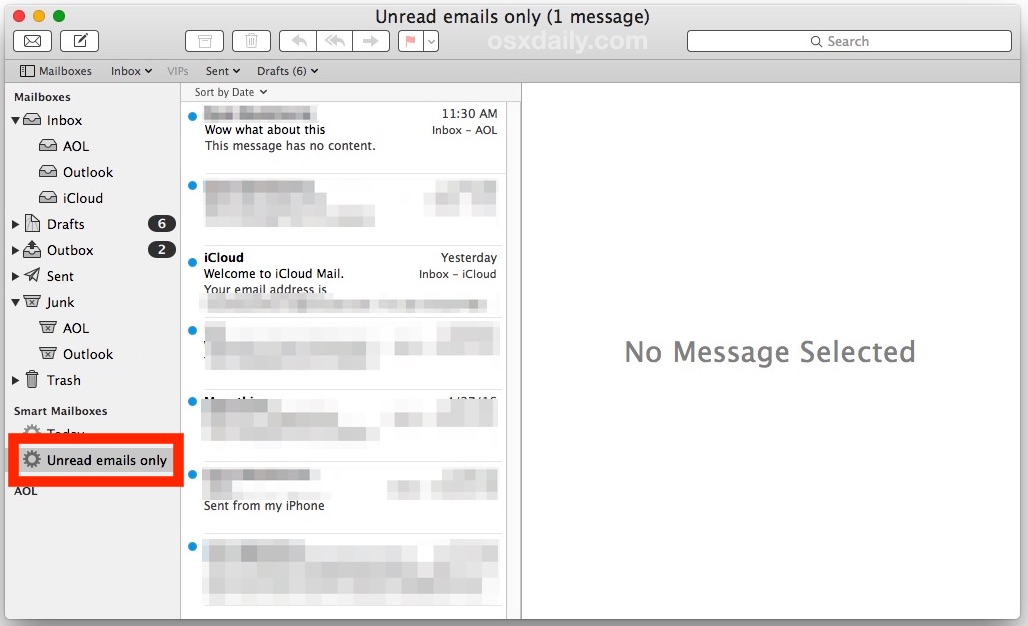
I've not had time to turn my mac on but I've found a pic.

http://cdn.osxdaily.com/wp-content/uploads/2016/06/unread-email-inbox-mail-mac-osx.jpg

**ignore the red box**
As you can see on the left hand side at the top you have Inbox which shows them all combined and below that a list of them all separately.
OK, but that's still FAR from what I was asking in the opening post.
By setting up Smart Mailboxes (which you still have to do manually), you would still get all those new emails in ONE folder;

Default situation;
[ Mailboxes ]
< Inbox >
Email account 1
Email account 2
< Drafts >
Email account 1
Email account 2
< Sent >
Email account 1
Email account 2
< etc. >

What I want;
[ Mailboxes ]
< Email account 1 >
Inbox
Drafts
Sent
etc.
< Email account 2 >
Inbox
Drafts
Sent
etc.

I could be wrong but I don’t think it’s possible with the stock Mail app. You may want to try a third party mail app like Spark. It groups your boxes by account just like you’re trying to do and—even better—it syncs your accounts and settings between devices (macOS and iOS).

Like I said, I could be wrong though. I can’t confirm anything because I’m not using the stock mail app.
The free email app Thunderbird will also organize email folders the way that the OP wants.

Original thread: https://forums.imore.com/threads/questions-about-apple-mail.389767/