iTunes issue in transfering files from PC to iPhone

Hi.
I used to transfer my files using the "File Sharing' section on iTunes.
However, I faced an issue today which doesn't let me do the transfer.
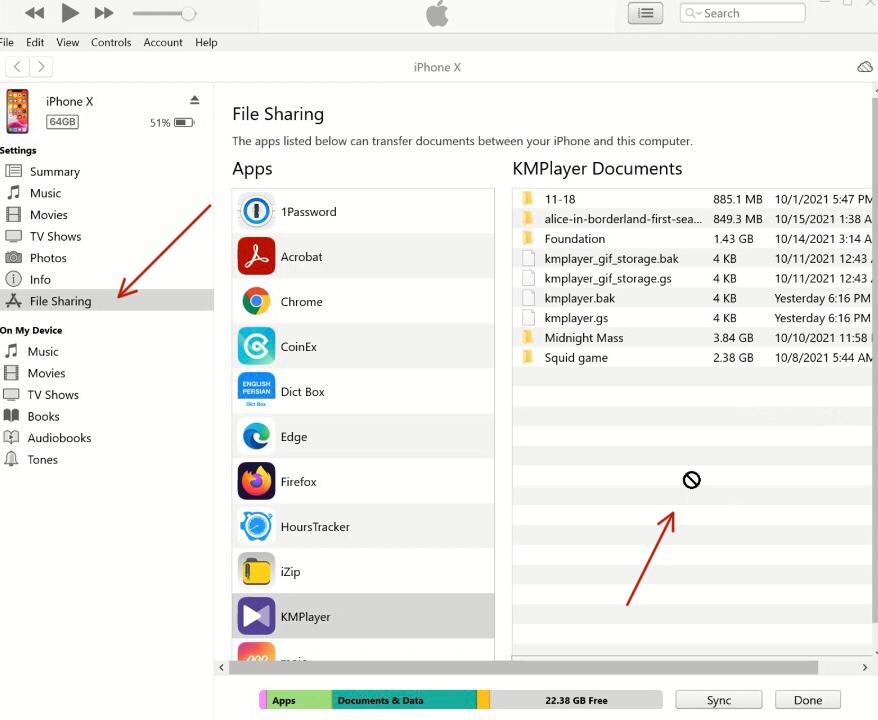
As you can see in the attached photo, the stop sign appears whenever I try to drag and drop files (any type of) in the file sharing section of any app. I have enough storage and checked various types of files.
Is there any way to fix this issue?

Check this photo, please:
https://i.postimg.cc/kMhgvyw7/1212.jpg
I wouldn’t know. I use iCloud Drive to move files to and from my iPhone.
Folks....I downloaded 4 Music CD's yesterday into my iTunes Account...All 4 with the proper CD Cover pictures, playing fine on the Laptop all 4 in my library, yet they are not crossing over to my iPh SE 2nd Gen. 128GB's and 94.14 of those GB's Free.

Any pointers ??

Tks for your help
Whatever It was that I did this AM with the Music File, it transferred to the iPh the missing 4 albums.

Greetings and Happy Holidays !!!
Whatever It was that I did this AM with the Music File, it transferred to the iPh the missing 4 albums.

Greetings and Happy Holidays !!!

I am so glad that it all worked out! Thanks for letting us know.

Original thread: https://forums.imore.com/threads/itunes-issue-in-transfering-files-from-pc-to-iphone.448761/