I've seen this issue dozens of time in engines that use pure OpenGL or DX as backend without any crazy texture handling that compensates automatically for that. It's texture pixel interpolation 100%. I'm willing to put my hand into the fire for that. Especially since I solved the issue exactly how one would solve this texture pixel interpolation during rendering. You can either trust my experience or go on a witch hunt. It's up to you.
Huge issues with charset lag
RPG Maker MV SupportI'm definitely not interested in going on a witch hunt, but I fail to see the connection between events lagging and texture interpolation. Can you break down what you mean?
When you try to render a texture on a larger surface than the texture actually is, the values for the pixels in between are rendered by calculating a value from neighboring pixels. When only part of a texture is rendered, then the border pixels still take neighboring pixels for that calculation even if these pixels weren't actually visible in the pixel-perfect render. This is how you end up with weird artifacts on the borders of sprites or tiles. In this case it takes the next invisible pixel which is the nearest neighbor pixel at the current scale. If you dynamically resize the window (scale, not pixel size), the artifacts will appear and disappear depending on the scale.
EDIT: Try this: Edit any character sprite and pack the images as tightly together as you can so that all the pixels of the frames touch. Run it in the game, try a few resolutions and scales and you will notice artifacts (I usually get them at the bottom) on those sprites that are from other frames of the currently shown frame. This is the same thing that happens with the tileset.
I even saw this happen with scaled sprites at certain pitch angles in my Mode 7 demo. So it might be easier to just slowly scale up asprite programatically to see this effect.
@quackgyver
I'll put this here just in case as a testing ground for the fix we had.
https://www.dropbox.com/s/w73g5k8zu94u418/Tiny Sample Project_RoundingFix.zip?dl=0
But the fix disables rounding as a whole and we don't know the ramifications of that, yet. So you'll have to test on your system. A lot of us tried this on our systems, and this issue is fixed whenever you just set the right resolution and in some cases, on some PCs it doesn't even happen at all as I said.
Because otherwise, I have no idea how else to help you if this doesn't work either and you're at the mercy of @Hackerham if he ever goes online again but I passed on the message and even we're both confused.
If you want to try it on your commercial project, go to that projects rpg_core.js and look for line 5489 and look for this:
Set this.roundPixels to false. You might also want to update pixi-tilemap in the libs folder: https://github.com/pixijs/pixi-tilemap/tree/master/dist
I didn't put it in the fix since just turning it off seems to work. And I don't have any time at all to test alot of other cases here. I did that all last night already and I have other projects to attend to. I can only wish you good luck.
Also
Guess what? It's not just me. I had a group of 15 people test it that also use RPG Maker , use the same project and trigger the same thing as you did, and didn't have the same issue as you did. That's a considerable amount of people already and this is not a common report we get. If you keep rejecting what I said because it keeps happening to you I have no words. What I'm trying to say is:
I'll put this here just in case as a testing ground for the fix we had.
https://www.dropbox.com/s/w73g5k8zu94u418/Tiny Sample Project_RoundingFix.zip?dl=0
But the fix disables rounding as a whole and we don't know the ramifications of that, yet. So you'll have to test on your system. A lot of us tried this on our systems, and this issue is fixed whenever you just set the right resolution and in some cases, on some PCs it doesn't even happen at all as I said.
Because otherwise, I have no idea how else to help you if this doesn't work either and you're at the mercy of @Hackerham if he ever goes online again but I passed on the message and even we're both confused.
If you want to try it on your commercial project, go to that projects rpg_core.js and look for line 5489 and look for this:
Code:
//-----------------------------------------------------------------------------
/**
 * The tilemap which displays 2D tile-based game map using shaders
 *
 * @class Tilemap
 * @constructor
 */
function ShaderTilemap() {
    Tilemap.apply(this, arguments);
    this.roundPixels = true;
}
Set this.roundPixels to false. You might also want to update pixi-tilemap in the libs folder: https://github.com/pixijs/pixi-tilemap/tree/master/dist
I didn't put it in the fix since just turning it off seems to work. And I don't have any time at all to test alot of other cases here. I did that all last night already and I have other projects to attend to. I can only wish you good luck.
Also
Guess what? It's not just me. I had a group of 15 people test it that also use RPG Maker , use the same project and trigger the same thing as you did, and didn't have the same issue as you did. That's a considerable amount of people already and this is not a common report we get. If you keep rejecting what I said because it keeps happening to you I have no words. What I'm trying to say is:
- This is highly possible to be a driver issue and possibly not updated? What are your specs?
- Something is scaling your game up or not properly.
- I honestly don't know what else. "Fixing" an issue where we can fix it with the correct resolution size is very risky and can bring new issues if we're not careful.
@bblizzard : That is a good explanation of why it happens. I was just thinking that this issue does often occur in any engine out there, just due to how images work. I've heard of it happening in PUBG and fortnite even, just due to how the screen handles pixels and rounding. Or go play ff7 on a current high def TV, you'll see tearing like mad due to how it tries to render those graphics.
And honestly? 99.99% of players will not notice it or complain. The 0.01% that do are those that want ultra 8k graphics usually and I doubt you will ever please them no matter what you do.
This cannot be the original game resolution (if by "original" you mean default). The default resolution is always a multiple of 48, and 320 is not.
I never had the issue at all and was about to come back here and say I couldn't reproduce it, then I suddenly remembered that I hadn't changed resolution. As soon as I changed the resolution to your settings, the issue started happening. It didn't happen for me with the default resolution which is 816x624.
I reproduced the issue using the OP's test project (one single map) on a Windows machine.
@bgillisp Yup. You can also see this happening a lot in emulated games that are being played on higher resolutions, particularly in PS1 emulation of 3D games. Menu textures are notorious for this, especially if you turn on any interpolation for textures.
Alright, I've created a new project where I've consistently been able to reproduce the bug.
The project files and builds are available at http://cdn.astrojone.com/tearingtest
All you need to do to trigger the tearing is talk to the NPC south of the player character in order to lower the walking speed, and then walk up and down.
Yes I understand this, but that's an effect, not a cause. HTML5 sub-pixel rendering can be handled in different ways, and RPG Maker MV doesn't handle it properly while other HTML5 engines do.
What do you mean by the "right resolution"?
I think that the most appropriate course of action would be for the RPG Maker MV development team to ensure that subpixel rendering is handled in a proper way, and that charsets and tiles are updated more accurately per frame when the performance drops. Right now the charsets aren't positioned correctly on subpixel level, while tilesets, pictures and parallax backdrops are.
I'll try this out along with testing the aforementioned fixes earlier in the thread, and then I'll report back.
I also asked people to test the bug on various platforms, and 100% of them managed to reproduce the problem.
For some reason this forum won't allow me to upload images anymore, so here's hotlinked image proof:
So the fact that your 15 people couldn't reproduce the problem doesn't mean that the bug doesn't exist. It can also just mean that you couldn't reproduce the problem.
What exactly am I rejecting in your eyes? Because I've given you enough specifics, proof, images and video on every claim I've made in this thread.
I gave the specifics earlier in the thread:
Everything is up to date on each system.
Well, check the project file that I'm including in this post. It doesn't have anything but the bare necessities, and 100% of the people that have tried it have been able to reproduce the issue.
I'm not sure what you mean by "correct resolution size", but this looks like a plain old rendering or positioning bug to me. Most HTML5 engines use good graphics stacks to ensure that rendering and positioning works well in contexts that would otherwise be problematic, such as with sub-pixel rendering. Everything points to the RPG Maker MV devs needing to look into fixing this bug to ensure proper subpixel rendering and positioning.
It's actually a huge issue, because the more resource-intensive your game is, the more pronounced the problem becomes. Every single charset in my current game shakes when the player is walking, charset subpixel positioning is very off on map loads and tearing occurs where events are supposed to line up with tiles. It looks absolutely terrible, and there's no way that we could release our game with this subpixel positioning bug present.
You said that you were able to reproduce it earlier in the thread:
So this is what I was referring to.
Feel free to try it again with the project that I'm providing in this post.
The project files and builds are available at http://cdn.astrojone.com/tearingtest
All you need to do to trigger the tearing is talk to the NPC south of the player character in order to lower the walking speed, and then walk up and down.
Yes I understand this, but that's an effect, not a cause. HTML5 sub-pixel rendering can be handled in different ways, and RPG Maker MV doesn't handle it properly while other HTML5 engines do.
What do you mean by the "right resolution"?
I think that the most appropriate course of action would be for the RPG Maker MV development team to ensure that subpixel rendering is handled in a proper way, and that charsets and tiles are updated more accurately per frame when the performance drops. Right now the charsets aren't positioned correctly on subpixel level, while tilesets, pictures and parallax backdrops are.
I'll try this out along with testing the aforementioned fixes earlier in the thread, and then I'll report back.
I also asked people to test the bug on various platforms, and 100% of them managed to reproduce the problem.
For some reason this forum won't allow me to upload images anymore, so here's hotlinked image proof:
- http://cdn.astrojone.com/tearingtest/rmmv_tearing_reproduced_1.png
- http://cdn.astrojone.com/tearingtest/rmmv_tearing_reproduced_2.png
- http://cdn.astrojone.com/tearingtest/rmmv_tearing_reproduced_3.png
- http://cdn.astrojone.com/tearingtest/rmmv_tearing_reproduced_4.png
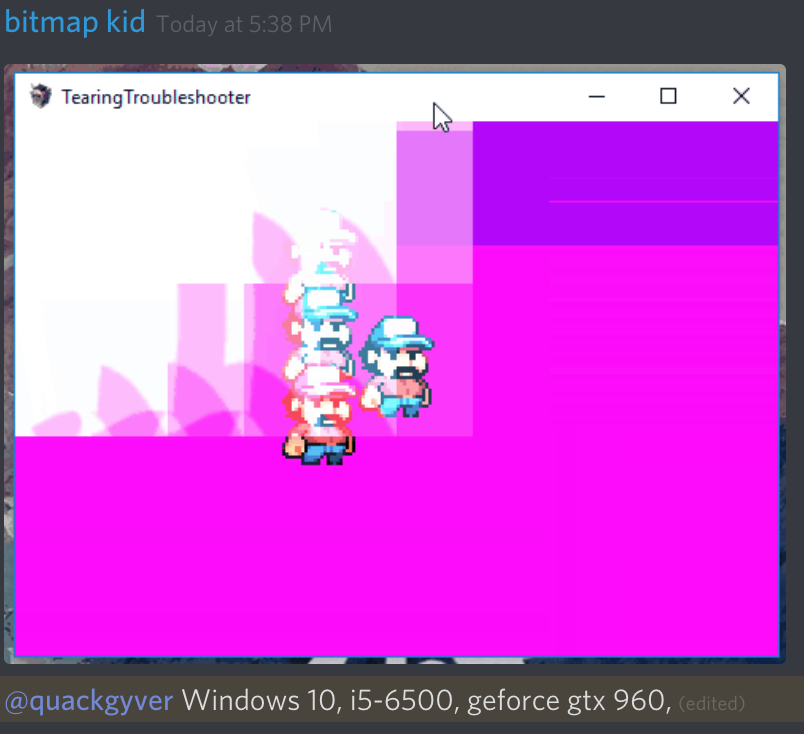
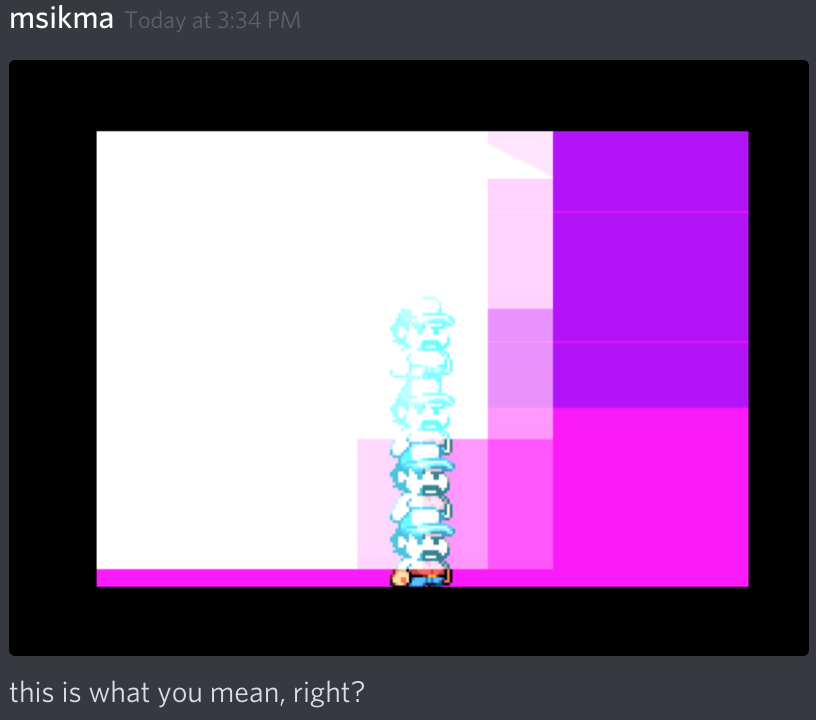
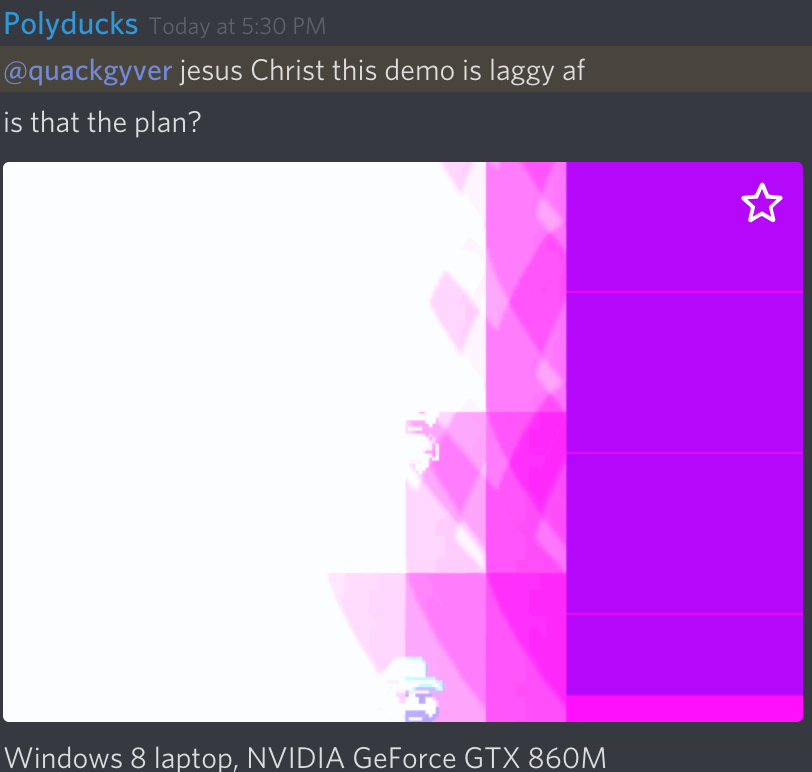
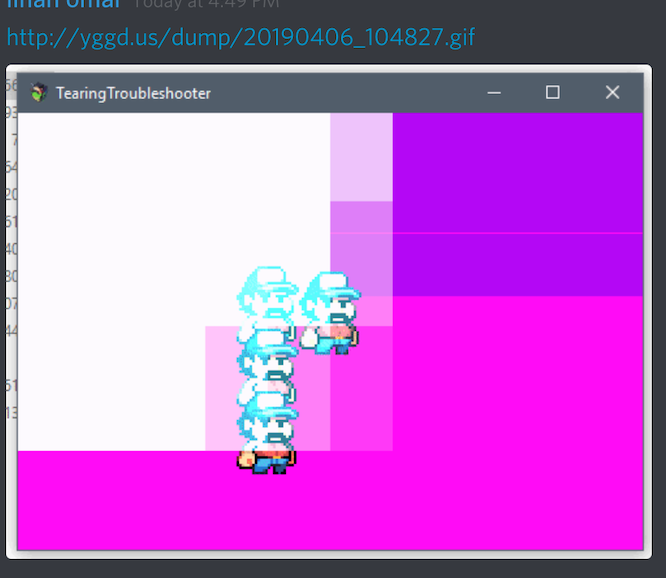
So the fact that your 15 people couldn't reproduce the problem doesn't mean that the bug doesn't exist. It can also just mean that you couldn't reproduce the problem.
What exactly am I rejecting in your eyes? Because I've given you enough specifics, proof, images and video on every claim I've made in this thread.
I gave the specifics earlier in the thread:
Everything is up to date on each system.
Well, check the project file that I'm including in this post. It doesn't have anything but the bare necessities, and 100% of the people that have tried it have been able to reproduce the issue.
I'm not sure what you mean by "correct resolution size", but this looks like a plain old rendering or positioning bug to me. Most HTML5 engines use good graphics stacks to ensure that rendering and positioning works well in contexts that would otherwise be problematic, such as with sub-pixel rendering. Everything points to the RPG Maker MV devs needing to look into fixing this bug to ensure proper subpixel rendering and positioning.
It's actually a huge issue, because the more resource-intensive your game is, the more pronounced the problem becomes. Every single charset in my current game shakes when the player is walking, charset subpixel positioning is very off on map loads and tearing occurs where events are supposed to line up with tiles. It looks absolutely terrible, and there's no way that we could release our game with this subpixel positioning bug present.
I meant "original" as in the original resolution that was discussed in this thread, not the default resolution of an RPG Maker MV-project.
You said that you were able to reproduce it earlier in the thread:
So this is what I was referring to.
Feel free to try it again with the project that I'm providing in this post.
There is no such thing as "subpixel rendering". There is a thing called "subpixel", but this is related to positioning, not to actual rendering.
Again. What everyone is saying is when they fixed the resolution to divisible by 48 or whatever than your resolution that's returning an odd value, the issue fixes itself and no longer a problem. When you reported that it happens even in the corrected resolution. It means 15 people who had the same issue with your original resolution all fixed it by making it "correct." Shaz is also saying this.
The Development ""team"" is me, @Hackerham and @Liquidize. It means that if we can fix it this way that means something is probably wrong on your end too. Cuz when we were investigating we noticed your game is being scaled up for some reason in the videos etc. But it's hard to say. Even if you tell us to fix it, when the issue isn't even happening at the "correctly done resolution"...
I'm using "subpixel rendering" as a short for subpixel positioning on render. I really don't think that this thread is going to be helped by nitpicking.
We established several pages back in this thread that setting a resolution that's divisible by 48 does not solve the problem.
So:
- I recorded a video proving that the problem can be reproduced on a resolution that is divisible by 48.
- I provided a project file where the problem can be reproduced despite having a resolution that is divisible by 48.
- 100% of the poeple that I asked to try it could reproduce the problem on a resolution that is divisible by 48.
I have video evidence and screenshots of people reproducing the error - along with a project file - that proves that the bug exists regardless of whether the resolution is divisible by 48.
Whether the resolution is divisible by 48 does not fix the problem. You have the proof in this thread. Saying that you have 15 people who couldn't reproduce the error in the same manner doesn't mean that the bug doesn't exist.
When a large majority of people can just fix it by just changing the resolution to be divisible by 48 it can mean many things. It means that the issue. It's possible that something in the user's system can do it. Are you saying that also your testers just change the resolution to 48 and it still didn't fix for them. Or is it just you?
You cannot apply changes or "fixes" on an engine like RPG Maker MV without triggering the rage of the masses if their games get broken just because of a rounding error. The reason I tried with 15 people is to make sure that they also can reproduce the same error as you that even with divisible by 48 it will not fix. BUT IT DOES.
So that means it's either your system or there are very specific computer systems or something that's why I asked for your specs earlier. In short, we cannot willy nilly just change how things are calculated. IF a majority of people is experiencing a problem, then we have to fix it. But if not a lot of people can have the same issue as you do, then we have to be very careful before we even attempt things.
Here's an example, whenever an AMD user has issues that NVIDIA users don't even encounter, how are we going to approach this? They have different architectures from one another and a lot of times, some of them are AMD specific. How in the world can you fix something you cannot replicate? It makes it hard to even pin down what the issue is in the first place?
Also, your statement other engines don't do this is completely false. About every game out there has a little tearing of some sorts, just due to different resolutions and how scaling works.
On another note: Remember the ACE stutter error that occurred under specific conditions I mentioned I encountered? My tester didn't encounter it at all, nor has anyone reported it on my demo at all. So that means it is probably specific to how my video card renders things, and there is nothing RPGMaker can do to fix it. You can't do fixes for every card and option in existence, not without breaking other things in return. That is true for ANY engine (emphasis on ANY).
Yes, it is a thread for nitpicking. If you want the issue to be solved, the precise cause has to be pinned down. There is a huge difference in movement and rendering and two completely separate pieces of code control these two.
I agree that it means something if a portion of the people who have managed to reproduce the bug managed to solve it by changing the resolution, but in the context of confirming whether the resolution is the problem it doesn't say anything until all the people who managed to reproduce the bug managed to fix it by changing the resolution.
I'm saying that I provided my testers with the project that I previously posted - and which is available on http://cdn.astrojone.com/tearingtest - and they all managed to reproduce the problem despite the fact that the project's resolution is divisible by 48 by default.
I've never heard of an engine or toolkit that refuses to conduct bug fixes just because it might have effects on existing projects. Every engine or toolkit that I've ever seen frequently releases bug fixes. Why couldn't RPG Maker MV do the same?
It would help if you could provide some videos and screenshots (as well as your original testing instructions) the way I've done in this thread. It would probably help us determine why all my testers managed to easily reproduce the bug while all of yours couldn't.
No one is asking you to change anything "willy nilly". The way bug reporting usually works is that a user provides details about the bug, then the developers look into it, and once they've found the cause, they either fix the bug or report back that it isn't a bug for whatever reason.
What I find strange about this thread is that everyone seems vehemently opposed to the idea of acknowledging that this might be a bug, and would rather spend all this time trying to discredit the bug reporter (including accusing me of lying or not being trustworthy - which is quite ridiculous) rather than passing the already more-than-sufficient bug report on to the devs so that they can look into it, the way a software company normally would.
I didn't refer to just "other engines" though - I was referring to HTML5 engines specifically, because browsers and video cards used to have issues with subpixel rendering and had to implement more sophisticated features to circumvent this. I'm getting the impression that RPG Maker MV didn't do the same, and that what I've discovered is a bug that was common back in 2013-2015 for other HTML5-based game toolkits and engines.
Yes, but every single person I've asked to test this has managed to reproduce the error. Give the latest project file and builds that I posted a try yourself. You might have an easier time reproducing it.
If you've given us this project from the beginning instead of just the map where everyone had mixed results and spent a considerable amount of time to have the same issue as you do, we wouldn't be having this conversation. I wouldn't just discredit a bug report if I didn't spent a considerable amount of hours and asking 15 people just to make sure.
I posted the map file because that's what I was asked to do.
Furthermore I've posted screenshots, a video, project files, builds and lots of information and specifics, and I'm still doing it.
More time needs to be spent trying to solve the bug, and less on trying to discredit the bug report.
I actually hope to test the project soon myself. I've got an old toaster of a computer that hates MV games, so if it doesn't occur there we'll probably have to rule out PC specs.
Edit: Is that version though a windows version? I don't own a MAC so can't test if it is a MAC version.
I'm going to say this now, don't expect it to be fixed by July.
You had several people in this thread dedicating their time, for free, to help you solve this problem. I myself spent hours of my time to help you, testing on multiple computers in multiple projects and trying to replicate it based on the information we exchanged... and I don't even use MV. So honestly, I find this statement outright insulting.
We weren't discrediting the bug report. No one was able to reproduce based on the data you provided up until this last demo. We asked you consistently to provide a project and you consistently declined with "I provided you with all the data you needed" when we all explained we didn't see it under the instructions you provided.
Original thread: https://forums.rpgmakerweb.com/threads/huge-issues-with-charset-lag.106617/