Hi !
I'm in the middle of the development of a RPG, and I find the "Escape" command a bit... simple.
Some games gives you a bit of challenge, even when you don't wanna fight, so much that even when you wanna flee (and in a situation where fleeing isn't a problem), you can still fail, stay in battle, and lose one turn.
What I want to achieve is a little gauge showing when selecting "Escape", like in the well known Paper Mario : TTYD
But instead of just smashing a button in order to escape, i'd like something like this :
In order to escape, the player must hit enter when the cursor in the green zone
- The more AGI difference between enemies and actors, thinner will be the green zone
- (optional) The more enemies are on the battlefield, faster will go the cursor (making fleeing numerous enemies that are faster than you logically hard)
- Next attempts after a failed flee are easier (so the player won't be doomed if they encounter three un-escapable demon dogs with 250 AGI just after beating a boss)
I'd be glad to discuss with someone who's interested in making this plugin. I have no idea on how to make JS plugins for MV, but i'm good at finding algorithms
For exemple : to implement the gauge easily, one can use two bars : one green and one red, then draws the red bar on both sides of the green bar. The amount of red drawn over the green depends on the AGI diff, with a minimum and a maximum amount of red, which set in the config
When hitting Enter, the plugin just checks if the cursor isn't in one of the regions covered in red
If it is, flee fails, otherwise, it succeeds
I'm not lazy to do it myself, I'm just... not used to js xD tried to learn but it's definitely not for me.
Hope someone will help me do this !
I'm in the middle of the development of a RPG, and I find the "Escape" command a bit... simple.
Some games gives you a bit of challenge, even when you don't wanna fight, so much that even when you wanna flee (and in a situation where fleeing isn't a problem), you can still fail, stay in battle, and lose one turn.
What I want to achieve is a little gauge showing when selecting "Escape", like in the well known Paper Mario : TTYD
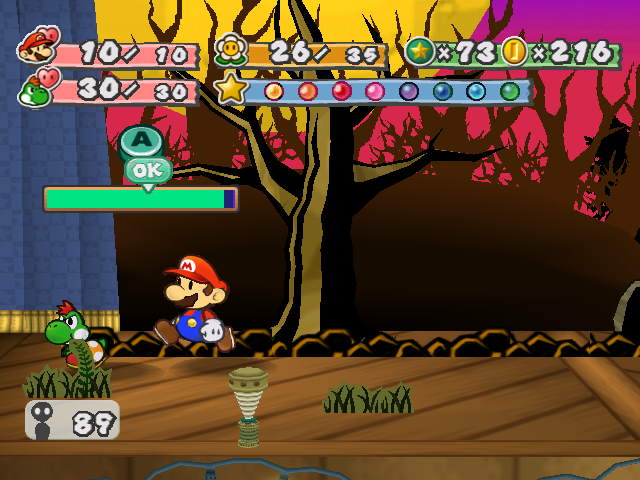
But instead of just smashing a button in order to escape, i'd like something like this :
In order to escape, the player must hit enter when the cursor in the green zone
- The more AGI difference between enemies and actors, thinner will be the green zone
- (optional) The more enemies are on the battlefield, faster will go the cursor (making fleeing numerous enemies that are faster than you logically hard)
- Next attempts after a failed flee are easier (so the player won't be doomed if they encounter three un-escapable demon dogs with 250 AGI just after beating a boss)
I'd be glad to discuss with someone who's interested in making this plugin. I have no idea on how to make JS plugins for MV, but i'm good at finding algorithms
For exemple : to implement the gauge easily, one can use two bars : one green and one red, then draws the red bar on both sides of the green bar. The amount of red drawn over the green depends on the AGI diff, with a minimum and a maximum amount of red, which set in the config
When hitting Enter, the plugin just checks if the cursor isn't in one of the regions covered in red
If it is, flee fails, otherwise, it succeeds
I'm not lazy to do it myself, I'm just... not used to js xD tried to learn but it's definitely not for me.
Hope someone will help me do this !