[RMMV] How to animate a sprite using the 12 spaces?

It's always a problem for me to have to animate sprites, since it is very limiting when it comes to making long animations. For example I made this fish tank. How can I animate it like the numbers in the image?

1622246235673.png

In this case only from 1 to 6. but I would like to use the 12 spaces later.
https://quxios.github.io/plugins/QSprite is far and away the most powerful spritesheet option MV has. It would have no problem doing that. The only downside is you need QMovement if you want to use it for characters doing diagonal movement. But if you just want to use it to animate a single animation, you won't need QMovement.
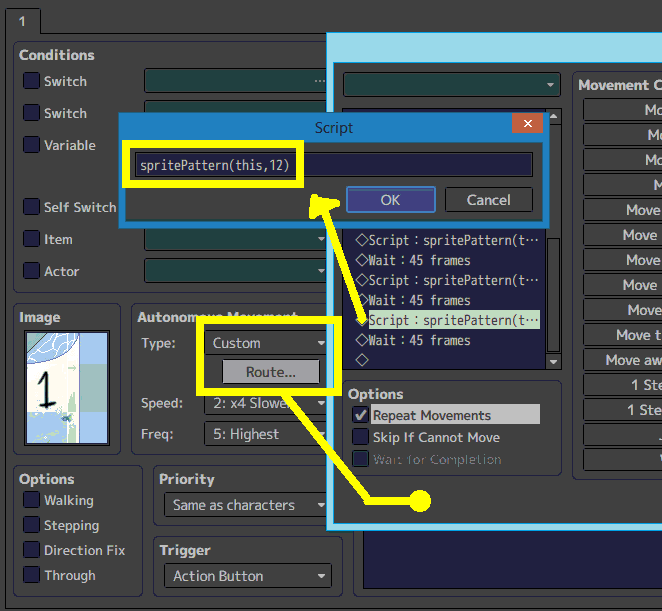
I made a function to make it easier to change the "pattern" of the map event.

Download:
GitHub

(Works on RMMV and RMMZ)

You can choose the order the way you prefer, it does not need to be called on the route, but it is the most ideal to animate.

Example of how to use to animate using only the first 6 frames:

Code:
◇Script:spritePattern(this, 1)
◇Wait:45 frames
◇Script:spritePattern(this, 2)
◇Wait:45 frames
◇Script:spritePattern(this, 3)
◇Wait:45 frames
◇Script:spritePattern(this, 4)
◇Wait:45 frames
◇Script:spritePattern(this, 5)
◇Wait:45 frames
◇Script:spritePattern(this, 6)
◇Wait:45 frames

Other event:
Code:
◇Script:spritePattern(5, 1)
◇Wait:45 frames
◇Script:spritePattern(5, 2)
◇Wait:45 frames
◇Script:spritePattern(5, 3)
◇Wait:45 frames
◇Script:spritePattern(5, 4)
◇Wait:45 frames
◇Script:spritePattern(5, 5)
◇Wait:45 frames
◇Script:spritePattern(5, 6)
◇Wait:45 frames

https://quxios.github.io/plugins/QSprite is far and away the most powerful spritesheet option MV has. It would have no problem doing that. The only downside is you need QMovement if you want to use it for characters doing diagonal movement. But if you just want to use it to animate a single animation, you won't need QMovement.

I have tried using this plugin, it happens to me that it looks like flickering between animations.
I made a function to make it easier to change the "pattern" of the map event.

Download:
GitHub

(Works on RMMV and RMMZ)

You can choose the order the way you prefer, it does not need to be called on the route, but it is the most ideal to animate.

Example of how to use to animate using only the first 6 frames:

Code:
◇Script:spritePattern(this, 1)
◇Wait:45 frames
◇Script:spritePattern(this, 2)
◇Wait:45 frames
◇Script:spritePattern(this, 3)
◇Wait:45 frames
◇Script:spritePattern(this, 4)
◇Wait:45 frames
◇Script:spritePattern(this, 5)
◇Wait:45 frames
◇Script:spritePattern(this, 6)
◇Wait:45 frames

Other event:
Code:
◇Script:spritePattern(5, 1)
◇Wait:45 frames
◇Script:spritePattern(5, 2)
◇Wait:45 frames
◇Script:spritePattern(5, 3)
◇Wait:45 frames
◇Script:spritePattern(5, 4)
◇Wait:45 frames
◇Script:spritePattern(5, 5)
◇Wait:45 frames
◇Script:spritePattern(5, 6)
◇Wait:45 frames

It works perfect!! Thank you very much! It's what I always wanted, something simple and easy to use. You will be on my credits.
If you are interested, I removed a few lines of code, as there were unnecessary checks (IFs).

Sorry about my English.
Thank you, but why the angry reaction?
If you are interested, I removed a few lines of code, as there were unnecessary checks (IFs).

Sorry about my English.

Original thread: https://forums.rpgmakerweb.com/threads/rmmv-how-to-animate-a-sprite-using-the-12-spaces.136936/