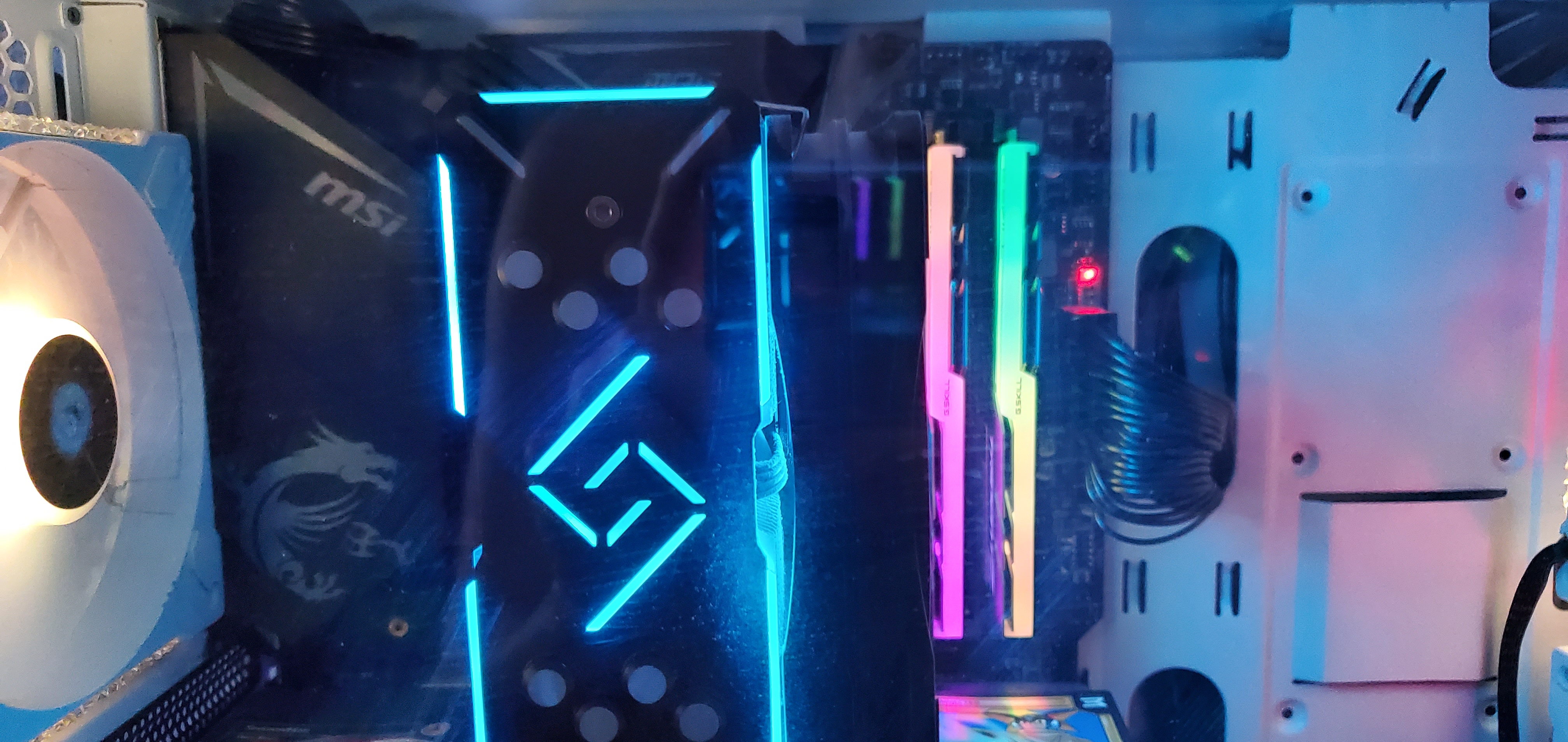
Red light on motherboard.

Hello guys,

Last night, I was using my PC like usual, just watching Youtube and Photoshop. All of a sudden, my monitor went black. The monitor lost signal first, then the PC restarted itself. I don't remember exactly if the PC turned itself off or restarted, but it wasn't the first time this happened. The last time this happened was last year, around this same time period. At first, I just thought it was some power issue. I remember that the PC would reboot itself many times, as in it'd show the MSI logo, then restarted again. So I unplugged the power cable, then turned on the PC again. It got past the boot screen, got to the desktop screen, but restarted itself again. After that, the monitor didn't receive signal from the PC anymore. I can turn it on, but nothing would show on the monitor, as if it wasn't connected at all. The fans and the lights run perfectly fine. The motherboard has a red light where it says CPU. So, either the CPU is damaged or the CMOS battery needs to be replaced.

I can't tell which is the cause of this. I can't do anything until I get back from work tonight. Just want to ask in advance to know what I need to prepare.
CMOS battery is easier to replace, right? Does it matter what kind of CMOS battery I use? Can it just be any random one I find at any store? I asked my father for one, but I'm not sure if it's the right kind. But how likely is it for the battery to go out of commission? These are supposed to last for a long time, no? Do I have the replace it entirely, or just take it out, then reseat it to reset the bios settings? And what happens when the bios settings are reset? Will I lose any data?

And, if it's not the battery, then it's the CPU. I think this is more likely, but it's a worse case scenario. I don't remember how to take off the cooler fan. I think it's glued on top of the CPU, along with the thermal paste...? If it's the battery, then I'd only need to remove the GPU to change it. But if the CPU is the culprit, then I'll need to fork out 2-300 bucks for a new one, right? Besides these two things, is there anything else that could have caused this? I thought it might have been the RAM or PSU, but the red light clearly says CPU problem.

Honestly, I was about to go to sleep when this happened. Might be a pointless question, but if I had turned off my PC earlier, would this still have happened?

Specs in case you need:
1660 Super MSI Gaming X, 16GB RAM, 3600 Ryzen, B550 Motherboard, 512GB SSD, 1TB SSD.

Thanks in advance for any help!

Link for images:
For everything in the world, a battery is a battery - if it physically fits and provides the correct voltage, it works - but your battery would not cause this.

The only thing the motherboard's battery does is store your CMOS settings and keep the system clock running. So if your battery were dead, you'd have to redo your settings every time you booted the system, but it wouldn't make your computer reboot, nor prevent it from booting.

I think if something were busted with your CPU it would be more likely to stop during the boot process with an error message from your motherboard, but it sounds like you'd be best off taking it to a shop to get evaluated.
it is possible but unlikely that this is caused by the battery - that batteryy has only two functions: to store some of the advanced BIOS settings and allow the internal clock to run without power.

all mainboards default to safe values when the data storage is lost - which means theoretically your computer should even start without a battery.

However to other questions:
do you have a main power switch on your external power connection where you power on all devices (computer, monitor and so on) at the same time, or is your computer permanently connected to power and you only use the internal button to switch on?

is the computer stored inside a box or i a warm room?

how old is that computer?

A CPU does not fail without reason - either old, or overheating, or due to power resonances.
all mainboards default to safe values when the data storage is lost - which means theoretically your computer should even start without a battery.

Well, it sort of starts... Just won't boot up.

do you have a main power switch on your external power connection where you power on all devices (computer, monitor and so on) at the same time, or is your computer permanently connected to power and you only use the internal button to switch on

You mean a power strip? Yes. PC and monitor are connected to a power strip.
All the parts (fans, boards, GPU, CPU, etc.) are inside a case, good ventilation. It's February, California, temperature hasn't been hot at all. I built this computer in 2020, July. So it's 1.5 years old.

So it's unlikely that the battery is the cause? What do I do now?
Do you have the make and model of the mainboard? The mainboard's manual will have info on which component has failed based on the LED that is lighting up. If you check the manual for the mainboard it will have the layout as well as the position of the diagnostic LEDs.

Occasionally it will be the CMOS battery which is used to power the component that stores the base hardware setup. If it was the battery then normally after a power cycle or reboot, the settings can be 'lost' and the system will try to boot by default into the BIOS config setup and the date will reset to default.

If it's a CPU issue the problems can manifest in random reboots, STOP errors (the dreaded BSOD) - the resulting minidump may have more info so check the System event log for the unexpected shutdown event. It might not have a huge amount of info if it's a minidump compared to a full dump but it may tell you if the OS reported a hardware fault.

CPU's nowadays normally use a ZIF type socket - the CPU is inserted, the lever for the ZIF socket is engaged to lock the CPU in place with the thermal paste applied between the CPU and any cooler in place. Replacing a CPU isn't that hard but you have to make sure you don't put too much thermal paste as it can 'leak' and short circuit the system.

First step is to identify you rmainboard maker and model then check the manual for which LED has lit up and what it signifies.
What do I do now?

it sounds like you'd be best off taking it to a shop to get evaluated.
We (or other people) can try to talk you through diagnostics, but with none of us actually being there to see and hear what's happening, and having to go through forum posts back and forth for every step, it's a painful and inaccurate process.
You're better off just taking it to someone in person who knows what they're doing.
You mean a power strip? Yes. PC and monitor are connected to a power strip.
not exactly - I asked if your powerstrip has a main switch for all devices, and if you are using that switch.

and if you made the mistake of using such a main switch, then there is a minor chance that it can be repaired easily.
CMOS battery is easier to replace, right? Does it matter what kind of CMOS battery I use?
It's usually a CR2032 type battery. It's the same kind used in the Dreamcast controller's memory card.
Based on how you described it, it sounds like there's pretty close to a 0% chance that this has anything to do with your CMOS battery. I can't imagine any reason why a dead CMOS battery would cause your computer to reboot in mid-use. The battery's functionality is generally limited to when the computer *isn't* on.

To me, the most likely culprit sounds like it's your motherboard itself. But the CPU is also definitely a possibility. It could also be your power supply failing to deliver proper amounts of power to the various sectors of your motherboard and the video card, and causing them to misbehave.

Unless you've got tools to test these things, or other components that you can temporarily swap in for testing purposes, it's probably going to be kinda hard to narrow down. Gotta either play roulette and start ordering parts and hope that you're guessing right, or take it to a shop that is equipped to properly diagnose this for you. I don't know which of those two is likely to be the more expensive option.

*edit* You mentioned that you built your computer 1.5 years ago. Most parts come with some type of a warranty, so if you can narrow down the culprit, you might be able to get out of this relatively cheaply. Things may have changed since the last time I built one (it has been a while), but I believe that a 3 year warranty is pretty common for both processors and motherboards, so long as they broke due to normal usage and not some type of mistreatment.
Uh... I'm having problem removing the cpu. People easily take it off in tutorial videos but I just can't seem to get a grip on it. It shouldn't be this hard or am I doing something wrong?


Edit: Apparently I needed to pull it all the way until I hear a Crack sound. Let's see how it us after dinner.
When you move the lever up, you should see the CPU 'move' slightly from the locked in position. At this point, normally you should be able to use grab the edges, lift up and remove. It should not take too much force to lift out of the socket but sometimes people are too hesitant when removing.

Don't use too much force, check closely to see if there is anything contributing to it being stuck - sometimes too much thermal paste can overflow slightly and the CPU gets stuck to the socket. Check that area near the SocketAM4 label - it doesn't appear to have overflowed past the board but can't tell for sure. Worst case is that a short has fused one or more pins inside the socket (I would have expected that sort of issue to have manifested a lot earlier than after 1.5 years.)
Sorry if this is a dumb thing to say, but just to make sure that you know, the CPU isn't just the silver part. The green board that it's attached to is also part of the CPU. So make sure that you're trying to lift the whole thing out, and not just the silver case. It's not something that you just normally need to get much of a grip on, as it should normally just lift right out.

If it's not coming out fairly easily, then either the lever isn't up quite far enough, or there's an issue.
If it were the CMOS battery, the bios would give a warning/message on startup that it has gone to default settings due to CMOS failure or something like that. Ive had this happen before. It will not cause the motherboard to not start.

If you got your manual, you can read up on what 1 red light indicates. I think some motherboards have 3 lights used to indicate problems. Like if you have 2 lights, or 1 light or 3 lights.
@Arctica So it's safe to rule out the battery as the culprit? The red light indicates CPU. The other ones are dram, vga, boot. The first one is the one that lights up, which is Cpu. I think I've had the boot lights up before. When the Gpu was missing, if I recall correctly.

Anyway, I managed to take it out.
It looks fine to me. You guys notice anything strange? Perhaps we can't tell just by looking... But, now what? Could it be the Gpu...? What else?
a shutdown and restart all of a sudden, and then a partial successful reboot, and then another shutdown, is usually the sign of either overheating, or a memory issue.
stop fiddling with it, and take it to a repair shop.
a sudden loss of image with no restart might indicate a short circuit in the graphics card.
that followed by a restart (not a shutdown) might be a sign of a faulty memory (either VRAM or RAM).
if you got it to boot up after the fact, it may have tried to shrug it off and work with what it had, but if it was a physical problem, keeping it on could worsen it.

the computer won't shut down on it's own unless there's an electrical failure (usually a short circuit or a loose contact)
and usually it won't turn back on if it's shorted out.
a shutdown under stress is usually sign of overheating (shutdown, not restart), but turning it back on should restore almost 100% functionality until it overheats again.
if the image went off first, that to me speaks a short in the video card, followed by the system trying to reboot the card, followed by the VRAM or the RAM failing.
if you keep poking at it, you could make it worse.
right now the computer is trying to keep itself offline, so keep it offline.
I'm writing this right now, from a 2009 laptop with a faulty BIOS battery... so, stop looking at yours, it's probably not it.
do you have an integrated graphics port? if so, try unplugging the video card... if not, you'll need a replacement because there's no way of testing the motherboard itself.
As several of us have told you now, the odds of it being related to your CMOS battery are practically 0%.

Even if the CPU is the problem, you're not going to be able to tell just by looking at the pins like that. To find out, you'd have to put it into a different system and see if it works. If you've got a friend or family member who has a motherboard that is compatible with your CPU, then see if you can get them to let you put your CPU into their system, in order to test it out. Either that, or put their CPU into your system and see if it works.

And as I mentioned previously, the issue could also very easily be your motherboard, and sounds more likely to me to be the case. But unless you've got a multi-meter and a lot of knowledge about circuitry, or if you are able to spot any busted capacitors, then the best way to find out is going to be similar to what I recommended with the CPU--stick that motherboard into another system and see if it works.

That's basically what's going to happen if you take your computer to a repair shop. They're going to take out one component at a time, and test each one in their own system (technically a "test bench") until they find the one that doesn't work.

It could also be your power supply, though I think that's a less likely culprit than the aforementioned. You can buy a relatively inexpensive device with which to test power supplies, and that's usually preferable to the method of plugging it into a new system, since determining a faulty power supply isn't something that can always be done with a quick glance. That, and because faulty power supplies can screw up other components, so you wouldn't want to put a possibly faulty power supply into one of your friend's or family member's computer anyway.

It's also possible that it's your video card, but in my personal experience, when a video card craps out, it's not usually just perfect one second, and then suddenly can't display anything to the monitor the next second. They usually seem to display a bunch of visual glitches and weird garbage on the screen first. I've never heard of one causing the display to just suddenly shut off and then causing the computer to immediately reboot, but I suppose it is possible. Easiest way to find out is to either stick another video card into your system, or stick your video card into somebody else's system.
@Arthran Sounds like it's going to take a long time and can cost a lot of money to take to a repair shop... Any idea on how many days or how much it would be? In the worst case scenario that the motherboard is broken, can I ask the manufacturer or the shop I bought from for an exchange? I think it was from Newegg... Didn't pay for any warranty, either. Pc parts right now are much more expensive, too. Nothing the repair shop can do to fix either cpu or motherboard, right?

Goddamn it. I'm very stressed out with certain things right now and this is just adding fuel to the fire.
The basic warranty isn't something that you would have had to pay extra for. There are additional protection plans that you can buy, but the item usually comes with a free manufacturer warranty. If you go to the Newegg page for your specific product, and scroll toward the very bottom, there should be a "Warranty and Returns" section that explains it. Here is an example from a random Gigabyte B550 Mobo that I pulled up just now:

Warranty.png


It varies by manufacturer and product, but I think that 3 years is pretty standard. Usually you contact the manufacturer, and then they give you instructions on how to send the part to them, and then they will either repair it or send you a free replacement.

Unfortunately, I've never actually used a repair shop before, so I can't give you a certain answer about how expensive it would be or how long it would take to go to one of those. I would assume that it probably varies widely based on the shop.

As far as combining a warranty and a repair shop goes, I don't know exactly how that would work. Maybe they are able to send in for the warranty on your behalf and will factor that into your cost as a discount. But you'd have to ask them about that. Worst case scenario, you could probably pay them to simply diagnose the problem, and then return your PC as-is. Then you could take the part out yourself, and send it in and wait for the replacement. Unfortunately, I think that probably wouldn't be a super fast process.

I know that unexpected expenses can be stressful, and that having your computer out of commission for an unknown amount of time can suck. Sorry that you're going through this.
@Arctica So it's safe to rule out the battery as the culprit? The red light indicates CPU. The other ones are dram, vga, boot. The first one is the one that lights up, which is Cpu. I think I've had the boot lights up before. When the Gpu was missing, if I recall correctly.

Anyway, I managed to take it out.
It looks fine to me. You guys notice anything strange? Perhaps we can't tell just by looking... But, now what? Could it be the Gpu...? What else?
Yes it is. Do be careful with CPU removal. I'd much prefer a pro to do it since last did I removed one myself, I broke one of the pins and that was the end of it lol.
Nothing the repair shop can do to fix either cpu or motherboard, right?
not if it's fried, so stop handling it!

Original thread: https://forums.rpgmakerweb.com/threads/red-light-on-motherboard.145066/