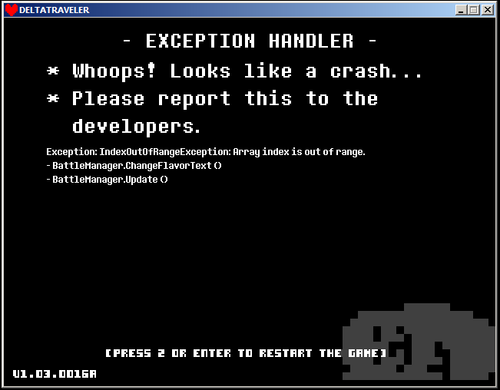
I'll try that. I know nothing about javascript though so wish me luck lol (I don't frickin code at all)
Alright, so, changing the text works... but what about adding an entire screen event for errors? Like, when an error occurs, fade out and into the screen, then display the error?
theoretically possible, but as said before it needs to be programmed in, and that requires a plugin.
you can try to request such a plugin, but most likely no one would be interested in doing something with as little utility as this. Not unless you make it a classified request and offer payment.
I believe there is a plugin out there already (more 1 or 2 lines),
there is also a thread how to change text and the button.
but for the other informations, you need to add it.
MrTrivel have a error stack ingame that shows the errors in there.
but if you want more, I think it's a nice plugin to edit further?
Yeah payment's gonna be a tough one. Thank God I'm gonna be old enough for a job by March next year, maybe I'll finally be able to spend my own money at that point.
Though, making a plugin for a crash handler sounds kinda weird, wouldn't the crash work before the plugin? Unless plugins magically are able to receive when errors are thrown in the core scripts, which kinda sounds possible, but still weird. Could work, but I'd need to learn js lol.
Alright, so modifying the core files themselves resulted in my game not loading at all upon trying to playtest. Just a black screen. Needless to say that method's a no go, if even changing strings s the game up that bad, lol.
Hey, it's been a bit. Has anyone found a (free) plugin that overrides the original crash handler?
Hey again, again. It's been 2 months. Have we moved on from this thread or can I still get some help?
Ideally, an error screen is something that your players will never have to see... so spending time trying to make a cute error screen makes no sense to me. That time is better spent polishing the parts of the game that the player will actually see. Or, if your players actually are seeing error screens often, then probably it's better to use your time trying to fix those errors, instead of just making the error screen more attractive.
If a game that I'm playing crashes, and I lose a bunch of progress, I will probably be equally annoyed regardless of how cute the error screen is. I'm not telling you this to make you feel bad about your idea. I'm just trying to explain why it's unlikely that you'll find anybody with much interest in making a free plugin for this feature.
I know, but I just don't like having to use default stuff. In my game I want to be able to customize as much stuff as possible, even the stuff that's less likely to show up. The chances are low, but never 0. The intention of the crash screen isn't to cheer up the player, but just to get rid of that RPGMaker feel. Doesn't change the fact that it was made in MV but it just feels less natural to RPGMV standards. In a good way, of course. I don't mean any of this as in "I wish I never used this engine", I'm fine with MV and it's easy to learn. I just don't want people to be disappointed in me for using such a simple engine, I want people to say "okay, this isn't your typical RPGMaker game, this is sick". Kinda like how Undertale was made in GameMaker and still blew up. Get what I mean? Oh, take Ao Oni for example. That blew up and it was made in RPGMaker XP. Hardly any custom graphics there.