What is wrong with this event?

This first image you can see in the editor I have 2 event tiles.

http://i650.photobuc...zpsf8927469.png
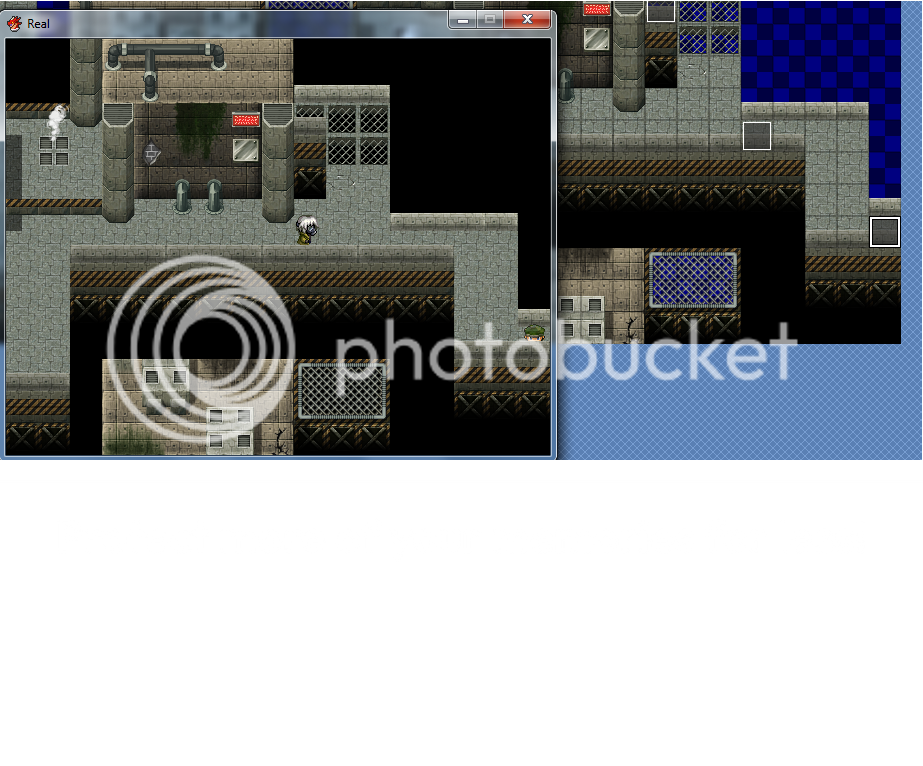
Here is the event on the left.

http://i650.photobuc...zps50a2b204.png
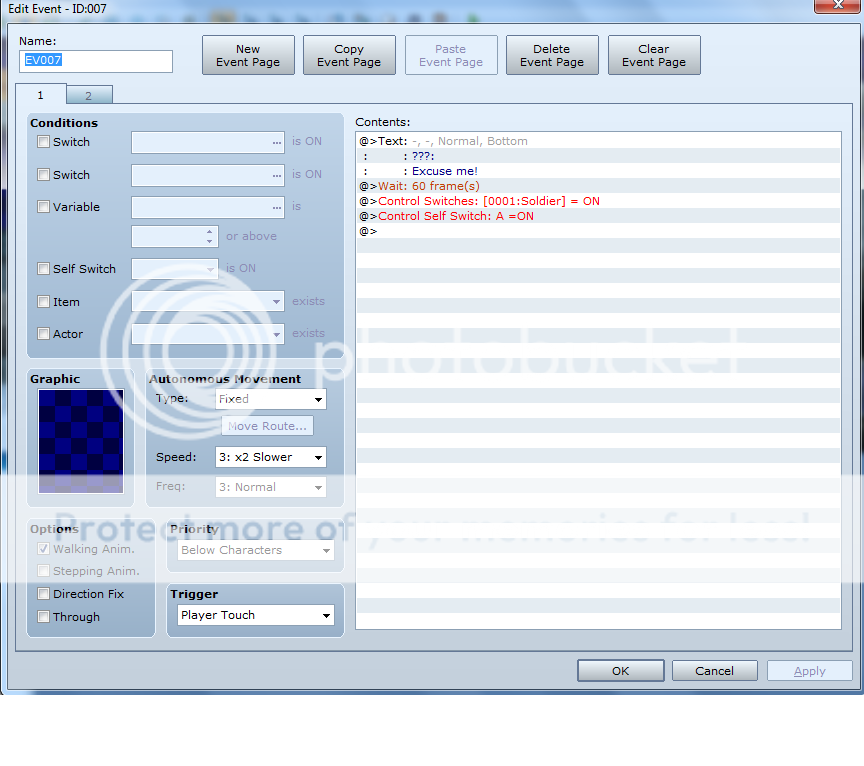
the event page 2 is blank when self switch a is ticked on.

this is the event on the far right.

http://i650.photobuc...zps52bc9ddc.png
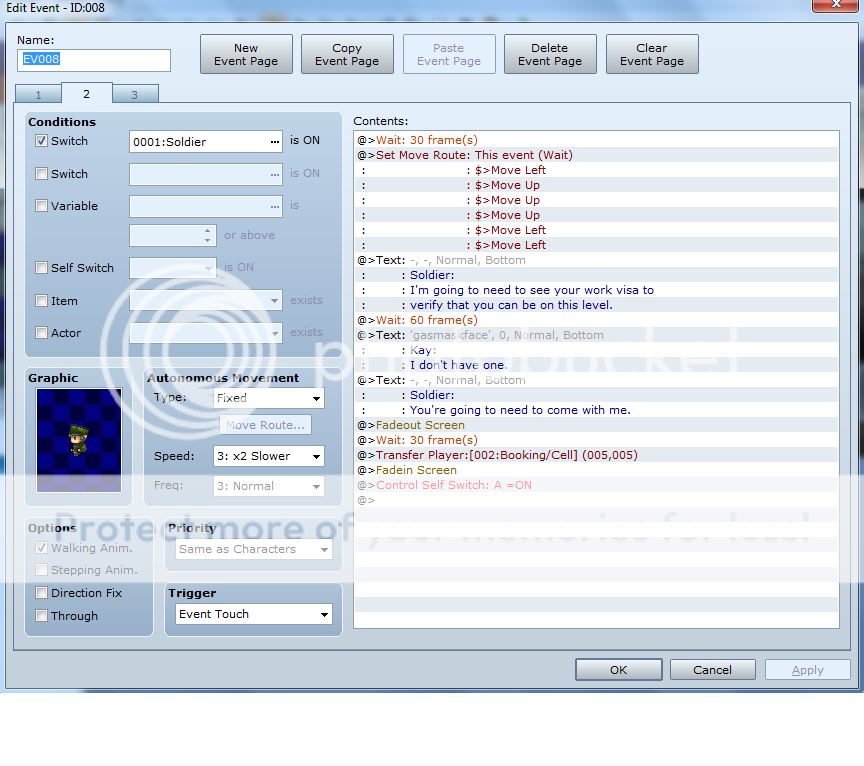
Event page 1 is blank. and event page 3 is blank with self switch a ticked on.

Notice in the game test screen, before I even get to the tile to turn switch 001: soldier event on, he is already standing there, even though the first screen of his even has no graphic. When I pass over the event tile he will say his dialogue but not move an inch.
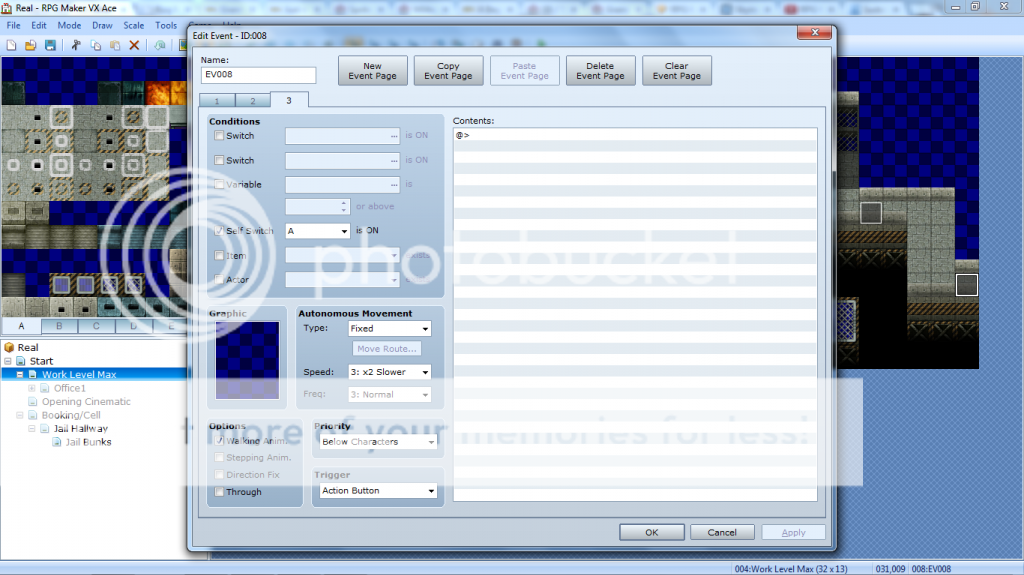
What's on page 3 of event 8? If its conditions are met (including if it has NO conditions), then it will be the active page.

http://i650.photobucket.com/albums/uu221/Damnit_Bats/switchprob4_zps5be8830e.png
Page 1 is blank, including no sprite?


I'd then be questioning whether you've added any scripts and have forgotten to customize them - I'd be looking for one that sets switch 1 on by default. Or something else that uses switch 1.
Page 1 is blank, including no sprite?

I'd then be questioning whether you've added any scripts and have forgotten to customize them - I'd be looking for one that sets switch 1 on by default. Or something else that uses switch 1.
Yup, blank, no sprite. The scripts I have are Yami Basic module, Yami overlay, and a Garys free movement. I really just started using rpg maker about 3 days ago so I'm still learning everything. I had to use tutorials to install those scripts. I wouldn't even know where to look to see if a script was effecting it. I copied that section of my game and sent it to this other guy on a different forum. He cant figure it out either. So I don't know if its my scripts.

EDIT: Would me being a trial account matter at all?
No, being a trial account won't matter.


It's the Yami Overlay script. You haven't configured it to use the correct switches and variables, OR you haven't "reserved" the switches and variables it uses.


When you put in a script, you REALLY need to read the comments and do what it says. The comments and constants make it very clear that it uses switches and variables. You either need to reserve those switches and variables - name them in your event editor even though you're not going to use them in any events - so that you don't accidentally use them for something else, which is exactly what you've done here. Or create (and name) NEW switches and variables to be used by the overlay script, and go into the script and change the switch and variable ids around.
No, being a trial account won't matter.

It's the Yami Overlay script. You haven't configured it to use the correct switches and variables, OR you haven't "reserved" the switches and variables it uses.

When you put in a script, you REALLY need to read the comments and do what it says. The comments and constants make it very clear that it uses switches and variables. You either need to reserve those switches and variables - name them in your event editor even though you're not going to use them in any events - so that you don't accidentally use them for something else, which is exactly what you've done here. Or create (and name) NEW switches and variables to be used by the overlay script, and go into the script and change the switch and variable ids around.
I just went in to my script editor and deleted them. It still isnt working though. Does it matter if other projects still have the script?
Why did you delete them? That's just made it worse.


You need to KEEP them, and either reserve the switches and variables it wants to use, and not use them for your events, or reserve new switches and variables, and tell the script which ones to use.
Why did you delete them? That's just made it worse.

You need to KEEP them, and either reserve the switches and variables it wants to use, and not use them for your events, or reserve new switches and variables, and tell the script which ones to use.
Okie I will load them back in. What am I looking for? Is it this?

#=-=-=-=-=-=-=-=-=-=-=-=-=-=-=-=-=-=-=-=-=-=-=-=-=-=-=-=-=-=-=-=-=-=-=-=-=-

    # - Overlay Switches -

    #=-=-=-=-=-=-=-=-=-=-=-=-=-=-=-=-=-=-=-=-=-=-=-=-=-=-=-=-=-=-=-=-=-=-=-=-=-

    # These are switches which are enable overlay layers. Turn them on to show

    # them in your maps.

    #--------------------------------------------------------------------------

    # Default: ON

    #=-=-=-=-=-=-=-=-=-=-=-=-=-=-=-=-=-=-=-=-=-=-=-=-=-=-=-=-=-=-=-=-=-=-=-=-=-

    LIGHT_SWITCH = 1        # Turn on/off light layer

    SHADOW_SWITCH = 2       # Turn on/off shadow layer

    PARALLAX_SWITCH = 3     # Turn on/off parallax layer

    GROUND_SWITCH = 4       # Turn on/off ground layer
Yes. That script is saying it's going to use switches 1, 2, 3 and 4, and variables 1 and 2. If you've just started your game, I'd leave those as they are, go in and name your switches 1-4 and variables 1-2 to YAMI OVERLAY so you know not to use them, and just change the switches you're using in your events to something that's not used.


Make sure you load EVERYTHING back in that you deleted. They're in there for a reason - you can't just go deleting things and expect it to suddenly start working.
Yes. That script is saying it's going to use switches 1, 2, 3 and 4, and variables 1 and 2. If you've just started your game, I'd leave those as they are, go in and name your switches 1-4 and variables 1-2 to YAMI OVERLAY so you know not to use them, and just change the switches you're using in your events to something that's not used.

Make sure you load EVERYTHING back in that you deleted. They're in there for a reason - you can't just go deleting things and expect it to suddenly start working.
It totally works now! You're a life saver. I knew there was more to scripts than just plug-n-play. I will for sure read more carefully next time. 
This thread is being closed, due to being solved. If for some reason you would like this thread re-opened, please report this post and leave a message why. Thank you.

Original thread: https://forums.rpgmakerweb.com/threads/what-is-wrong-with-this-event.22180/