Hello again.
I apologize because I feel like this is probably a dumb question, but I was curious about sprites, primarily the default ones and not Battlers for Holders or BattleSymphony or anything.
I noticed most, if not all of the downloadable spritesheets I find are all a sort of chibi look and such. I know the generator in the program follows this too. My question is: When I draw my own, can I draw a different style, provided I stay within my grids and everything appropriately? When I sprite I like to use a style similar to Sailor Moon: Another Story. Here are some examples. I always see everyone using the default style.
I wasn't sure that it really mattered or not, but it is all I see anyone use. As long as I stay in the boxes properly, should it be okay?
(Sprite Sheets pulled from random google image searches.)
I apologize because I feel like this is probably a dumb question, but I was curious about sprites, primarily the default ones and not Battlers for Holders or BattleSymphony or anything.
I noticed most, if not all of the downloadable spritesheets I find are all a sort of chibi look and such. I know the generator in the program follows this too. My question is: When I draw my own, can I draw a different style, provided I stay within my grids and everything appropriately? When I sprite I like to use a style similar to Sailor Moon: Another Story. Here are some examples. I always see everyone using the default style.


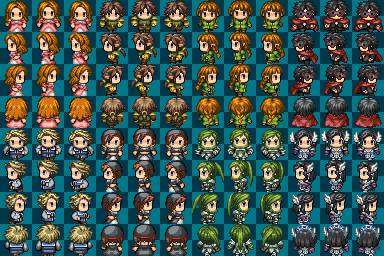
I wasn't sure that it really mattered or not, but it is all I see anyone use. As long as I stay in the boxes properly, should it be okay?
(Sprite Sheets pulled from random google image searches.)