After the battle processing event command, turn on a switch. In your other event, create a new (blank) event page, and set its condition to that switch. This should make it 'disappear' after the battle.
Event System Support (expert users only)
RPG Maker VXAce Supportthanks
I'm making a dual party event system in which two parties explore a map and solve puzzles that require the use of both parties. These parties move along different paths and activate distinct switches exlcusive to each party. The activation of these distict switches on both sides allow the player (who is controlling both instaneously, by that I mean he is able to switch between them by pressing 'q') to progress forward.
In this event, I require the need to set the mapID to a variable so that the player can be transferred sucessfully. However, I get the following error message;

Here is the entire event script;

The error occurs at precisely this line:

I made a demo out of frustration which should help...
http://www.mediafire...7l7a1b2bno6nhb9
In this event, I require the need to set the mapID to a variable so that the player can be transferred sucessfully. However, I get the following error message;
Here is the entire event script;
The error occurs at precisely this line:
I made a demo out of frustration which should help...
http://www.mediafire...7l7a1b2bno6nhb9
@RiskBreaker - Did you ever reorder your maps or insert another map somewhere in the middle? I know I've run into that error when I've reordered them or something and then the map isn't in the same "spot" so to speak.
I'm having another issue that I hope is just one of those stupid things I'm not seeing.
I'm trying to figure out why the highlighted fadeout screen isn't working. All it does is briefly dim - but not go all way dark, you can still see the scene behind it, and then go back to normal, before suddenly displaying the picture called.
take out that specific fadeout and reinsert it. sometimes its simple tuning mistakes. even if it doesnt seem like it will help try it anyway.
Okay that didn't work. I appreciate it though.
@mlogan:
Do you have any other events that might be interfering with the command? I know I sometimes have parallel process events that fade in maps.
Also, have you tried putting a wait command after the fade-in?
Do you have any other events that might be interfering with the command? I know I sometimes have parallel process events that fade in maps.
Also, have you tried putting a wait command after the fade-in?
Just coming back to report that I figured it out - and yes it was another event interfering. 🙂
@mlogan - I haven't reordered the maps/renamed etc. Is there anyway I can hardwire it's initialization via ruby script? I never knew this ide would have so many bugs...
@RiskBreaker:
Not sure but by the lookings of your screenies you transfer the player to the wrong locations.
The event command in the screeny shows
If you read it as the values stored in it's
.
But as far as I know it should be
Currently you try to teleport the player to the map with the X-Coordinates of the event which has X-Coordinate 8. It may help if you'd correct that.
Not sure but by the lookings of your screenies you transfer the player to the wrong locations.
The event command in the screeny shows
Code:
TransferPlayer to [104][105][106]
Code:
[MapX][MapY][MapID]But as far as I know it should be
Code:
[MapID][MapX][MapX]
or [106][104][105]Hi I'm having trouble with my cutscene. But first of all I would like to mention that I am using Ace and that my cutscene is run by an event set on player touch which controls the character and one other event as you can see in the screenshots below. The event is pretty simple, it's just composed of text, waits, and set move routes. But it's simplicity is what made me lost as to my problem. The event page is kinda long, not really but I'll paste all of it here.
http://i4.photobucket.com/albums/y133/Linkblade/EVh1.png
http://i4.photobucket.com/albums/y133/Linkblade/EVh2.png
http://i4.photobucket.com/albums/y133/Linkblade/EVh3.png
Problem:
http://i4.photobucket.com/albums/y133/Linkblade/EVh4.png
The red box is where the problem starts, everything was fine before then. The problem is that after the player turns right event: "Nicole - Park" does fullfil the set move route command thus results in the inability of controlling my character. The only way for me to allow the event to continue after that point is to uncheck "Wait for Completion." But when I do that "Nicole - Park" does not move but all of the following text and commands continue.
So that's basically my problem. If anyone knows the solution, I'd be grateful, thank you.
http://i4.photobucket.com/albums/y133/Linkblade/EVh1.png
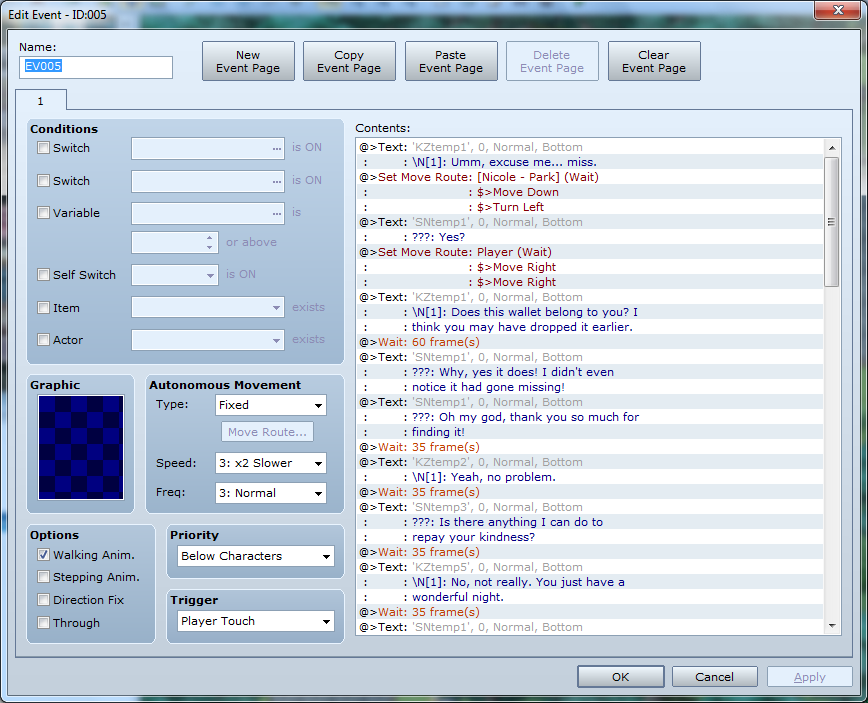
http://i4.photobucket.com/albums/y133/Linkblade/EVh2.png
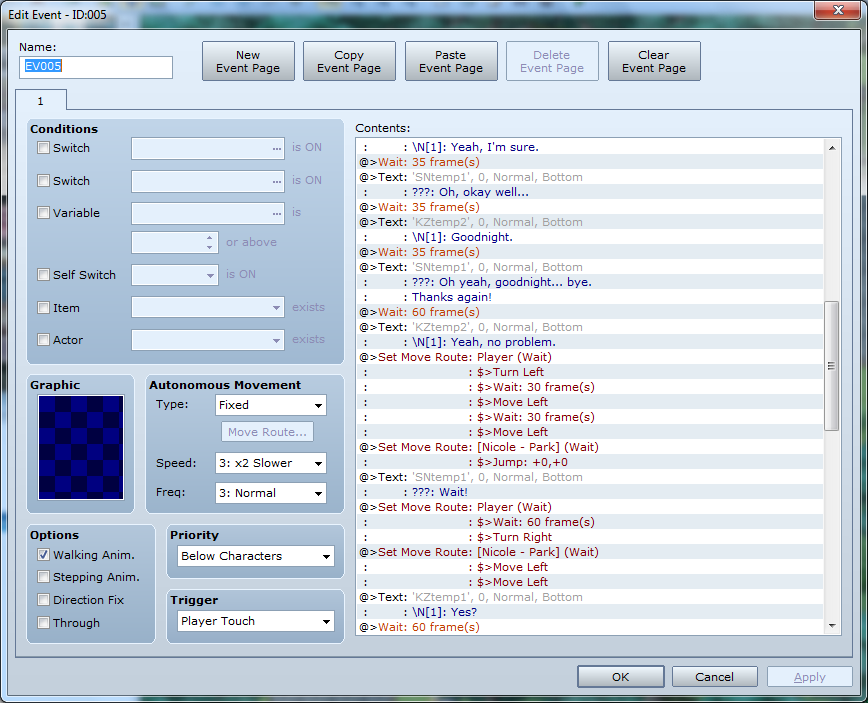
http://i4.photobucket.com/albums/y133/Linkblade/EVh3.png
Problem:
http://i4.photobucket.com/albums/y133/Linkblade/EVh4.png
The red box is where the problem starts, everything was fine before then. The problem is that after the player turns right event: "Nicole - Park" does fullfil the set move route command thus results in the inability of controlling my character. The only way for me to allow the event to continue after that point is to uncheck "Wait for Completion." But when I do that "Nicole - Park" does not move but all of the following text and commands continue.
So that's basically my problem. If anyone knows the solution, I'd be grateful, thank you.
Have you tried checking "Skip if cannot move" in the Move route(above the Wait for Completion one)?
Like I said earlier, the event continues but the event does not move. I want it to move.
Most likely there's an other event blocking that events path, at least that's what my problem is most of the time with something like this.
Thanks for your help, I figured it out, I just set the event to through.
Im not sure if i can make this idea make sense but im wondering if anyone knows how to do this.
I want to implement a system where there is a gauge or something that goes up as the character takes damage(slowly) and when it hits maximum it forces a transformation that makes the character more powerful but also takes a toll on the character in the form of damage.
I know this sounds complicated but if someone could explain(in detail or post link to tutorial cause im a little slow) how to do this id be grateful
I can make a state or condition that enhances the characters traits but not any sort of thing like this
This can be done but will take some time. tell you when i am done. if you still want it.
EDIT: Wait, never mind I managed to solve my problem! May as well delete this post, I guess. 😀
Ok if you go to my link in the signature it will take you to my scripts and there is a good weather one there along with other scripts
Anyone?
Original thread: https://forums.rpgmakerweb.com/threads/event-system-support-expert-users-only.51/