Help with roguelike game.

Well, I'll try to explain this x) 

I want to make a simple rogue like game, but I have a little question. In the first room I made an event that runs a random variable between 1 and 8 (At the moment I'll be testing this system with 8 maps). Then, when the player go through the door, he will be teleported to a random map depending on the number of the variable (with 8 Conditional branchs on the event, each one for one of the variables)

Then, in that first map I want to make another event that teleport the player to another random map. I can repeat the proccess already mentioned, but then, the player will have 1/8 chances of being teleported to the same room, and I dont want that.

What can I do? 
Hello, what I would do for something like that is add another conditional branch just before the teleport that checks if the variable is equal to the map ID.

If it is re-run the random number part of your event. This can be done with labels.

If the variable isn't equal then run the teleport like normal.
@RPG Guy: that doesn't help because it will be able to get back to a previous map on second, third or further transfers.


@AndresNobody:


Basically you need to store the IDs of the maps where you already have been and skip them on the transfer.


There are several ways to do that, but with pure eventing it will require dozens of conditional branches and dozens of switches to check for old maps.


you either need a script/plugin that manages those numbers (simple mathematics, should be easy as a request (return unique ID number script), or you may search for a plugin that does real random maps - those aren't easy and may take a while until someone finished a good one, but they were made in the last year for ace and sooner or later one will be ported to MV
@RPG Guy: that doesn't help because it will be able to get back to a previous map on second, third or further transfers.

@AndresNobody:

Basically you need to store the IDs of the maps where you already have been and skip them on the transfer.

There are several ways to do that, but with pure eventing it will require dozens of conditional branches and dozens of switches to check for old maps.

you either need a script/plugin that manages those numbers (simple mathematics, should be easy as a request (return unique ID number script), or you may search for a plugin that does real random maps - those aren't easy and may take a while until someone finished a good one, but they were made in the last year for ace and sooner or later one will be ported to MV
That's bad, because I dont know anything about scripting >.< 

I just found that the user Shaz maybe have an answer to this: 

http://forums.rpgmakerweb.com/index.php?/topic/51987-paid-random-dungeon-generator-runtime/

So I just send him a PM.
I didn't think about that, you're right. I suppose it would be possible if you made 8 switches, one for each map, then added 8 additional conditional branches that re-ran the random number if one of them were on.

Example: map ID is going to be 1 for this example.

If variable 1 > 1 (I think the editor looks a bit different but you should get it)

If switch "map2" = on

If Variable 1 === 2

Jump to label 'random number'

End

End

If switch 'map3' = on

If Variable 1 === 3

Jump to label 'random number'

End

End

Jump to label 'teleport'

Else

Jump to label 'random number'

End

The above example assumes that variable 1 is the variable you're using for your random number.

Just add 1 conditional branch for each map.

I think that should solve your issue but I'm not actually looking at the editor right now so that may be slightly off.
Are your entry/exit points on each map at the same coordinates? If all of your rooms have an entry and an exit point, where does the exit point of the last room go?
I didnt make them yet, so they can be at the same coordinares or not.

I only want an exit point, so the player cant go back. But if your system requires an entry and an exist point I can change that 🙂
So are you just going to transfer them into the middle of the map or something? They can only work their way through in one direction?
I want to teleport them to the room entrance. That entrance can be in the middle, or in the bottom, but when you enter, that door will be locked so you cant go back.
this might be the closest of what you want

http://forums.rpgmakerweb.com/index.php?/topic/51808-map-generator/
I know about that plugin, but I want to create my own maps 🙁
Bump!

So are you just going to transfer them into the middle of the map or something? They can only work their way through in one direction?
It is doable by event, doing that way :


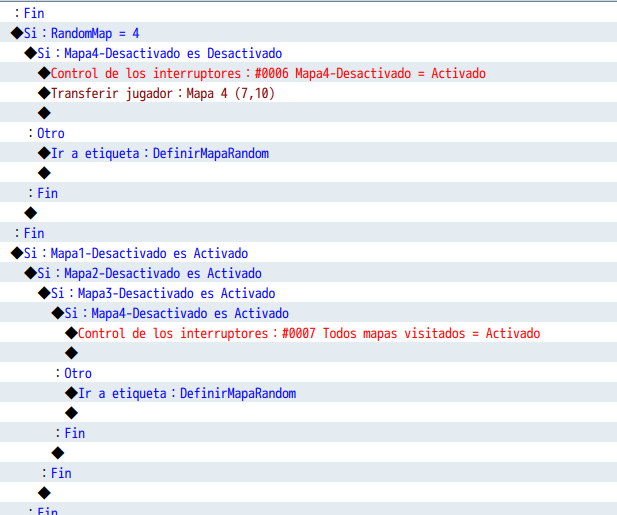
You activate a switch once a map has been visited, and you make sure that you cannot go back to it if the switch is activated. The random test starts again if you find an already visited map. Repeat with as many maps as you need (I put two in the example).
AndresNobody, please do not bump your topic unless it has been 72 hours later since your last post. You can review our forum rules here. Thank you.

Will you only be going through these rooms once, ever, during the game?  Or will you have the option of coming back and going through them again, and if so, do they have to be traversed in the same order the second/third/fourth times?
It is doable by event, doing that way :


You activate a switch once a map has been visited, and you make sure that you cannot go back to it if the switch is activated. The random test starts again if you find an already visited map. Repeat with as many maps as you need (I put two in the example).
This works! I found a problem. If you visit all the rooms and try to go to another one, you get stucked. 

I make this: https://i.gyazo.com/fcef1c78055be207f54b91dd95597fca.png

So, when I have visited the 4 rooms that I have I turn on that switch that make that you cant keep visiting rooms. 

(Wow, I dont know how to explain things in english xD)

AndresNobody, please do not bump your topic unless it has been 72 hours later since your last post. You can review our forum rules here. Thank you.

Will you only be going through these rooms once, ever, during the game?  Or will you have the option of coming back and going through them again, and if so, do they have to be traversed in the same order the second/third/fourth times?
Sorry for the bump. I am in another forum were the rule for bumps is 48 hours, not 72 >.<

Yes, you can visit the rooms just one time over the game. 
Okay.  On the event that's going to take you to the first room, do this:

Control Variables: [001: Random Rooms] = Script: [1, 2, 3, 4, 5]Call Common Event: [001: Go to Next Room]I've used variable 1 - replace it with any variable you have available.

The script is an array with all the map numbers for all of your rooms, separated by commas.

The common event is a new one that is not set to parallel or autorun, and does not have a conditioning switch.  Make it do this:

Control Variables [002: Next Room] = Script: $gameVariables.value(1).splice(Math.randomInt($gameVariables.value(1).length))This chooses a map number at random from the list, and removes it from the list, so subsequent calls can't pick a map that's already been visited.

I've used variable 2 for the map number - replace it with any variable you have available.

Again I've used variable 1 for the map list - replace it in both locations in that line, with whatever variable you used in the previous event.

Now what you do next in that common event depends on whether you're going to teleport to the same point in every room, or a different location in every room.

This first example assumes you'll teleport to the same coordinates in each room:

Control Variables [002: Next Room] = Script: $gameVariables.value(1).splice(Math.randomInt($gameVariables.value(1).length))Control Variables [003: X Coordinate] = 6Control Variables [004: Y Coordinate] = 7Transfer Player (use variables 2, 3 and 4 for the map number, x and y coordinates)The second example assumes you'll teleport to a different coordinate, depending on which map they're going to:

Control Variables [002: Next Room] = Script: $gameVariables.value(1).splice(Math.randomInt($gameVariables.value(1).length))Conditional Branch: Variable [002: Next Room] = 1  Transfer Player (specify map and location)Branch EndConditional Branch: Variable [002: Next Room] = 2  Transfer Player (specify map and location)Branch EndConditional Branch: Variable [002: Next Room] = 3  Transfer Player (specify map and location)Branch EndRepeat the conditional branch and transfer for each map, changing the value to compare the variable to, and the transfer destination, for each one.

As you can see, there's less work if you want to send them all to the same coordinates on each map.

Now, once you're on the next map, you'll no doubt need an event to take you to the next one in line, which will work just the same way for all of them but the last map.  I'm not sure what you want to do here - I thought I asked you, but I can't see where, and I can't see your answer.  I assume the last room will also have an exit, and that exit might take you to a 'standard' map?  In that case, you can do this:

Change the common event, and add the following line after the first one:

Control Variables [002: Next Room] = Script: $gameVariables.value(1).splice(Math.randomInt($gameVariables.value(1).length))Control Variables [005: Rooms Left] = Script: $gameVariables.value(1).lengthagain using whatever variables you're assigning instead of 5 and 1.

Now create your 'exit' event on the first random map - a door, stair, whatever you plan to make it, with whatever trigger.  It will have 2 event pages.

Page 1 will have no conditions, and will simply be a Transfer to the 'standard' map - this is the page that will run when all of the random maps have been visited and there are no others to go to.

Page 2 will be conditioned by Variable 5 (or whatever you've used above) being greater than 0.  It will only have one event command, and that will be a call to the 'Go to Next Room' common event.

That's it.  Copy that event onto all of your dungeon maps, and you're done.

So here's what's happening ...

when you first enter the 'dungeon', it will generate the list of maps that make up the dungeon.

Then it will choose one of those maps at random, remove it from the remaining dungeons available, and transfer you there.

Each time you come to an exit location, it'll choose one of the remaining maps at random, remove it from the list, and transfer you there.

When there are no more maps to visit, it will take you out to your 'standard' map.

If you follow this but have troubles implementing it, post screenshots to show what you've done.  If you struggle to follow the logic and aren't sure at all about setting up your events, let me know and I'll give you screenshots.  If you try it but get any errors, show your events and what the errors are and I'll help you troubleshoot.
It's been 4 days. Have you tried this?
Sorry, I was working this week. 

I have this: 

(Common Event 1)

24dc5005c92071f7b2607d248e10c74b.png


The event that's going to take me to the first room (My maps ID are 1, 2, 3, 4 and 9... But I tried this with 1, 2, 3, 4, 5 to, but its gives me an error):

3f14086f1a61dc8ca0ac0972ba03cd21.png


But then, when I play and use the event above...: 

2dbc6d2252ec45a4e67b54115b66f622.png


I appear in a black map. The number at the left is the variable 1, Random Rooms. All the variables here: 

ef8be5e1b54fd7e5ce73d853ffbc2b72.png


(Ignore the variable 9)

And sometimes, when I use that same event, I get thsi error:

6b313e5413a2ae168f4a923ba8fca285.png
I think the problem is in that part of your event code:

Control variable [randomrooms] = [1, 2, 3, 4, 9]Because that is NOT a randomizer by itself, and whatever you tried to do with it to get one of those numbers only for variable 2 (that part of the script is outside the screenshots) most probably didn't work as intended.

I suggest you either renumber your maps to get a real random sequence (and use the random part of the variables command), or use a common event to identify a correct map ID out of a sequence.
It is probably that there is a () where there shouldn't be one, or there is not a () where there should be one.


I will do some more testing today and let you know where the error is.


Andar, that is the list of rooms from which one will be chosen at random. The choosing at random is in the common event.


Edit: I see what it is - I forgot to add a second argument to the splice command. Change that line to this:

Code:
Control Variables [002: Next Room] = Script: $gameVariables.value(1).splice(Math.randomInt($gameVariables.value(1).length), 1)
Thanks for the screenshot of the debug window - that made it very obvious what the problem was (variable 2 should only have one number, so it made it clear that the splice was picking up too many)

Original thread: https://forums.rpgmakerweb.com/threads/help-with-roguelike-game.52216/