Turning on and off switch event help!

Okay so here is what I'm trying to do.

I want to make it so that when you touch a NPC (set to player touch) it turns on a switch, but the second you step away from the NPC so you are no where near it the switch automatically turns off. Thing is I've tried to do this but I can't seem to find any good examples. Plus I want the NPC to run around so I can't set events around the NPC so the event turns off.  I've tried using conditional branches and timers to turn the switch off once you walk away from the event npc- and it's just giving me a hard time. 

Is there any way I can do this? 

 
That is very easy:


Check if switch is on, if yes then turn it off.


if it's off then turn it on.


This looks like this:


243f9885d4.png


Edit: Sorry, now I realized that this only works when touching the event again.


I'll look if i can find an easy way to do this.
That is very easy:


Check if switch is on, if yes then turn it off.


if it's off then turn it on.


This looks like this:


243f9885d4.png


It's close to what I want, but not really.

I mean, when you are touching this event the switch stays on. As long as you are touching this event the switch should always stay on. (Pretty much not moving at all)
But like I said before, move away and it turns off. The way you did it was it made it turn off as soon as you touch the NPC. Which is not what I want. It's too quick.
What if you make events around it which will switch it off with a player touch.


@Meemoo: As Suzume said this is the only way I know.


But if it's a moving event then you have to move them as well. This will be more work, but it should not be difficult at all.
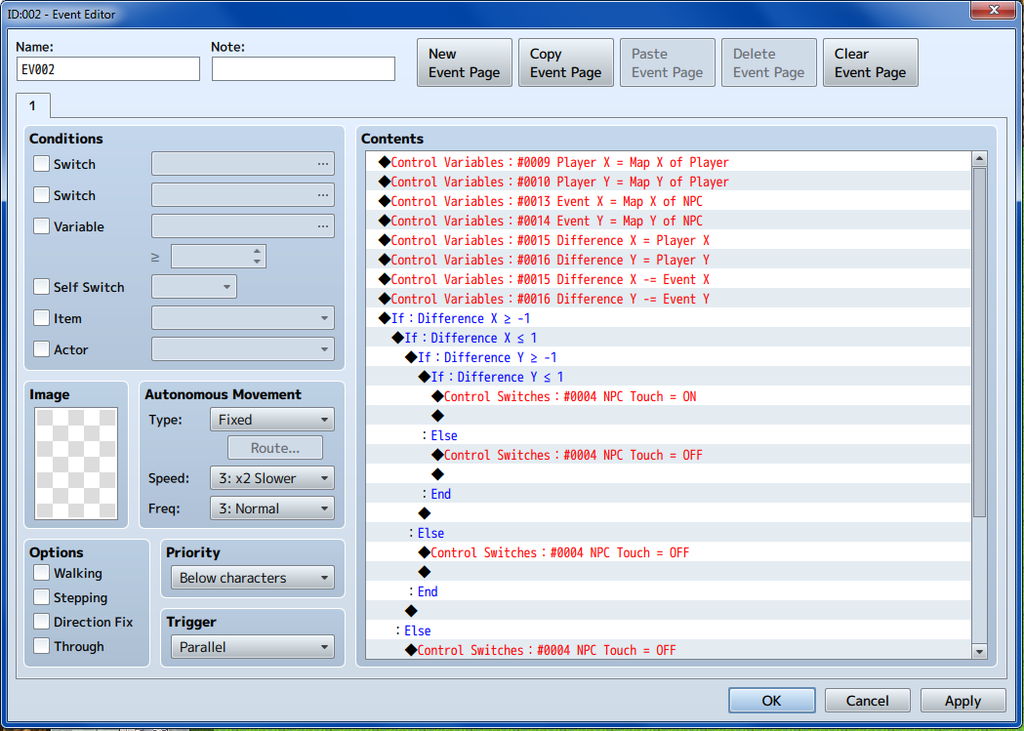
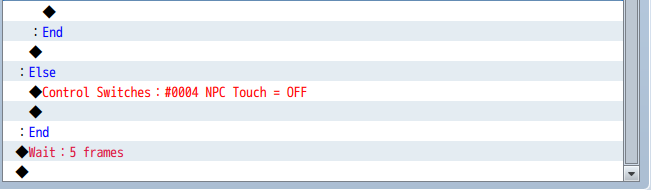
You need a parallel process event and 6 variables to do this.  2 variables will be set up to detect the event's x and y, 2 variables for player x and y, and 2 variables set up to store the difference between the event x,y and player x,y.  Then in conditional branches you can check if the variables that are set up for the differences are between -1 and 1, if yes then activate the switch, if no deactivate the switch.
What if you make events around it which will switch it off with a player touch.


I've already attempted at this but thanks!
 

You need a parallel process event and 6 variables to do this.  2 variables will be set up to detect the event's x and y, 2 variables for player x and y, and 2 variables set up to store the difference between the event x,y and player x,y.  Then in conditional branches you can check if the variables that are set up for the differences are between -1 and 1, if yes then activate the switch, if no deactivate the switch.


If you could show me how to do this with picture that would be great. Thanks a lot for your guys help!


Sorry it took so long to post these, work and all.


It's okay! Thank you so much for taking the time to post this! It helps out so much.


I'm sorry to have bothered you again, but I wonder if I'm doing this wrong. When I go to test it all out it works great, only thing is that the switch is always on now, even if my player is no where near the NPC. Did I do something wrong? I would want the Switch to turn off when the player is no longer beside the NPC.
Do you have all the instances where I put control switch off?


I do, It still doesn't work though for some reason. Here's what I put down. The "Spirit Caught" Switch is what I'm using for the NPC. and the "Spook" Name is the name of the Event. The Ghost switch is where the numbers are stored for "Spook" I hope I did this right.

Pic.PNG

pic 2.PNG
You have 2 extra variables Difference 2X and Difference 2Y, you need to change those to Difference X and Difference Y.


Oh my god! I'm sorry, I fixed that and now it works perfectly! I'm so happy, thank you so much! This is so great. Thank you again! <3
Ugh.  You dont need all that.  Just subtract them from each other through the script and get absolute value.   It will save a ton of work.  When I get home I can post it.  
if Math.abs(($gameVariables.value(X1) - $gameVariables.value(X2))) == 1 && Math.abs(($gameVariables.value(Y1) - $gameVariables.value(Y2))) <= 0
Or
if Math.abs(($gameVariables.value(X1) - $gameVariables.value(X2))) == 0 && Math.abs(($gameVariables.value(Y1) - $gameVariables.value(Y2))) <= 1


The top one should work if they are on the X coordinates side and the bottom one should work if they are next to the event on the Y coordinates.
Thank you for a solution Krizmn, but don't double post, just edit your previous post.

Original thread: https://forums.rpgmakerweb.com/threads/turning-on-and-off-switch-event-help.55711/