Hi everybody !
I'm new on RPG MV and i was intrested in coding my own plugins. I know that there is a tons of plugin made by YEP etc.. But i really want to code them by myself and learn the logic behind coding plugins. I've a little background with 'coding' ( HTML, CSS, C, C++, JAVA, Python ) .
So i'm currently learning how to code a window and a Scene to create a kind of 'inventory' . What i want is a basic window with cells in it and every cell correspond to a 'slot' in your inventory. A cursor can be moved up/down/right/left to select a specific item in a specific slot in this inventory.
To give an idea of what i'm describing, this looks like what i want to code (just look the item stock, we don't care of features "equip" etc.. ) : http://corgi-engine-docs.moremountains.com/images/inventory1.jpg
What i've mad until now is simply code a basic window and a basic scene where i can draw an icon or text.. But i'm stuck : How can i define "slots" in my scene and how can i make them "selectable" ? Here is the "draft" code i've for the moment :
Any help will be appreciated 🙂 !
I'm new on RPG MV and i was intrested in coding my own plugins. I know that there is a tons of plugin made by YEP etc.. But i really want to code them by myself and learn the logic behind coding plugins. I've a little background with 'coding' ( HTML, CSS, C, C++, JAVA, Python ) .
So i'm currently learning how to code a window and a Scene to create a kind of 'inventory' . What i want is a basic window with cells in it and every cell correspond to a 'slot' in your inventory. A cursor can be moved up/down/right/left to select a specific item in a specific slot in this inventory.
To give an idea of what i'm describing, this looks like what i want to code (just look the item stock, we don't care of features "equip" etc.. ) : http://corgi-engine-docs.moremountains.com/images/inventory1.jpg
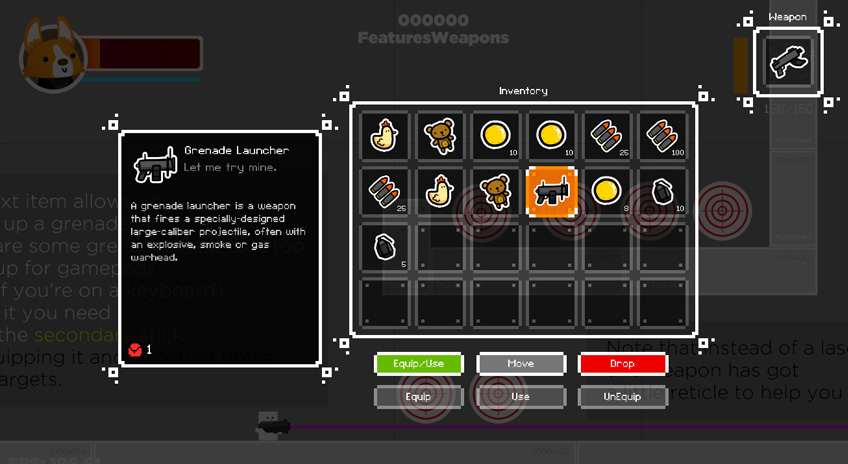
What i've mad until now is simply code a basic window and a basic scene where i can draw an icon or text.. But i'm stuck : How can i define "slots" in my scene and how can i make them "selectable" ? Here is the "draft" code i've for the moment :
function Window_Sample() {
this.initialize.apply(this, arguments);
}
Window_Sample.prototype = Object.create(Window_Base.prototype);
Window_Sample.prototype.constructor = Window_Sample;
Window_Sample.prototype.initialize = function(x, y) {
var width = this.windowWidth();
var height = this.windowHeight();
Window_Base.prototype.initialize.call(this, x, y, width, height);
this.refresh();
};
Window_Sample.prototype.windowWidth = function() {
return Graphics.width / 2;
};
Window_Sample.prototype.windowHeight = function() {
return Graphics.height / 2;
};
Window_Sample.prototype.refresh = function() {
var x = this.textPadding();
var width = this.contents.width - this.textPadding() * 2;
this.contents.clear();
this.drawIcon(2, 0, 0);
this.drawIcon(3, 50, 0);
};
Window_Sample.prototype.open = function() {
this.refresh();
Window_Base.prototype.open.call(this);
};
function Sample_Scene() {
this.initialize.apply(this, arguments);
}
Sample_Scene.prototype = Object.create(Scene_MenuBase.prototype);
Sample_Scene.prototype.constructor = Sample_Scene;
Sample_Scene.prototype.initialize = function() {
Scene_MenuBase.prototype.initialize.call(this);
};
Sample_Scene.prototype.create = function() {
Scene_MenuBase.prototype.create.call(this);
//create the window
this._sampleWindow = new Window_Sample(0,0);
this._sampleWindow.x = Graphics.width / 2 - 100;
this._sampleWindow.y = Graphics.height / 2 - 100;
// add window
this.addWindow(this._sampleWindow)
};
Sample_Scene.prototype.start = function() {
Scene_MenuBase.prototype.start.call(this);
}
Sample_Scene.prototype.update = function(){
Scene_MenuBase.prototype.update.call(this)
if (Input.isTriggered('cancel')){
SoundManager.playCancel();
SceneManager.goto(Scene_Map);
}
}
Any help will be appreciated 🙂 !